So this is a feature request/question if this is already possible. I almost always browse my collection via the artist tab and it bothers me that some artists don’t have a picture, have a wrong one (different artist, same name) or a really bad one. Now on my PC I use MusicBee and with that you can just look for the ArtistImages folder in the library folder and change/add any images you want (you do need to remove all the images from the appdata for this to work). Can I do a similar thing with Volumio and so how, if not maybe this is something that would be nice to have in an update. I know that this is just a cosmetic issue, so I understand if this isn’t a priority. I don’t know that much about the internals of Volumio, but I would think that these images are saved somewhere and not loaded from the internet, last.fm I assume, everytime.
It seems like an obvious thing to do, it has been asked for several times.
All it would need is for it to look in the artist/band folder (before looking online at last.fm) and use artist.jpg or similar, just as it does with the folder.jpg image in the album folders.
I strongly support this - the current logic produces too many missing pictures for my taste.
A simple way to store custom images by artistname would be very helpful, so I can store e.g.
/artistart/Mozart.jpg
/artistart/Beethoven.jpg
/artistart/SomeDudeNoOneKnows.jpg
I would think this is a very simple change to add.
Das ist eine berechtigte Frage, und Sie sind nicht der Einzige, der sich über nicht passende Künstlerbilder ärgert. In Volumio werden Künstlerbilder derzeit automatisch aus Online-Quellen wie Last.fm abgerufen und intern zwischengespeichert, aber es gibt keine unterstützte Möglichkeit, sie manuell zu ersetzen oder zu casino Betblast verwalten, wie es MusicBee mit einem lokalen Ordner ermöglicht. Der Cache ist nicht wirklich dafür gedacht, von Benutzern bearbeitet zu werden, und Änderungen können überschrieben werden. Daher ist dies derzeit nicht auf saubere und dauerhafte Weise möglich. Eine manuelle Überschreibungsfunktion oder eine Option für lokale Künstlerbilder wäre definitiv eine sinnvolle Funktionsanforderung, auch wenn es sich nur um eine kosmetische Änderung handelt.
Keep notice of the fact that Volumio is a streamer, not a media server.
Volumio uses MPD, which has no database management tools.
There are 2 way to add personal images:
- Add you personal art to the storage where you host your music:
- Artist name folder add your personal image as
Artist.jpg - Album add your personal image as
Cover.jpg
- Artist name folder add your personal image as
- Add personalized images to
/data/albumart/personal/artist- Folder , with
Artists.jpg
- Folder , with
Using the same logic for test files and it’s working:
Once you add a Cover.jpg or replace the one that is there with a larger version, and you go to the Sources settings to do a Rescan and Update, how long does it take for the new cover to show? Whenever I do Rescan it takes a few seconds based on the text showing on screen, and Update is the same. But the new covers are not shown.
Do you need to create /data/albumart/personal/artist in the Internal Storage share? Because in my case, that share was totally empty when I mounted it the first time, and I just threw 125 GB of files and folders in there.
But I’ve been using Volumio for about a week and that’s all the experience I have with it.
You need to clear the Album cache and refresh your browser:
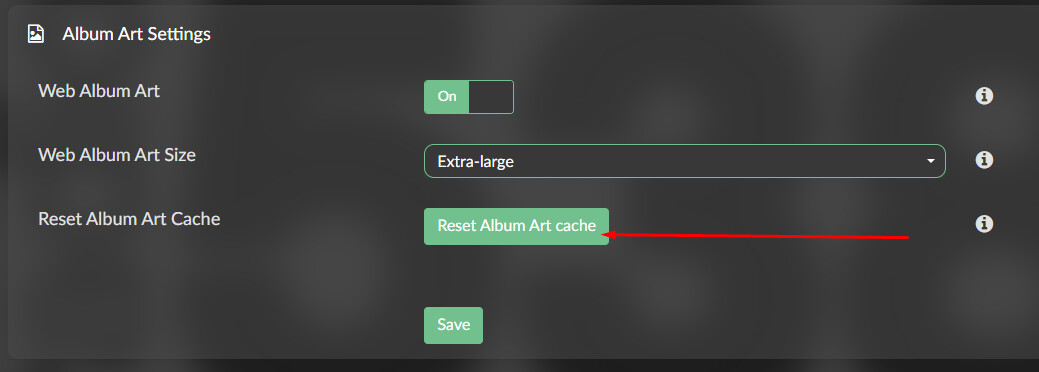
Don’t understand what you mean with internal storage share.
you need to create the folder on the given path.
You might want to use the search function of the forum:
https://community.volumio.com/search?q=%2Fdata%2Falbumart%2Fpersonal%2Fartist
Thanks, I had overlooked that.
Well, the path /data/albumart/personal/artist, where is it located? But most importantly, how do I access it from Windows or macOS? Because I can access the Internal Storage share, which is the large ext4 partition where you can add as much music as you want. If I connect an external USB drive, then I can also access that as a share from Windows or macOS.
But when it comes to /data/albumart/personal/artist, what’s the share for that? Windows doesn’t show available shares, but macOS does, and there’s “Internal Storage”, “USB” and “NAS”.
On windows use Winscp, Filezilla
On a MAC use Filezilla or Shellbean