Learning Plugin Development

Hi all,

I am creating this topic to put in one place, all the beginner - noob questions that we might have.

That way, the questions and answers will all be in one place for someone else like me.

Please add your noob questions to this topic as well ( as suggested by @nerd )

These are the previous 2 questions I posted before starting this topic.

How to get a setting value from volumio’s internal settings from within a custom plugin code? - Plugins - Volumio Community

pushState Listener triggered multiple times - Plugins - Volumio Community

Hi @nerd

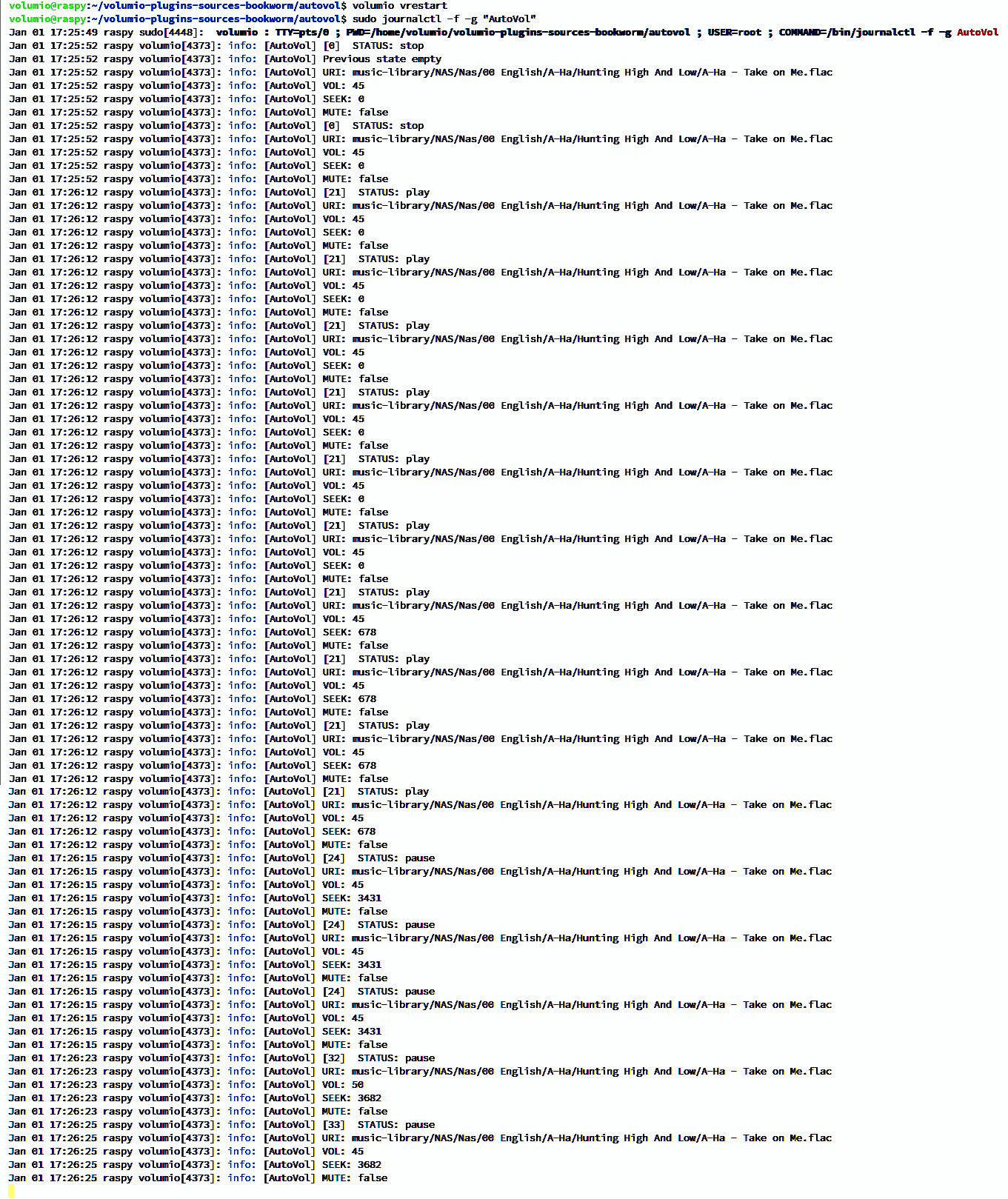
I tried switching off the pushState listener in the onStop function as you suggested.

But the listener is still triggered multiple times.

If I account for this repeat triggers in code, my plugin works as expected.

Thanks.

NOTE: I am currently on Volumio 4 for Raspberry Pi and have the following plugins installed - Auto Volume (my plugin), System Information, Now Playing, Touch Display

I am developing a plugin to control the volume of each song being played.

For that I need to limit the range of values for a config to be below volumio’s “Max Volume Level” setting (Playback Options → Volume Options → Max Volume Level).

How do I query this value from within my plugin’s code and set my UIconfig range accordingly?

Thanks to everyone active in the volumio community.

Hey @netrikkann,

Query the Max Volume Level setting from your plugin code:

var maxVolume = this.commandRouter.executeOnPlugin('audio_interface', 'alsa_controller', 'getConfigParam', 'volumemax');

The setting is stored as ‘volumemax’ in the alsa_controller plugin configuration file at:
/data/configuration/audio_interface/alsa_controller/config.json

To dynamically set your UIConfig element range in getUIConfig(), modify the element’s max attribute before resolving:

uiconf.sections[X].content[Y].config.bars[Z].max = maxVolume;

Or for a simple input with attributes:

uiconf.sections[X].content[Y].attributes = [{'max': maxVolume}];

Kind Regards,

1 Like

Hi @nerd

Merry Christmas!

Thanks a lot for the clarification. :pray: That makes my work a lot simpler.

I am doing plugin development for the first time. The more you learn the more fun it becomes. :ok_hand:

Just one more query :thinking: :
How do I dynamically limit the max setting in my config page, if my volume values are select-options type?

Thanks

Hey @netrikkann,

For select-options type, filter the options array in getUIConfig() before resolving:

ControllerYourPlugin.prototype.getUIConfig = function() {
    var defer = libQ.defer();
    var self = this;

    var lang_code = this.commandRouter.sharedVars.get('language_code');

    self.commandRouter.i18nJson(__dirname+'/i18n/strings_'+lang_code+'.json',
        __dirname+'/i18n/strings_en.json',
        __dirname + '/UIConfig.json')
        .then(function(uiconf)
        {
            // Get system max volume
            var maxVolume = self.commandRouter.executeOnPlugin('audio_interface', 'alsa_controller', 'getConfigParam', 'volumemax');

            // Filter options to only include values <= maxVolume
            var allOptions = uiconf.sections[X].content[Y].options;
            var filteredOptions = allOptions.filter(function(opt) {
                return parseInt(opt.value) <= parseInt(maxVolume);
            });
            uiconf.sections[X].content[Y].options = filteredOptions;

            // Set current value
            uiconf.sections[X].content[Y].value = self.config.get('yourConfigKey');

            defer.resolve(uiconf);
        })
        .fail(function(error)
        {
            self.logger.error('Failed to parse UI Configuration: ' + error);
            defer.reject(new Error());
        });

    return defer.promise;
};

Replace X and Y with the correct section and content indices for your select element.

Multiple community plugins already use executeOnPlugin to query alsa_controller settings. Study their index.js files for practical examples:

  • rotaryencoder2
  • ir_controller
  • ampswitch
  • gpio_control

Repository: GitHub - volumio/volumio-plugins-sources-bookworm

Kind Regards,

1 Like

Hi @nerd

Thanks for the quick reply.

Will look into your directions right away.

I am trying to listen to pushState events in my plugin code. for now I am listening and logging.

I register my listener on the onStart function. But every time the state changes the listener is triggered multiple times instead of once.

Can someone tell me what is going wrong here?

// Plugin has started
AutoVol.prototype.onStart = function() {
    const self = this;
	
	const defer=libQ.defer();

	self.astart = Date.now();

	socket.emit("getState", "");

	socket.on("pushState", (state) => {
		self.statusChanged(state);
	});

	// Once the Plugin has successfull started resolve the promise
	defer.resolve();

    return defer.promise;
};

Hey @netrikkann,

The issue is listener accumulation. Each time onStart runs, you add another socket.on listener without removing previous ones. After plugin restarts or multiple starts, you end up with duplicate listeners all firing on the same event.

Fix: Remove the listener in onStop.

AutoVol.prototype.onStart = function() {
    const self = this;
    const defer = libQ.defer();

    self.astart = Date.now();

    // Store reference to the bound function for later removal
    self.pushStateHandler = function(state) {
        self.statusChanged(state);
    };

    socket.emit("getState", "");
    socket.on("pushState", self.pushStateHandler);

    defer.resolve();
    return defer.promise;
};

AutoVol.prototype.onStop = function() {
    const self = this;
    const defer = libQ.defer();

    // Remove the listener
    socket.off("pushState", self.pushStateHandler);

    defer.resolve();
    return defer.promise;
};

Key points:

  • Store the handler function reference in self.pushStateHandler
  • Use socket.off() in onStop to remove that specific listener
  • This prevents listener accumulation across plugin restarts

Alternative: Use socket.once() if you only need the state once, but for continuous monitoring you need the on/off pattern shown above.

Kind Regards,

@netrikkann,

One request: please consolidate your plugin development questions into a single thread - something like “Learning Plugin Development” or similar. It keeps related discussion together and helps others learning the same things find the answers more easily.

Kind Regards,