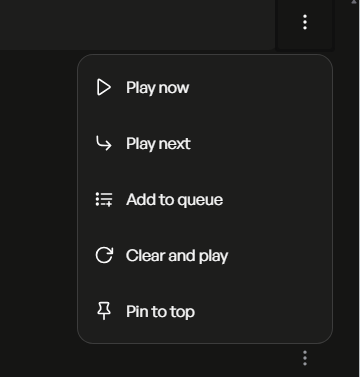
To make it even more clear, not to save in Volumio playlists (newly made or existing), but directly to streaming services playlists or library etc.
If you’ve ever used i.e. Roon it would be much easier to understand.
1 Like
Ok, I see.
But did you ever ask for this feature?
Nova dev is very active!
Yes, I did ask, also in the past contributed in some other sw issues, most of them solved and some not yet> as known problem with Volumio gets stuck/ totally confused in case of huge library> when music library super search enabled, stuttering albums scrolling in Ios app…
The very sw has become more reliable and I am generally happy sound wise, but there are for sure some details to work on. Roon is an excellent example of functionality and features, but also has some, for myself, unacceptable drawbacks (the need for an external server machine, enourmous CPU load/ heating and somehow softened, fatty sound). JPlay is also very good, but in some important attributes not compatible with Volumio.
The latest release of Nova 261008 no longer lets you delete a playlist under Your Library. Here are my suggestions and hopes:
- Add back the ability to delete a playlist, see screen shot below.
- Make Volumio Playlist look like Qobuz Playlist whereby it is designed nicer with Hi Res graphics etc.
- Please add ability to search playlists. This is really missing. Currently only Music Library and Qobuz are searchable but Playlists which could include both are not.
Thank you.
UPnP renderer implementation in Volumio seems to be somewhat problematic and this can also be attested when working with Audirvana. There have been multiple requests in the past for Volumio to co-operate with Audirvana to solve such problems but to no avail up to now. It seems, for some reason, that Volumio developers do not much care for their UPnP renderer implementation and integration with 3rd party sw. Such problems though, have nothing to do with the UI and should be reported and discussed in another thread.
Again, this seems to me to be a matter dependent on how each service’s API is used in Volumio (and whether this functionality is supported by the respective API) and not a matter for the UI, whose only job is to present and control existing functionality. This thread deals specifically with the new Nova UI and not with issues of the back-end. Let’s keep this thread clean.
Don’t know is it of software or Ui matter (IMO both are part of the same product), I am posting here bc new 4 version has introduced also the new UI. Also correlating Nova UI with others like Roon’s or similar was a topic I raised several times in the past, both here on community and in direct communication with the dev team. Anyway, if other services can do it, why Volumio cannot/ could not?
BTW, I notice that the other topic related to esp. V 4 is practically dead locked.
Plus, I expect the dev team to follow/ read comments here, not just (random) community members
Hi @koksg ,
All what @NikosR is trying to tell you, that reporting issues that are not related to Nova, should be reported in it’s own topic.
This topic is only being monitored on Nova related issues, so your concerns/issues will be overlooked. And you raise some valid points, no discussion/argements about those 
Both the original Volumio 4 feedback and the newer Volumio 4 for Rivo etc threads are fully active. You can post such issues there or create a new thread.
Hi everyone. I’ve noticed that the new interface is improving rapidly, and I want to commend you on the work you’re doing. However, I’m still having trouble displaying song lyrics—an issue I actually reported via the app a few days ago. Basically, the system fails to find lyrics for almost 100% of the songs I listen to, and I can assure you this isn’t obscure music… I’ve only managed to get the lyrics for an Alan Parsons Project song to show up once. The last time I wrote in, I was told that what I was listening to probably wasn’t in the library yet, which makes me wonder:
Lately, I’ve been using an offline player on my smartphone called SonicPlay—a relatively new app on the Play Store. It has a simple button—much like the one you’re implementing—to display song lyrics. It finds them most of the time, but when it doesn’t, a “Search Online” button appears; this scans the web in real-time and immediately displays what I was looking for. Wouldn’t it be possible to do the same thing?
Help! I’m stuck back in Manifest.
I’ve been using Nova since it was launched but I just wanted to try something on Manifest and now I don’t see the option to change UI in System Settings anymore.
I’m on Volumio V.4.225 (alpha) on a Pi5. I tried switching to beta channel, but that didn’t work.
Edit: I also tried restoring using the Backup And Restore Data plugin, but that didn’t help.
Hey,
Yes, it seems v4.225, an alpha version, drop the setting for UI…
You can ssh and change
/data/active_volumio_ui
with
{"uiName":"nova","uiPath":"/data/nova/current","uiPrettyName":"Nova"}
Then
volumio vrestart
1 Like
Thank you @balbuze - I’m back in the modern world!
BTW volumio vrestart wasn’t enough, it needed a full (power) restart.
1 Like
Guys, whatever you do, don’t go to alpha channel. Alpha channel is meant to be internal only and has not validated builds.
4 Likes
Thanks everyone for the feedback on v0.261008.0!
A quick reminder about this thread: it’s for Nova, so about things that worked in Manifest but are broken in Nova, and ideas for new Nova features. Anything about Volumio OS itself (playback, network drives, plugins, streaming services, updates) belongs in the Volumio 4 threads, where the right people follow it and can provide best support. That keeps this thread focused and makes sure nothing gets lost.
@balbuze — thanks for the comparison, we’ve seen the album art resize issue and are looking for a way that works on big screens.
@TimRS — the smb://… address is just how Nova displays the share; the slashes are fine. The error (95) Operation not supported comes from mounting the share in Volumio OS, not from Nova, so it would be best followed up in the Volumio 4 thread or with support. Many NAS boxes need a specific SMB version, so it may be worth trying vers=3.0 (or vers=2.0) in the share’s mount options.
@SimonE — glad the player and lyrics work well for you! Thanks for the settings suggestions. As @volumio said, please stay off the alpha channel.
@backenst — you can delete a playlist from Playlists in the side menu; each one has its own delete button there.
@koksg — the iPad 2’s last iOS update (9.3.5) is about 10 years old, and its browser can’t run the new theme, which is why the screen stays dark. Unfortunately we can’t support it with Nova: we support iOS 15 (2021) and later. The streaming-service playlists and JPlay/UPnP points are Volumio OS topics; as @NikosR and @Wheaten mentioned, the Volumio 4 threads are the right place for them.
@Ddgranato1 — thanks! Lyrics show only when the lyrics provider has the song, so some tracks won’t have them. We will support more tracks eventually.
Keep the Nova feedback coming 
2 Likes
Nova v0.261012.0 is out!
New
Search results are now grouped by source (your library, TIDAL, Qobuz, Spotify, Web Radio…), each in its own shelf, with redesigned artist, album and playlist cards.
Improved
Pages now show a preview of their real layout while they load, instead of a blank spinner — browsing feels steadier and faster.
Notifications have a calmer, frosted look, sit in the top corner on larger screens, and can now be swiped away.
Search results look better on phones, with a tidier two-column layout.
Fixed
Notifications no longer occasionally get stuck and fail to disappear.
1 Like
[quote=“leorigna, post:179, topic:77583”]
@backenst — you can delete a playlist from Playlists in the side menu; each one has its own delete button there.
Now i see it. Clear on the desktop app, but perhaps not on the Apple mobile app.
Hi everyone, using 4.204 / 0.261012.0 small tip: on a 7" rpi official touchscreen (V1) you see scrollbars on the left side panel and also the “mainscreen” is not what it looks like, some items are not displayed correctly!
Solution: in the “Touch Display Configuration” plugin, adjust the scale factor to 85%.
Thank you for the great progress and work on Nova.
1 Like
Thanks again for the update. Mobile search is easier to use.
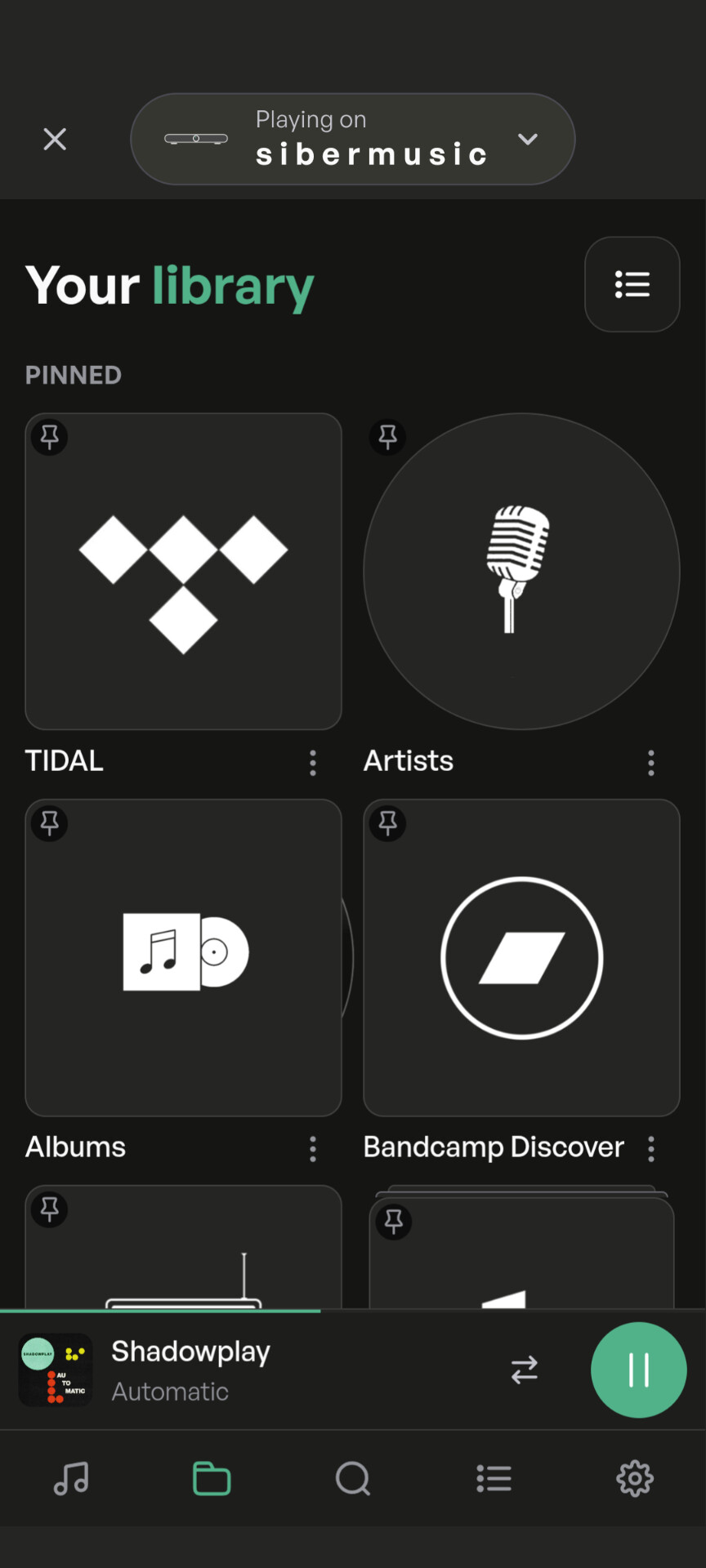
One minor thing I noticed is that some of the tile backgrounds look a bit odd on the Your Library page. Some are circles, some are squares, that’s fine, but Albums seems to both, like an LP coming out of its sleeve, whilst others have extra layers behind. Nothing wrong with any of that, but was that intentional?