BM24
August 6, 2025, 2:05pm
1
Is the following possible?
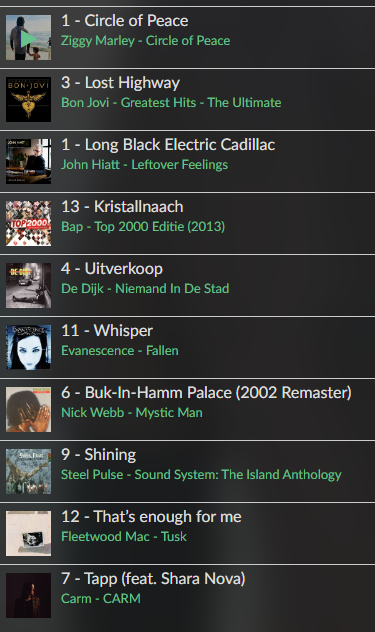
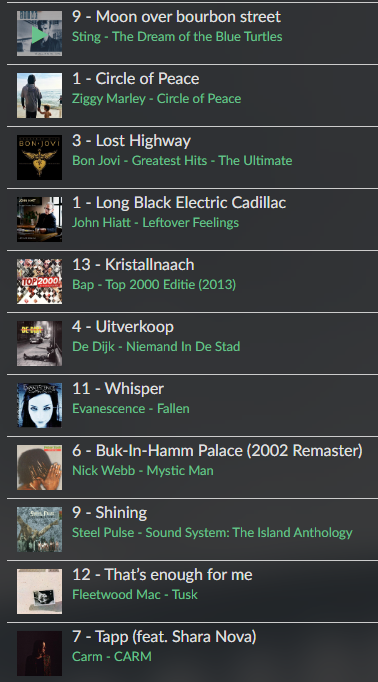
Someone started playing some files, so there is a queue. Maybe it’s not playing but paused. Now I want to play another file (just one, but it can also be a playlist). Then Volumio should restore the state before, i.e. like reloading the former queue.
What I try to achieve: children might be in there rooms, I want to play a certain file to notice them they should come to the kitchen
Current “solution”: by running a openHAB script I reduce volume stepwise to 0, than I clear the current queue, than I load the new one, restore volume to the default level and start playing. This works fine - but they loose their previous queue.
It’s not standard part of the api, but you can do it, but needs some programming/scripting:REST AP I:
volumio.local/api/v1/getQueue to get the current loaded queue, and store it.volumio.local/api/v1/replaceAndPlay Your desired trackvolumio.local/api/v1/addToQueue recover/restore the queue from 1
BM24
August 6, 2025, 4:06pm
3
Hey, that’s cool, will have a try! Thanks a lot.
So in python3 it looks like this:
import requests

BASE_URL = "http://localhost:3000"

def call_volumio_api(endpoint, method="GET", payload=None):
    url = f"{BASE_URL}{endpoint}"
    try:
        if method == "POST":
            response = requests.post(url, json=payload)
        else:
            response = requests.get(url)
        if response.status_code == 200:
            return response.json()
        else:
            print(f"[Volumio Error] Status code: {response.status_code}")
    except Exception as e:
        print(f"[Volumio Error] {e}")
    return {}

def get_volumio_queue():
    return call_volumio_api("/api/v1/getQueue")

def volumio_replace_play(payload):
    return call_volumio_api("/api/v1/replaceAndPlay", method="POST", payload=payload)

def volumio_add_to_queue(payload):
    return call_volumio_api("/api/v1/addToQueue", method="POST", payload=payload)

# Get current queue
vol = get_volumio_queue()
track_list = vol.get("queue", [])

# Replace and play a specific track
replace_payload = {
    "uri": "mnt/NAS/QNAP/S/Sting/(1985) - The Dream Of The Blue Turtles/0109 - Sting - Moon over bourbon street.flac"
}
volumio_replace_play(replace_payload)

# Add full queue back to Volumio
for track in track_list:
    volumio_add_to_queue(track)
and in node.js :npm install axios
const axios = require('axios');

const BASE_URL = 'http://localhost:3000';

async function callVolumioAPI(endpoint, method = 'GET', payload = null) {
  const url = `${BASE_URL}${endpoint}`;
  try {
    const response = method === 'POST'
      ? await axios.post(url, payload)
      : await axios.get(url);

    if (response.status === 200) {
      return response.data;
    } else {
      console.error(`[Volumio Error] Status code: ${response.status}`);
    }
  } catch (error) {
    console.error(`[Volumio Error] ${error.message}`);
  }
  return {};
}

async function getVolumioQueue() {
  return await callVolumioAPI('/api/v1/getQueue');
}

async function volumioReplacePlay(payload) {
  return await callVolumioAPI('/api/v1/replaceAndPlay', 'POST', payload);
}

async function volumioAddToQueue(payload) {
  return await callVolumioAPI('/api/v1/addToQueue', 'POST', payload);
}

// Main logic
(async () => {
  const vol = await getVolumioQueue();
  const trackList = vol.queue || [];

  // Replace and play a specific track
  const replacePayload = {
    uri: 'mnt/NAS/QNAP/S/Sting/(1985) - The Dream Of The Blue Turtles/0109 - Sting - Moon over bourbon street.flac'
  };
  await volumioReplacePlay(replacePayload);

  // Add full queue back to Volumio
  for (const track of trackList) {
    await volumioAddToQueue(track);
  }
})();
load a queue:
run the script python3 volumio_queue.py or node volumio_queue.js :
BM24
August 6, 2025, 5:57pm
5
Wow… so pretty much nothing for me to do anymore
Well you have the hard task to add a track to play
BM24
August 13, 2025, 10:00am
7
Works so well, thank you.
But now I ran into a problem I couldn’t solve yet:
curl http://192.168.178.61/api/v1/commands/?cmd=volume&volume=50
I get
{"time":1755078972945,"response":"volume Success"}
but volume doesn’t change.
Could you add changing the volume to e.g. 15 and sending pause/play to your Python code example? I really don’t see what’s wrong with this:
def volumio_pause(host):
    return call_volumio_api("/api/v1/commands", method="POST", payload={'cmd': 'pause'})

def volumio_set_volume(host, volume):
    return call_volumio_api("/api/v1/commands", method="POST", payload={'cmd': 'volume', 'volume': volume})
I will not program your complete interface. Use google, chatgpt,…
To control player state:
def volumio_player_control_toggle(action="toggle"): # No parameter it defaults to toggle
    call_volumio_api("/api/v1/commands/?cmd=" + action)
call it:volumio_player_control_toggle()volumio_player_control_toggle("play")
Volume control:
def volumio_volume_control(setting="15"): # no parameter it defaults to 15
    call_volumio_api("/api/v1/commands/?cmd=volume&volume=" + setting)
call it:volumio_volume_control()volumio_volume_control("45")
BM24
August 13, 2025, 11:28am
9
Of course, and I tried myself - see above. Maybe I’m a bit tired today…
Wheaten
August 13, 2025, 11:33am
10
I’ve programmed def call_volumio_api(endpoint, method="GET", payload=None): in such way that it can be used for the entire API. However you need to have some basic understanding.
If the API doesn’t mention a payload, don’t throw one. (There is a huge difference between payload and query parameters)
BM24
August 13, 2025, 12:56pm
11
Oh my god, yes, of course.
I am good, but calling me God… that’s a bit to much.