A few years ago I managed to set up an external Hard drive that is connected to my router as my network shares. As it had taken days of frustration when I got it working I wrote all the setting down.
Sadly I can’t find that bit of paper and am trying to do it again. I can get it working if I leave my pc on. But I don’t want to and I didn’t have too.
The settings I am using in Volumio are:-
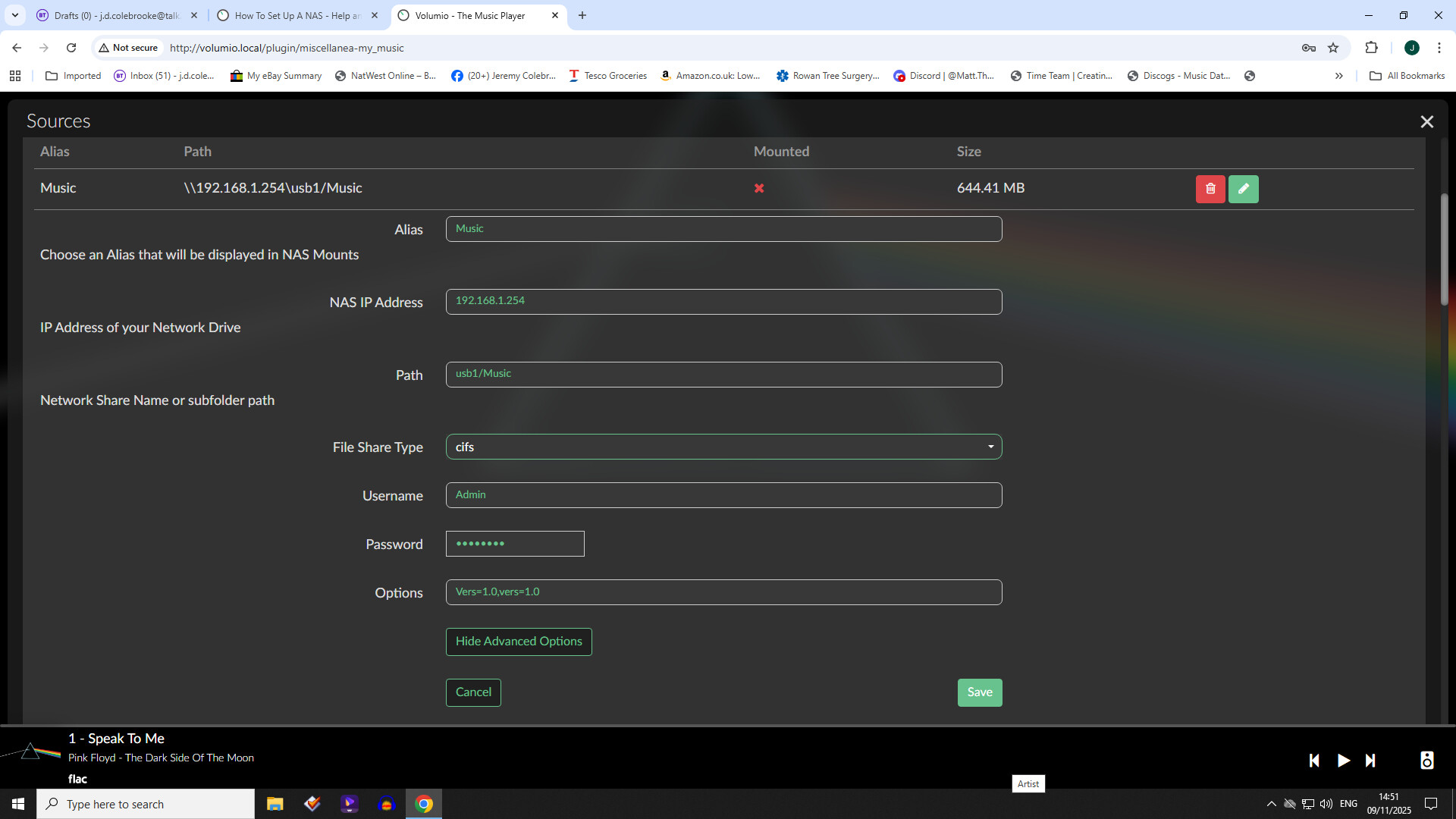
Alias = Music
NAS IP Addresses = 192.168.1.254 (standard UK BT router ip address)
Path = Network/BTHUB6DX/usb1/Music (this line is from W10 explorer) I’ve tried not using Network, I’ve tried adding a slash at the front of network all to no avail)
File Share Type = cifs (This option worked for me where the NFS option did not)
Username = Admin (I’m using Admin as that is the router user log in)
Password = I’m using the BT router admin password
Options = Vers=1.0
Can anybody suggest the stupid mistake
All I get is various error messages depending on if you use forward /or back \ slashes. Not including Network in the path
Thanks in hoping somebody knows the answer.
Hard to give any support as every router has it’s own mysterious way to expose a shared USB disk (which is not a NAS for that matter).
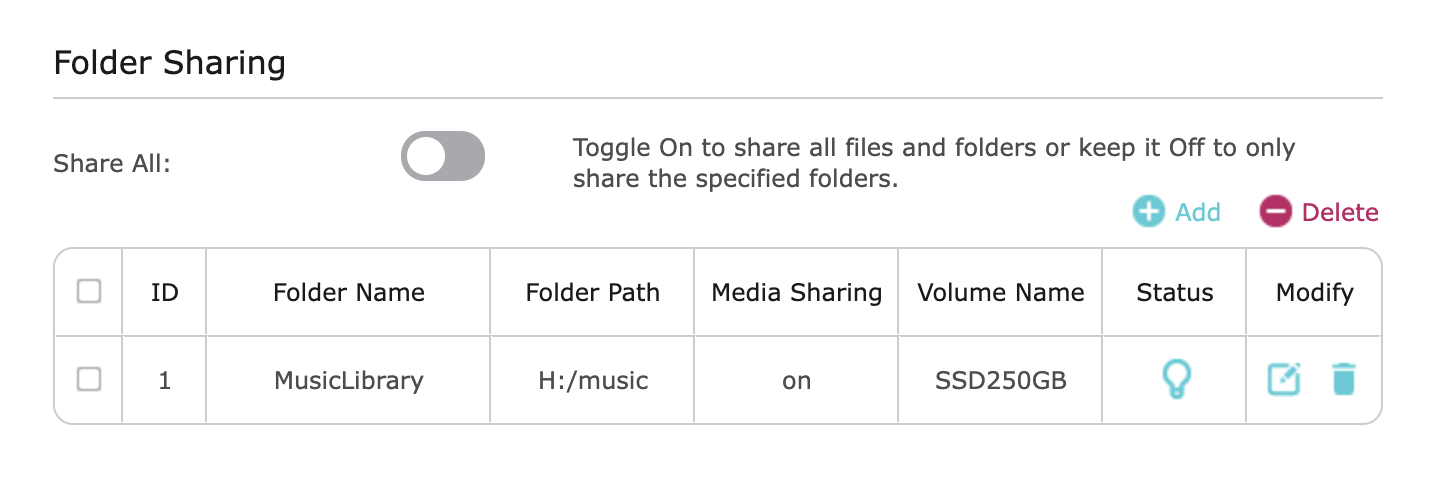
For example TP-LINK expose it as a drive letter.
Simply adding the IP show me the shares.
On Windows the “Network” is not part of any path, just some Microsoft fun.
So I can drop the network bit, but still keep the router name as that is part of the path. I’m hoping I don’t have to have the pc on. I have 2 othere different streaming players on is Arcam but I have to have the pc on as it uses Asset UPnP software its path is \BTHUB6DX\usb1\Music.
The other is listed in the app as nework shares section as usb1\music on BTHUB6DX (\BTHUB6DX\usb1\Music). So all very close. That player does not need the pc on
Please give a screenshot from the explorer (Only the URL is needed) by entering your IP and browse to the position where the files are.
so start with \\192.168.1.254\
Not sure what you mean as I don’t have a url just this and this text box has just refused the cut and paste so typing it
Network - BTHUB6DX - usb1 - Music where the dash is a right facing chevron
Hi Wheaten
Sorry for the late reply had to go away for a few day. I didn’t need the router name. But I did it on my app rather than via the pc. It shouldn’t have made any diference but I turned the pc off and added that to the settings via the app and bang it worked fine, don’t need the pc on now!! I knew it was something silly. So many thanks for your help.
Hopefully you all don’t mind me piling on…I hoped the reply by Wheaten was going to solve my similar struggles to mount a TP Link USB share but no dice.
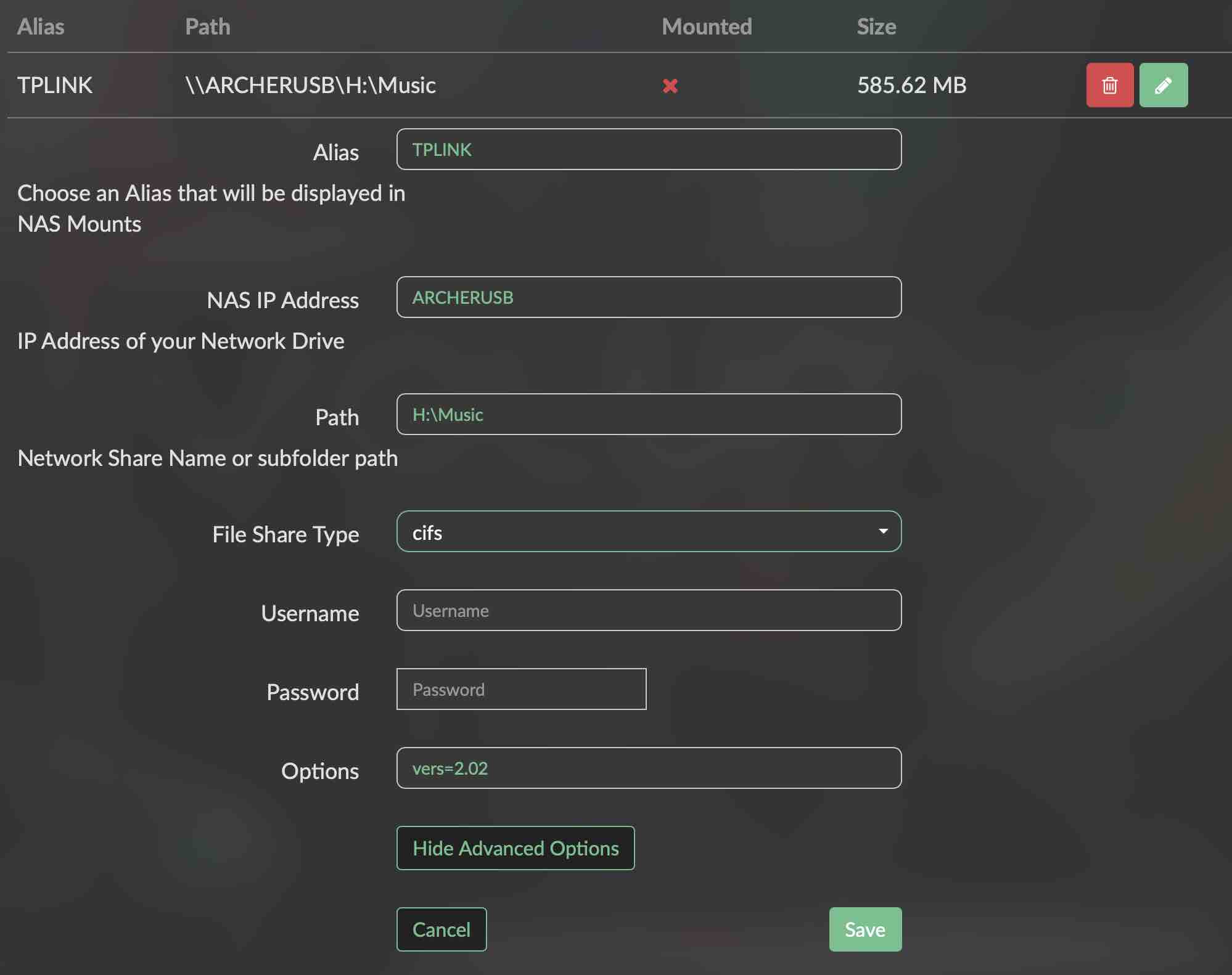
As he said, the drive is exposed as H:\ by the TP Link router. I can interact properly with the SMB share via Finder on my Mac without SMB user credentials.
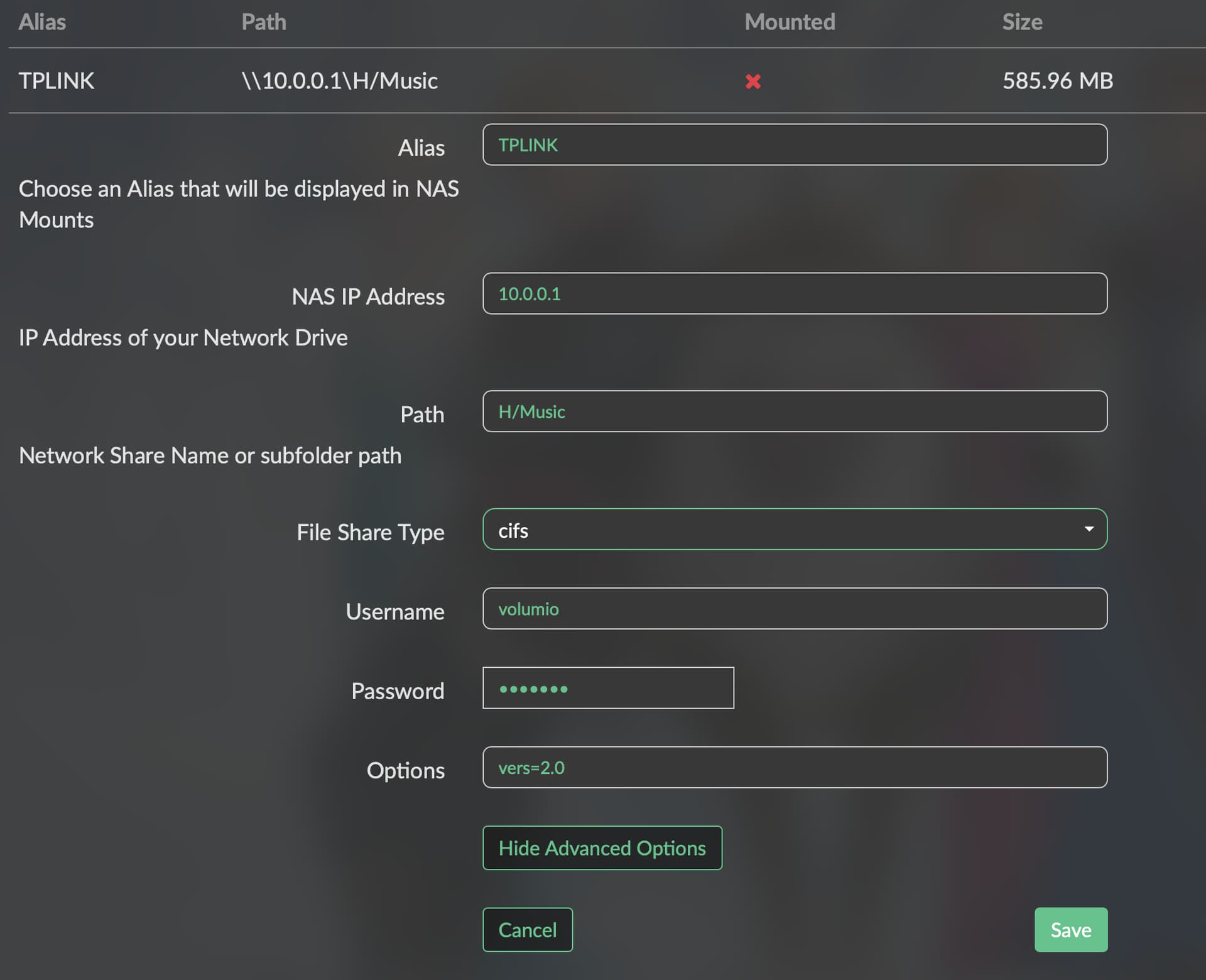
In Volumio 3.874 network share settings, I’ve tried many permutations of router IP, SMB share name, drive letter, etc etc and end up with variations on an invalid argument or inaccessible error.
In the log below, Volumio config adds an extra backslash to the SMB address after "H:". Is this what’s causing the connection to fail?
I’ve seen the info about specifying SMB version; I left the field blank, 2.02 was populated by Volumio.
info: Adding a new share
info: No correspondence found in configuration for share TPLINK on IP ARCHERUSB
info: Executing SMB command: smbclient --debuglevel=4 -L ARCHERUSB -N -m SMB3_11
info: Negotiated SMB version with TPLINK: SMB2_02
info: Detected device TPLINK with version SMB2_02
info: Set SMB version 2.02 in CIFS options: vers=2.02
 volumio : TTY=unknown ; PWD=/ ; USER=root ; COMMAND=/bin/mount -t cifs -o guest,ro,dir_mode=0777,file_mode=0666,iocharset=utf8,noauto,soft,vers=2.02 //ARCHERUSB/H:\\Music /mnt/NAS/TPLINK
pam_unix(sudo:session): session opened for user root by (uid=0)
pam_unix(sudo:session): session closed for user root
info: Error mounting TPLINK on IP ARCHERUSB : (22): Invalid argument
Refer to the mount.cifs(8) manual page (e.g. man mount.cifs)
Unknown vers= option specified: 2.02

CIFS: VFS: Unknown vers= option specified: 2.02
Thanks for the reply. Clearly you couldn’t have know but that was my first attempt after reading your earlier post. Here’s a few logs with different permutations in case you can see where I’m being an idiot:
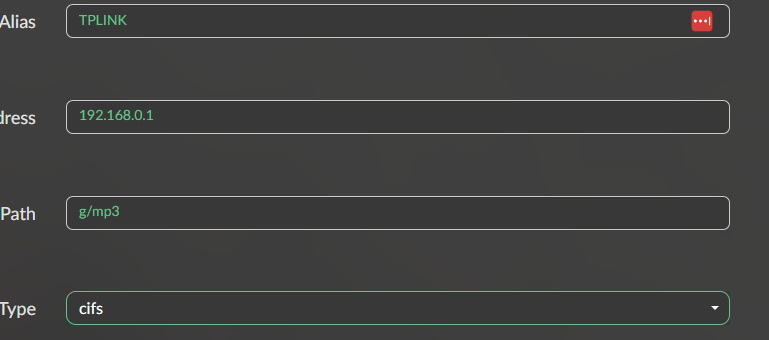
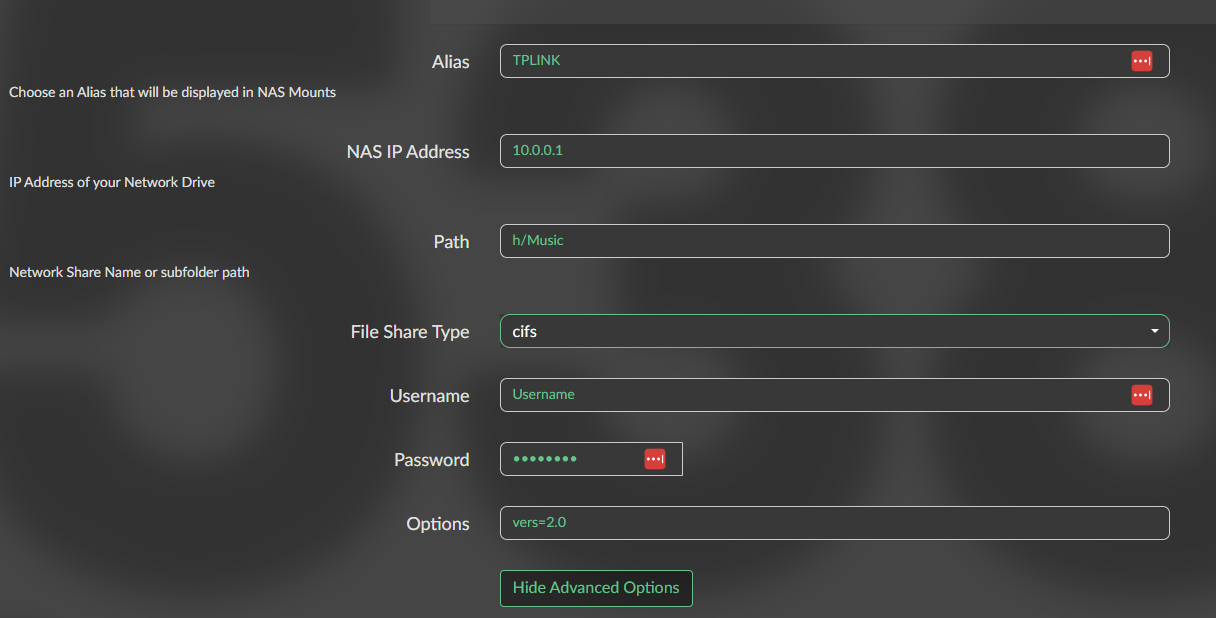
Added as h/music
info: Adding a new share
info: No correspondence found in configuration for share TPLINK on IP 10.0.0.1
info: Executing SMB command: smbclient --debuglevel=4 -L 10.0.0.1 -N -m SMB3_11
info: Negotiated SMB version with TPLINK: SMB2_02
info: Detected device TPLINK with version SMB2_02
info: Set SMB version 2.02 in CIFS options: vers=2.02
 volumio : TTY=unknown ; PWD=/ ; USER=root ; COMMAND=/bin/mount -t cifs -o guest,ro,dir_mode=0777,file_mode=0666,iocharset=utf8,noauto,soft,vers=2.02 //10.0.0.1/h/music /mnt/NAS/TPLINK
pam_unix(sudo:session): session opened for user root by (uid=0)
pam_unix(sudo:session): session closed for user root
Unknown vers= option specified: 2.02

CIFS: VFS: Unknown vers= option specified: 2.02
info: Error mounting TPLINK on IP 10.0.0.1 : (22): Invalid argument
Refer to the mount.cifs(8) manual page (e.g. man mount.cifs)
Added as “h:\music”
info: Adding a new share
info: No correspondence found in configuration for share TPLINK on IP 10.0.0.1
info: Executing SMB command: smbclient --debuglevel=4 -L 10.0.0.1 -N -m SMB3_11
info: Negotiated SMB version with TPLINK: SMB2_02
info: Detected device TPLINK with version SMB2_02
info: Set SMB version 2.02 in CIFS options: vers=2.02
 volumio : TTY=unknown ; PWD=/ ; USER=root ; COMMAND=/bin/mount -t cifs -o guest,ro,dir_mode=0777,file_mode=0666,iocharset=utf8,noauto,soft,vers=2.02 //10.0.0.1/h:/music /mnt/NAS/TPLINK
pam_unix(sudo:session): session opened for user root by (uid=0)
pam_unix(sudo:session): session closed for user root
info: Error mounting TPLINK on IP 10.0.0.1 : (22): Invalid argument
Refer to the mount.cifs(8) manual page (e.g. man mount.cifs)
Unknown vers= option specified: 2.02

CIFS: VFS: Unknown vers= option specified: 2.02
Added as “h:/music”
info: Adding a new share
info: No correspondence found in configuration for share TPLINK on IP 10.0.0.1
info: Executing SMB command: smbclient --debuglevel=4 -L 10.0.0.1 -N -m SMB3_11
info: Negotiated SMB version with TPLINK: SMB2_02
info: Detected device TPLINK with version SMB2_02
info: Set SMB version 2.02 in CIFS options: vers=2.02
 volumio : TTY=unknown ; PWD=/ ; USER=root ; COMMAND=/bin/mount -t cifs -o guest,ro,dir_mode=0777,file_mode=0666,iocharset=utf8,noauto,soft,vers=2.02 //10.0.0.1/h:/music /mnt/NAS/TPLINK
pam_unix(sudo:session): session opened for user root by (uid=0)
pam_unix(sudo:session): session closed for user root
info: Error mounting TPLINK on IP 10.0.0.1 : (22): Invalid argument
Refer to the mount.cifs(8) manual page (e.g. man mount.cifs)
Unknown vers= option specified: 2.02
Still no dice.
In the log below, in the first two lines that begin with CIFS, the first address uses forward slashes, the second backslashes. Is one of those lines just informational, or might there be some error in what is attempting to be mounted?
info: Adding a new share
info: No correspondence found in configuration for share TPLINK on IP 10.0.0.1
info: Executing SMB command: smbclient --debuglevel=4 -L 10.0.0.1 -N -m SMB3_11
info: Negotiated SMB version with TPLINK: SMB2_02
info: Detected device TPLINK with version SMB2_02
info: Version SMB2_02 detected, but user has specified version in options
 volumio : TTY=unknown ; PWD=/ ; USER=root ; COMMAND=/bin/mount -t cifs -o username=volumio,password=volumio,ro,dir_mode=0777,file_mode=0666,iocharset=utf8,noauto,soft,vers=2.0 //10.0.0.1/H/Music /mnt/NAS/TPLINK
pam_unix(sudo:session): session opened for user root by (uid=0)
CIFS: Attempting to mount //10.0.0.1/H/Music
CIFS: VFS:  BAD_NETWORK_NAME: \\10.0.0.1\H
pam_unix(sudo:session): session closed for user root
info: Error mounting TPLINK on IP 10.0.0.1 : (2): No such file or directory
Refer to the mount.cifs(8) manual page (e.g. man mount.cifs)
CIFS: VFS: cifs_mount failed w/return code = -2