HDMI out signal takes too long, or doesn't come until reboot

In what can be certainly classified as a first world problem, here’s a frustrating issue about Volumio on Raspberry Pi (which is the only one I can afford).

When I first change my receiver to the Volumio HDMI input, then open Volumio in either the browser or the phone app, and start playing something, it takes a few seconds to actually start playing. The signal from the Raspberry Pi seems to need a few seconds to “build” for lack of a better word. A better word exists, I just don’t know it.

Now, this is also the case, and can be even worse if I change a setting. For example, I was listening to something and I simply changed the setting that toggles between single and continuous in playback, and when I clicked on Save, it kept playing but it stopped sending the audio signal to the HDMI port. I waited and waited and nothing happened, so I clicked on the song again in the list to restart playback, and it came back, but it’s very common that if I change any setting, it will behave like what I described.

Some devices and software players have an option to send a very low volume audio signal to the HDMI port to keep it alive. Is there any way to do that in Volumio?

It seems to me that perhaps the HDMI out of the Raspberry Pi 4B is not the best option for sending the Volumio digital output to the receiver. Today, pretty much every time that I turned on the receiver and tried to play something in Volumio, I could see in the GUI that the songs were playing, but there was no audio coming out.

This happened three different times during the day, and each time I had to reboot Volumio to be able to listen to music.

So perhaps HDMI is not the best option, but since the little machine doesn’t have neither coaxial nor Toslink outputs, what would it be? I bought the Canakit version of the Pi 4B, which comes with a nice case with a fan on top to keep it cool, I would prefer not to add a DAC on board that would also make me spend money in a different case. And to keep hiss to a minimum, I’d rather go all digital straight to the receiver, which has a pretty good DAC itself.

So what options do I have?

Hey @PluggedIn,

Good to see you again. Before anyone can investigate this, we need specifics.

From your earlier posts I know you have a Raspberry Pi 4B (CanaKit), Volumio 4.096, connected to an Onkyo TX-RZ50 via “front HDMI port.” What we do not know:

  1. The Pi 4B has two micro-HDMI ports. Port 0 is nearest to the USB-C power connector, port 1 is further away. Which one is the cable connected to? This matters - they are not identical in behaviour.

  2. The CanaKit typically includes a micro-HDMI to HDMI cable or adapter. Which is it - a cable or an adapter with a separate HDMI cable?

  3. When you say “front HDMI port” on the Onkyo TX-RZ50 - do you mean the front panel convenience input, or one of the rear HDMI inputs? The TX-RZ50 has both, and they handle handshake differently.

  4. What is configured in Volumio under Settings - Playback - Audio Output? The exact device name shown there.

  5. Is HDMI CEC enabled on the Onkyo? CEC can interfere with audio handshake - the receiver and the Pi can get into a negotiation loop that delays or drops the audio signal.

  6. And - I have now asked you across three separate threads - We need a log link from http://volumio.local/dev (or http://192.168.1.180/dev). Go there, click “Send Log,” paste the URL here. This one should be captured after one of the “no audio until reboot” events, before the reboot.

Also a note on your Samsung P9 Express card. The Pi 4B does not support the microSD Express bus mode. It falls back to standard UHS-I speeds. The card works, but you will never see those 800 MB/s advertised speeds on a Pi. This also explains the slow flash speeds you reported earlier - it was not a defective card.

On the broader question of “is HDMI the best option” - yes, other options exist, but recommending one without understanding why HDMI is misbehaving first would be solving the wrong problem. Fix the diagnosis, then decide on the architecture.

Kind Regards,

Hey @nerd! Always good to have your response to any of my posts.

So let’s get to the answers:

I was using port 0. In the playback settings, it gives me four options, HDMI out, headphones, HDMI port 0 and port 1. If I choose HDMI out, I never get any sound. On port 0 I do get sound, and just because you mentioned the two ports can behave differently, I just connected the cable to port 1, however, I got no sound from it, obviously having selected port 1 in the settings. I even shut down the Pi, disconnected it from power, but still nothing, even though the progress bar in the song is moving. But the receiver is not getting any signal. Edit: after leaving it playing for several minutes, I could hear sound for a fraction of a second, and now finally it’s playing fine. It seems like a horribly long HDMI handshake.

This is a full cable, no adapters, micro HDMI on one end and HDMI on the other. It doesn’t seem like a bad quality cable, but I was thinking of ordering a better one today.

In this case it’s the front one, which is the one that is assigned to the “AUX” input.

Right now it’s HDMI port 1.

Yes. While some manufacturers implement that technology in a way that makes you want to shoot yourself, like LG TV sets (on which I have disabled it), it’s useful in some ways.

Sorry, I wasn’t aware of that. Sometimes I can read things too fast and overlook something. Next time I have an issue I’ll keep that in mind and send the log, then paste the URL here.

So I’m told. All these cards have so many different classes that sometimes it’s easy to get lost. I bought it mostly because of the size, to have enough for my current library, and future albums I buy. But well, maybe it was $10 more expensive than the same size for a non express one, so it’s not the end of the world. I’m happy it’s working fine and I was able to get a lot of my music in there :slight_smile:

Hey @PluggedIn,

No need to apologise on the log - just keep it in mind for next time. When an issue happens, grab the log before rebooting.

Three things to change, one at a time, testing after each:

  1. Move the cable to a rear HDMI input on the Onkyo.

The front panel HDMI is a convenience input designed for temporary connections - cameras, game consoles, a friend bringing over a laptop. It handles EDID handshake differently from the rear inputs, typically with shorter timeouts and simpler negotiation. A permanent headless Linux device sending audio to it is not what it was designed for. Pick any free rear HDMI input, assign it to whatever source name you want in the Onkyo’s setup menu, and test.

  1. Switch back to port 0 on the Pi.

Port 1 taking several minutes to produce audio is not normal. Port 0 worked. Use port 0. Make sure the Volumio playback setting matches - HDMI port 0.

  1. Disable CEC on the Onkyo.

CEC with a headless Linux device is asking for trouble. The Pi and the receiver continuously negotiate over CEC - “I am here,” “what are your capabilities,” “let me send you EDID again,” “wait, I need to renegotiate.” Every time the receiver switches input, powers on, or changes mode, this conversation restarts. When Volumio changes a playback setting and restarts MPD, HDMI output drops momentarily. CEC sees the drop, begins renegotiation, and the delay spirals. This is the most likely cause of your “audio disappears when I change a setting” symptom.

Disable CEC on the receiver, move to a rear input, use port 0. Test for a day.

On the “HDMI out” option showing no sound - that is a generic ALSA device name that does not map to a specific port. Use the explicit port 0 or port 1 options. Ignore “HDMI out.”

On the cable - do not spend money on a new cable. The CanaKit cable is adequate. HDMI is a digital interface. The signal is either there or it is not. There is no “better quality handshake” cable despite what marketing departments would like you to believe. The bits do not care about gold plating. A one has the same value whether it travels through gold, copper, or the tears of an audiophile who spent 200 pounds on a cable. A zero is still a zero even if it arrives on a diamond-encrusted connector hand-polished by Swiss engineers under a full moon. The electron does not know it is in a premium cable. It has no aspirations. It has charge, spin, and momentum, none of which improve with a higher price tag. If the cable passes electrical continuity and meets the HDMI spec, it is the same cable as the one that costs ten times more. The difference is marketing, packaging, and the weight of the box it comes in - which admittedly does feel more premium, because it is heavier, because they put more cardboard in it.

Save your money for music. That is the part where quality actually matters.

And if after these changes the problem persists - that is when I need the log.

Kind Regards,

Thanks for the detailed explanation. I had no idea that the front HDMI input was that flaky compared to the ones in the back. That wasn’t even going to be the definitive one, because I bought an HDMI switcher months ago that I still have to open (I have 5 4K Blu-ray players and four streaming devices. Yes, I know. I have a problem.) I was going to connect it to that switcher, but then I remembered that the 6th HDMI port in the back of the receiver was used for the PC, for when I edit some music in 5.1, and I don’t do that very often, so Volumio Pi can have that port just fine.

So I connected it to that port, and I didn’t change the micro HDMI connector to the HDMI 0. This time when I started playing, it did after a couple of seconds, which is the normal. I had also disabled CEC per your advice. Should I still change it to port 0? You mentioned that they don’t work the same, so which one is better, if they both work?

My worst nightmares are substantially more pleasant than this. I’m not a fan of “The Walking Dead”, but if you have seen the episode where Jeffrey Dean Morgan’s character beats Steven Yeun’s character to a pulp with that modified baseball bat, that’s what several times came to my head when thinking what I would do to whoever created HDMI-CEC.

And the way you describe it, makes total sense when remembering the times I had to deal with it, especially in my LG OLED TV set, a device that thinks it knows better than me what input I want my receiver to be in, and if I dare switch it to another, it will switch it back to what it wants more than once to let me know that it’s in charge.

Well, I already did, but I’m not one to spend $200 on a cable. It was about 15 bucks and I’m sure it will be a better cable. While HDMI is a digital interface, very cheap cables can lead to that handshake getting interrupted and thus your music playback. The one that comes with the kit is OK, but I wanted a better one and also shorter, since 3 feet is enough for this purpose.

So far so good, but we’ll see what happens the next few days. If these problems keep happening, I’ll make sure I do the logs thing before rebooting.

Thanks again for your help!

While I still haven’t received the new cable, I doubt this will change, and it goes back to this on my first post:

Now, all the problems disappeared after turning off CEC and plugging the cable to the back. I don’t have any of the worst issues now, but I would like my listening experience with Volumio to be no different from listening to a CD, or Apple Music on my Apple TV 4K (at least when it comes to stereo albums, because Dolby Atmos albums have this very same problem).

Meaning, I would like to select an album to play, and listen to it from the very first millisecond, the same way it is if I start playing a CD. But with Volumio, if I hadn’t played anything in a while, I start playing, then after a second or two the music comes on, and I have to rewind to the beginning. It gets old pretty fast.

I assume this is because Volumio probably doesn’t send the audio signal until I click on Play. So it takes a second or two for the receiver to understand what type of audio signal it is, like how many channels, bit depth, sampling rate, etc.

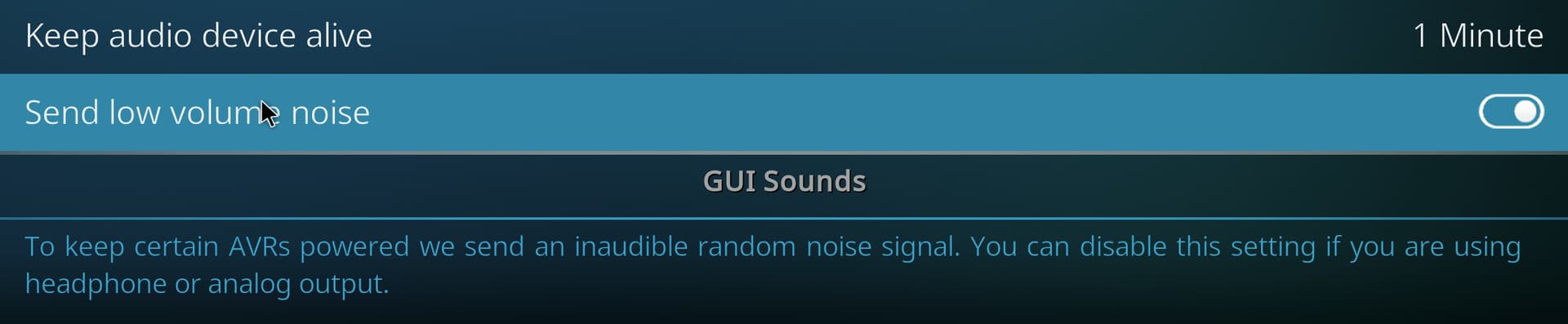
This would be very easy to fix if Volumio were to always send a very low volume noise signal (so low that most people wouldn’t even hear it), which is what Kodi does:

Now, is there a way to maybe edit some config file in Volumio to make this happen, or is it impossible since it needs additional code to be written for it to be available?

Hey @PluggedIn,

Good news first: moving to a rear HDMI input and disabling CEC resolved the worst symptoms. That confirms the diagnosis - front panel input and CEC negotiation loops were the primary culprits for the signal drops and the multi-second blackouts.

What you are experiencing now - the 1-2 second delay on first play after idle - is a different problem with a different cause, and you have diagnosed it correctly.

Here is what happens:

When you press Play after Volumio has been idle, MPD (the audio engine underneath Volumio) opens the ALSA device, the Pi begins transmitting audio over HDMI, and the Onkyo detects a new incoming audio stream. The receiver then performs format negotiation - it needs to determine channel count, sample rate, and bit depth before it will output anything. That negotiation window is your 1-2 second gap. When gapless playback transitions between tracks of the same format, MPD keeps the ALSA device open continuously, so the Onkyo never loses lock. That is why you only hear it on first play or after a pause.

Kodi solves this with exactly the feature you screenshotted - it keeps the audio device open and sends inaudible noise to prevent the receiver from dropping the connection. This is a well-understood solution that has existed in media players for years.

Volumio does not currently have this feature in its UI.

The underlying audio engine (MPD) does support it natively. MPD has a parameter called always_on which, when set to “yes” in the audio output configuration, keeps the ALSA device open even when playback is stopped and sends silence to the output. This would keep the HDMI audio link alive, and the Onkyo would never lose lock because it would continuously see a valid audio stream. The infrastructure is there. It just needs to be exposed.

This is not a new discovery. There is an open GitHub issue on the Volumio2 repository - issue #1668, titled “First couple of seconds of each track is always cut off with some DACs” - filed in December 2018. It describes exactly this behavior with SPDIF DACs, but the same mechanism applies to HDMI receivers. Your HDMI use case is arguably more common and affects a wider user base, since HDMI format negotiation is inherently slower than SPDIF lock acquisition.

The issue remains open. Since 2018. Which, in software years, makes it old enough to have started primary school, learned to read, written a letter asking when it will be fixed, and received no reply.

I will bring this to the attention of the backend developers. Again. I have raised it before. The good news is that the fix is well-defined - MPD already supports the parameter, Kodi has demonstrated the UX pattern, and the implementation is not architecturally complex. The bad news is that “well-defined, not complex, and previously raised” describes approximately 40% of my open items list, and the other 60% are things that were well-defined, not complex, previously raised, and then became complex because nobody touched them for long enough that three dependencies changed underneath.

In the meantime, there is no user-facing workaround I can recommend that would survive Volumio updates cleanly. Manual MPD config edits get overwritten by Volumio’s template system on every update, which makes them a maintenance treadmill rather than a solution.

So the honest answer is: you are right, this needs code, and I will push for it.

Kind Regards,

You have 15 minutes :slight_smile:

1 Like

:rofl:

Well, let me ask you this. How difficult is that MPD config edit? Is it the typical sudo nano [whatever conf file] in Linux? Or is a more complex edit of a file in a hex editor or something like that? Because Volumio doesn’t seem to have updates all the time, so if doing a simple sudo nano etc saves me the aggravation of starting an album without the first two seconds (yes, I’m THAT guy), then I’ll happily do it. Via SSH that is, for some reason the Volumio screen now defaults to 4K with 100% scaling, so it’s tiny. Must be the new cable. Then when it updates, I’ll do it again, until hopefully…

…they fix it. And thank you for pushing it. In my view, any player should behave like a CD player. There shouldn’t be any lost music at all. I wouldn’t mind that it doesn’t start playing right away and takes a few extra seconds, as long as it starts from the very first millisecond.

My CD player, the Onkyo DX-C390, which is a 6 CD changer, doesn’t start playing the moment I press play, but it plays right from the first recorded bit of the CD. It’s connected to the Onkyo receiver with a coaxial good quality cable, so it’s still digital, but it always starts from the start, not two seconds in.

Of course I can tell the difference between having a 6 disc changer as opposed to the convenience of having thousands of albums in much higher resolution than CD can provide, but I’m in my '50s, so my hearing can’t tell apart 16 bit 44.1 Khz that much from 24 bit 96 Khz and in the end it’s not like every CD sounds worse than every album on FLAC HiRes audio.

Hey @Wheaten,

Fifteen minutes. You gave me fifteen minutes. I have spent longer than fifteen minutes deciding whether a log entry warrants a semicolon or a full stop. I have spent fifteen minutes reading a single line of dmesg output and concluding that I need to read it again. My coffee takes fifteen minutes to reach the temperature at which I am willing to acknowledge its existence.

But challenge accepted. I have a counteroffer. I am nursing an idea for a plugin that addresses the HDMI audio silence gap @PluggedIn described. The MPD parameter exists, the mechanism is understood, and wrapping it in a plugin means it survives OTA updates without requiring users to perform post-update surgery on template files.

I need two things:

  1. A name. The plugin sends inaudible noise to keep the audio output alive when playback is idle. Working concepts so far include “silence_is_golden” which is ironic because the plugin’s entire purpose is to murder silence, “phantom_signal” which sounds like a prog rock album, and “idle_hum” which sounds like what I do when pretending to think during meetings. Open to suggestions.

  2. Testing. I do not have an AVR or any HDMI audio receiving equipment. My audio setup negotiates about as diplomatically as a toddler with a biscuit - it is simple, direct, and entirely uninterested in EDID handshakes. I can write the plugin, but I need someone with an HDMI-to-receiver chain to put it through its paces. Someone who is, shall we say, THAT guy about the first two seconds.

I know you will help - you always do, it is pathological at this point and I respect it deeply - but this one should not land on your plate. The man with the problem, the equipment, and the self-declared enthusiasm for “under the hood stuff” gets to carry the testing burden. It is only fair. He breaks it, he measures it, he reports it. You have done enough volunteer hours this quarter to qualify for a pension.

I believe we may already have a volunteer in this thread. Oh dear…

Kind Regards,

Hey @PluggedIn,

To answer your direct question - yes, it is a simple sudo nano edit, not hex sorcery. But as I mentioned, I have a better idea brewing that would make manual edits unnecessary. See my reply to @Wheaten above.

And you are absolutely right. A music player should behave like a CD player. When you press play, you get the music. All of it. From the first sample. Your Onkyo DX-C390 does not skip the first two seconds because its transport mechanism takes a moment to have an existential crisis about what bit depth it is looking at. It reads the TOC, positions the laser, and plays. The fact that a mechanical device with a spinning disc and a laser on a sled manages this more gracefully than a computer with no moving parts is - and I say this with professional respect for everyone involved - embarrassing.

Now, about that plugin idea. I can write it. I cannot test it. My audio equipment has the HDMI negotiation complexity of two tin cans and a piece of string. You, on the other hand, have an Onkyo TX-RZ50, a Raspberry Pi 4B on a rear HDMI input with CEC disabled, a working SSH connection (once you use the correct IP address), a freshly discovered enthusiasm for “under the hood stuff,” and - most critically - the ears of a man in his 50s who is, by his own proud admission, THAT guy about the first two seconds.

You are the perfect test pilot. You have the equipment, the problem, the motivation, and the barely contained excitement of someone who just discovered that Linux has a command line. I will build it, you will break it, and together we will file the bug reports. @Wheaten will supervise from a safe distance, as is his right after years of loyal service.

Are you in?

Kind Regards,

For me too. Don’t have any HDMI devices to test. Only a NAD D3045 that runs HDMI-Arc.
If the plugin is going to see daylight, you might also consider to include a configurable silence to suppress plops and clicks on rate changes with USB DAC’s.

Yes I know it makes the naming a bit more difficult.

Silence switch?
PWAN? (Plugin Without A Name)

Hey @PluggedIn,

Remember when I said I would push for it? I pushed myself.

The plugin is built, submitted, and live in the store as beta:

Since it is beta, the plugin store will not show it unless you enable test mode. Go to:

http://volumio.local/dev

image

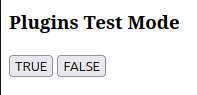
Scroll down to “Plugins Test Mode” and click TRUE. Then go to the plugin store in the Volumio UI and search for Audio Keepalive. Install it, enable “Keep audio device active”, save, and reboot.

After reboot, play an album. Tell me if those first two seconds are still missing.

You are the man with the Onkyo TX-RZ50, the rear HDMI input, CEC disabled, and the self-declared inability to tolerate missing music. This is your moment. Break it for me.

Kind Regards,

OK I’m guessing I should report findings in the thread where you announced it, correct?

1 Like

Yes please do, so it’s all in one place.