If i select R-PI DAC as I2S device i get an ALSA error
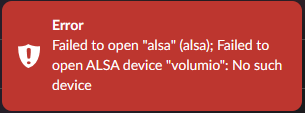
However, if i switch back to “Generic I2S device” it is working as expected. 
(using AOIDE DAC2)
If i select R-PI DAC as I2S device i get an ALSA error
However, if i switch back to “Generic I2S device” it is working as expected.
(using AOIDE DAC2)
It has turned out there has been a duplicate entry in config.txt - thanks again @nerd
An old bug in Volumio…
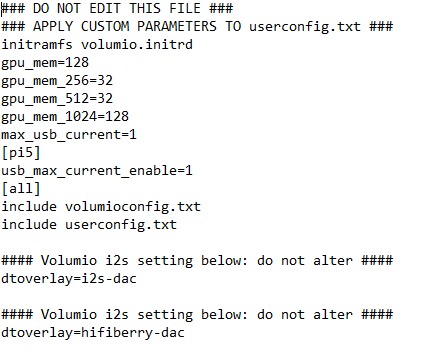
Removing the hifiberry overlay did the trick.
This is not happening if you setup a new device and choose R-PI DAC from the beginning.
Everthing else is working like a charm.
Yeah this is happening sometimes. Not sure what the root cause is.
I’ve seen multiple reports in the last years, that some config.txt had more then 5 entries for the same DAC.
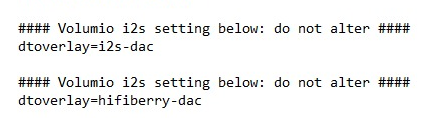
no issue if you have 5 times the same entry - but if these are different- the last one will get effective- regardless if it is the one that should be used
Hi @nerd,
Small question, I was working on another code that listens gpios on raspi and configure dac accordingly, so I can switch between I2S, SPDIF and another SPDIF inputs on dac. This is my logic from script:
...
import json
import time
import smbus2
import logging
import signal
import sys
import os
import threading
import RPi.GPIO as GPIO
from websocket import WebSocketApp

...
I2C_BUS = 1
DAC_ADDR = 0x48

# ES9018K2M register addresses
REG_INPUT      = 0x01
REG_MUTE       = 0x07
REG_GPIO       = 0x08
REG_CHMAP      = 0x0B
REG_DPLL       = 0x0C
REG_SOFT       = 0x0E
REG_VOL_L      = 0x0F
REG_VOL_R      = 0x10

# RPi GPIO pins
GPIO_I2S    = 17
GPIO_SPDIF1 = 27
GPIO_SPDIF2 = 22

...
class ES9018K2M:
...
    def init_dac(self):
        # Configure both GPIO1 and GPIO2 as Inputs
        self._write(REG_GPIO, 0x88)

        # 2. Set DPLL Bandwidth to 0xAA for fast locking
        self._write(REG_DPLL, 0xAA)

        # 3. Disable mute-on-lock
        self._write(REG_SOFT, 0x8A)

        # 4. Default to I2S on startup
        self._write(REG_INPUT, 0x80)
        self._write(REG_CHMAP, 0x32)
        self.input_mode = "i2s"

        # 5. Unmute
        self._write(REG_MUTE, 0x80)

    def set_input_mode(self, mode):
        # Switches between I2S, SPDIF1 (GPIO1), and SPDIF2 (GPIO2)
        if self.input_mode == mode:
            return

        logging.info(f"Switching DAC input to: {mode}")
        self.set_mute(True)
        time.sleep(0.1)

        if mode == "i2s":
            self._write(REG_INPUT, 0x80) # I2S

        elif mode == "spdif1":
            self._write(REG_CHMAP, 0x32) # Route SPDIF from GPIO1
            self._write(REG_INPUT, 0x81) # Select SPDIF

        elif mode == "spdif2":
            self._write(REG_CHMAP, 0x42) # Route SPDIF from GPIO2
            self._write(REG_INPUT, 0x81) # Select SPDIF

        time.sleep(0.1)
        self.set_mute(False)
        self.input_mode = mode

...

...
def input_monitor_thread(dac_instance):
    last_detected_mode = None
    logging.info("Input monitor thread started (I2S / SPDIF1 / SPDIF2)")

    while True:
        try:
            current_mode = None
            if GPIO.input(GPIO_I2S) == GPIO.LOW:
                current_mode = "i2s"
            elif GPIO.input(GPIO_SPDIF1) == GPIO.LOW:
                current_mode = "spdif1"
            elif GPIO.input(GPIO_SPDIF2) == GPIO.LOW:
                current_mode = "spdif2"

            if current_mode and current_mode != last_detected_mode:
                dac_instance.set_input_mode(current_mode)
                last_detected_mode = current_mode
        except Exception as e:
            logging.error(f"Polling error: {e}")

        time.sleep(0.25)

...

if __name__ == "__main__":
    GPIO.setwarnings(False)
    GPIO.setmode(GPIO.BCM)
    for pin in [GPIO_I2S, GPIO_SPDIF1, GPIO_SPDIF2]:
        GPIO.setup(pin, GPIO.IN, pull_up_down=GPIO.PUD_UP)

    dac.init_dac()

    monitor = threading.Thread(target=input_monitor_thread, args=(dac,), daemon=True)
    monitor.start()

    while True:
        try:
            start_ws()
        except:
            time.sleep(5)
what would be the best approach to implement this to your plugin?
Thanks
Here’s the Node.js equivalent for the potential implementation:
// Register addresses
var REG_INPUT  = 0x01;
var REG_CHMAP  = 0x0B;

// Input source selection
ControllerES9018K2M.prototype.setInputSource = function(mode) {
  var self = this;

  if (self.currentInputMode === mode) {
    return;
  }

  self.logger.info('ES9018K2M: Switching input to: ' + mode);
  self.setMuteSync(true);

  if (mode === 'i2s') {
    self.i2cWriteSync(REG_INPUT, 0x80);
    self.i2cWriteSync(REG_CHMAP, 0x32);
  } else if (mode === 'spdif1') {
    self.i2cWriteSync(REG_CHMAP, 0x32);
    self.i2cWriteSync(REG_INPUT, 0x81);
  } else if (mode === 'spdif2') {
    self.i2cWriteSync(REG_CHMAP, 0x42);
    self.i2cWriteSync(REG_INPUT, 0x81);
  }

  self.setMuteSync(false);
  self.currentInputMode = mode;
};
GPIO monitoring using @iiot2k/gpiox (Pi 5 / Bookworm compatible):
var gpiox = require('@iiot2k/gpiox');

// Watch for input changes
gpiox.watch(17, gpiox.PULL_UP, function(pin, value) {
  if (value === 0) self.setInputSource('i2s');
});

gpiox.watch(27, gpiox.PULL_UP, function(pin, value) {
  if (value === 0) self.setInputSource('spdif1');
});

gpiox.watch(22, gpiox.PULL_UP, function(pin, value) {
  if (value === 0) self.setInputSource('spdif2');
});
Note: The older onoff library uses deprecated sysfs interface and has issues on Pi with the new RP1 GPIO chip. @iiot2k/gpiox uses libgpiod which is the proper replacement for kernel 6.x and Bookworm.
The i2cWriteSync and setMuteSync already exist in the plugin.
However - what’s the hardware? Commercial HAT with input selection, or custom board? And are GPIOs connected to physical switches or signal detection?
The plugin handles DAC configuration matching Volumio’s ALSA output path. Automatic input switching with SPDIF sources bypasses Volumio entirely - external source plays through DAC while Volumio thinks it’s still in control. This conflicts with core backend architecture. Manual input selection in UI is straightforward, but automatic detection with external sources is a different beast.
Kind Regards,
Thanks a lot @nerd ! Will try to tinker on this tomorrow:)
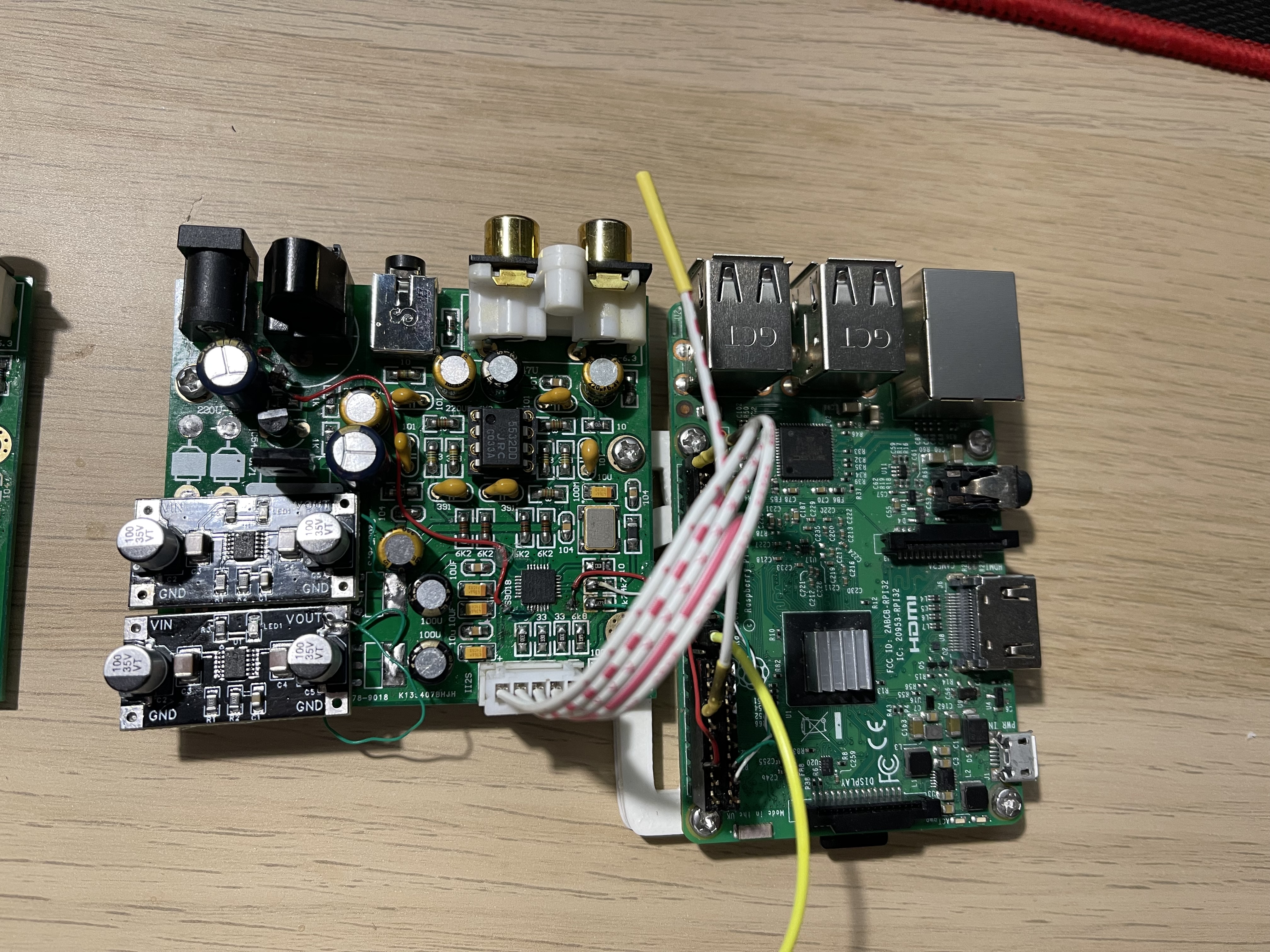
I bought a couple of ES9018K2M boards a long time ago, if I remember correctly they were around $15 each. They are exactly the same boards as the ones used by the author of this thread.
But I decided to slightly modify the board:
– add two SPDIF inputs (since the DAC itself supports this)
– replace the JRC5532 op-amp with an OPA1652 (this allows powering both the DAC board and the Raspberry Pi from a single 5V power supply)
– replace the noisy AMS1117 regulators with a pair of LT3045
– and put everything into a proper enclosure.
I use one manual rotary switcher for switching inputs. In practice, if one of the SPDIF inputs is used, I only need volume control from Volumio, and it doesn’t really matter whether Volumio is playing anything or not.
Hey @Grey_bird,
Nice hack! Those LT3045 regulators are a proper upgrade.
Since you’re using a manual rotary switch, I added input source selection to the plugin - simple UI dropdown:
Select I2S / SPDIF1 / SPDIF2, save, done. Writes REG_INPUT and REG_CHMAP with graceful mute during switch. Keeps the plugin design simpler - no GPIO dependencies, no native libraries, works on all Pi models.
With a physical switch you’d just match the UI selection to your switch position. Or leave it on whichever input you use most.
Question: Do you actually need GPIO monitoring for automatic detection? Your rotary switch is manual anyway - you already know which position you’ve selected. The GPIO code would only save you one click in the UI after turning the physical knob.
Let me know if you test it and if GPIO auto-detection is worth adding.
Kind Regards,
great again
i also do have one of these anywhere
i found out how to connect I2C control, but having SPDIF inputs sounds great
would you share info where to connect these inputs ?
the 3045‘s for power supply sounds great as also the OP amp change