Failed to open "alsa". Volumio 3.819 Raspberry Pi 3 Model b + Allo Piano 1.1

I’m having problems to get sound from the Raspberry pi with Allo Piano dac through the I2S port. The raspberry Pi works fine as it is brand new. I can get sound out of the HDMI port. The DAC has been working for years. I have reinstalled volumio in the SD card couple of times and it is always the same problem.

Find bellow the log:


info: CoreCommandRouter::volumioGetState
info: CorePlayQueue::getTrack 13
info: CoreCommandRouter::volumioGetQueue
info: CoreStateMachine::getQueue
info: CorePlayQueue::getQueue
info: CoreCommandRouter::executeOnPlugin: system , getHwuuid
info: CoreCommandRouter::executeOnPlugin: system , getUpdaterChannel
info: CALLMETHOD: music_service inputs serialMonitorAction [object Object]
info: CoreCommandRouter::executeOnPlugin: inputs , serialMonitorAction
info: Error : CoreCommandRouter::executeOnPlugin: No method [serialMonitorAction] in plugin inputs
info: CALLMETHOD: system_controller motivocontrol displaySelection [object Object]
info: CoreCommandRouter::executeOnPlugin: motivocontrol , displaySelection
 volumio : TTY=unknown ; PWD=/ ; USER=root ; COMMAND=/sbin/ifconfig eth0
pam_unix(sudo:session): session opened for user root by (uid=0)
pam_unix(sudo:session): session closed for user root
 volumio : TTY=unknown ; PWD=/ ; USER=root ; COMMAND=/sbin/ifconfig wlan0
pam_unix(sudo:session): session opened for user root by (uid=0)
pam_unix(sudo:session): session closed for user root

 volumio : TTY=unknown ; PWD=/ ; USER=root ; COMMAND=/sbin/ifconfig eth0
pam_unix(sudo:session): session opened for user root by (uid=0)
pam_unix(sudo:session): session closed for user root
 volumio : TTY=unknown ; PWD=/ ; USER=root ; COMMAND=/sbin/ifconfig wlan0
pam_unix(sudo:session): session opened for user root by (uid=0)
pam_unix(sudo:session): session closed for user root

info: CoreCommandRouter::executeOnPlugin: my_volumio , getAutoUpdateCheckEnabled
info: CoreCommandRouter::volumioGetVisibleSources
info: CoreCommandRouter::executeOnPlugin: my_music , getDisabledSources
info: CoreCommandRouter::volumioGetState
info: CorePlayQueue::getTrack 13
info: CoreCommandRouter::executeOnPlugin: metavolumio , getInfinityPlayback
info: CoreCommandRouter::executeOnPlugin: multiroom , getMultiroom
info: Received Get System Info
info: CoreCommandRouter::executeOnPlugin: system , getSystemInfo
info: CoreCommandRouter::executeOnPlugin: volumiodiscovery , getThisDevice
info: Discovery: Getting this device information
info: CoreCommandRouter::volumioGetState
info: CorePlayQueue::getTrack 13
info: CoreCommandRouter::executeOnPlugin: network , getCachedIPAddresses
info: CoreCommandRouter::volumioGetState
info: CorePlayQueue::getTrack 13
info: Listing playlists
info: CoreCommandRouter::executeOnPlugin: appearance , getUiSettings
info: CoreCommandRouter::executeOnPlugin: system , getPrivacySettings
info: CoreCommandRouter::executeOnPlugin: updater_comm , getUpdateMessageCache
info: CoreCommandRouter::volumioGetState
info: CorePlayQueue::getTrack 13
info: CoreCommandRouter::volumioPlay
info: CoreStateMachine::play index undefined
info: CoreStateMachine::setConsumeUpdateService undefined
info: CorePlayQueue::getTrack 13
info: CoreStateMachine::startPlaybackTimer
info: CorePlayQueue::getTrack 13


info: CoreCommandRouter::executeOnPlugin: wizard , getOnboardingWizard
info:
---------------------------- MPD announces state update: player
info: sendMpdCommand stop took 55 milliseconds
info: ControllerMpd::getState


info:
---------------------------- MPD announces system playlist update
info: Ignoring MPD Status Update
info: sendMpdCommand status took 2 milliseconds
info: sendMpdCommand clear took 3 milliseconds


error: updateQueue error: null
info:
---------------------------- MPD announces system playlist update
info: Ignoring MPD Status Update
info: ------------------------------ 4ms
info: sendMpdCommand playlistinfo took 3 milliseconds
info: sendMpdCommand add "NAS/NAS_Madrid/complete/Sentinals - Big Surf! (1963)/13 - Hideaway.flac" took 3 milliseconds


error: ControllerMpd::pushError: TypeError: Cannot read property 'split' of undefined
info: ------------------------------ 9ms
info: ------------------------------ 4ms
info: sendMpdCommand play took 3 milliseconds
info: CoreCommandRouter::executeOnPlugin: my_volumio , getMyVolumioStatus
info: Received Get System Info
info: CoreCommandRouter::executeOnPlugin: system , getSystemInfo
info: CoreCommandRouter::executeOnPlugin: volumiodiscovery , getThisDevice
info: Discovery: Getting this device information
info: CoreCommandRouter::volumioGetState
info: CorePlayQueue::getTrack 13
info: CoreCommandRouter::executeOnPlugin: network , getCachedIPAddresses
info:
---------------------------- MPD announces state update: player
info: ControllerMpd::getState

info:
---------------------------- MPD announces state update: player

info: sendMpdCommand status took 22 milliseconds
info: ControllerMpd::getState


info: sendMpdCommand clearerror took 5 milliseconds
info: sendMpdCommand status took 4 milliseconds
info: sendMpdCommand playlistinfo took 4 milliseconds


info: ControllerMpd::pushState
info: CoreCommandRouter::servicePushState
info: CorePlayQueue::getTrack 13


info: CoreStateMachine::syncState   stateService pause
info: CoreStateMachine::syncState   currentStatus stop
info: CoreStateMachine::pushState
info: CorePlayQueue::getTrack 13
info: CoreCommandRouter::executeOnPlugin: volumiodiscovery , saveDeviceInfo
info: CoreCommandRouter::volumioPushState
info: ------------------------------ 47ms
info: sendMpdCommand playlistinfo took 18 milliseconds

info: ControllerMpd::pushState
info: CoreCommandRouter::servicePushState
info: CorePlayQueue::getTrack 13


info: CoreStateMachine::syncState   stateService pause
info: CoreStateMachine::syncState   currentStatus stop
info: CoreStateMachine::pushState
info: CorePlayQueue::getTrack 13
info: CoreCommandRouter::executeOnPlugin: volumiodiscovery , saveDeviceInfo
info: CoreCommandRouter::volumioPushState
info: ------------------------------ 51ms
info: CoreCommandRouter::executeOnPlugin: my_volumio , getMyVolumioStatus
info: Received Get System Info
info: CoreCommandRouter::executeOnPlugin: system , getSystemInfo
info: CoreCommandRouter::executeOnPlugin: volumiodiscovery , getThisDevice
info: Discovery: Getting this device information
info: CoreCommandRouter::volumioGetState
info: CorePlayQueue::getTrack 13
info: CoreCommandRouter::executeOnPlugin: network , getCachedIPAddresses
info: CoreCommandRouter::executeOnPlugin: appearance , isLatestTOSAccepted
info: CoreCommandRouter::volumioPlay
info: CoreStateMachine::play index undefined
info: CoreStateMachine::setConsumeUpdateService undefined
info: CorePlayQueue::getTrack 13
info: CoreStateMachine::startPlaybackTimer
info: CorePlayQueue::getTrack 13


info:
---------------------------- MPD announces state update: player
info: sendMpdCommand stop took 55 milliseconds
info: ControllerMpd::getState


info:
---------------------------- MPD announces system playlist update
info: Ignoring MPD Status Update
info: sendMpdCommand status took 2 milliseconds
info: sendMpdCommand clear took 2 milliseconds


error: updateQueue error: null
info:
---------------------------- MPD announces system playlist update
info: Ignoring MPD Status Update
info: ------------------------------ 4ms
info: sendMpdCommand playlistinfo took 2 milliseconds
info: sendMpdCommand add "NAS/NAS_Madrid/complete/Sentinals - Big Surf! (1963)/13 - Hideaway.flac" took 2 milliseconds


error: ControllerMpd::pushError: TypeError: Cannot read property 'split' of undefined
info: ------------------------------ 9ms
info: ------------------------------ 4ms
info: sendMpdCommand play took 2 milliseconds
info:
---------------------------- MPD announces state update: player
info: ControllerMpd::getState

info:
---------------------------- MPD announces state update: player
info: ControllerMpd::getState


info: sendMpdCommand status took 10 milliseconds


info: sendMpdCommand status took 17 milliseconds
info: sendMpdCommand clearerror took 10 milliseconds
info: sendMpdCommand playlistinfo took 9 milliseconds


info: ControllerMpd::pushState
info: CoreCommandRouter::servicePushState
info: CorePlayQueue::getTrack 13


info: CoreStateMachine::syncState   stateService pause
info: CoreStateMachine::syncState   currentStatus stop
info: CoreStateMachine::pushState
info: CorePlayQueue::getTrack 13
info: CoreCommandRouter::executeOnPlugin: volumiodiscovery , saveDeviceInfo
info: CoreCommandRouter::volumioPushState
info: ------------------------------ 38ms
info: sendMpdCommand clearerror took 26 milliseconds
info: sendMpdCommand playlistinfo took 24 milliseconds

info: ControllerMpd::pushState
info: CoreCommandRouter::servicePushState
info: CorePlayQueue::getTrack 13


info: CoreStateMachine::syncState   stateService pause
info: CoreStateMachine::syncState   currentStatus stop
info: CoreStateMachine::pushState
info: CorePlayQueue::getTrack 13
info: CoreCommandRouter::volumioPushState
info: ------------------------------ 57ms
info: CoreCommandRouter::executeOnPlugin: system , getPrivacySettings
info: CALLMETHOD: system_controller my_volumio retreiveBackendEventStates undefined
info: CoreCommandRouter::executeOnPlugin: my_volumio , retreiveBackendEventStates
info: Received Get System Version
info: CoreCommandRouter::executeOnPlugin: system , getSystemVersion
info: Received Get System Info
info: CoreCommandRouter::executeOnPlugin: system , getSystemInfo
info: CoreCommandRouter::executeOnPlugin: volumiodiscovery , getThisDevice
info: Discovery: Getting this device information
info: CoreCommandRouter::volumioGetState
info: CorePlayQueue::getTrack 13
info: CoreCommandRouter::executeOnPlugin: network , getCachedIPAddresses
info: CoreCommandRouter::getUIConfigOnPlugin
info: CoreCommandRouter::executeOnPlugin: appearance , getConfigParam
info: CoreCommandRouter::executeOnPlugin: appearance , getAvailableUIs
info: Received Get System Version
info: CoreCommandRouter::executeOnPlugin: system , getSystemVersion
hwmon hwmon1: Undervoltage detected!
hwmon hwmon1: Voltage normalised
hwmon hwmon1: Undervoltage detected!
hwmon hwmon1: Voltage normalised
hwmon hwmon1: Undervoltage detected!
hwmon hwmon1: Voltage normalised
info: CorePlayQueue::getTrack 13
info: CorePlayQueue::getTrack 14
info: CoreCommandRouter::volumioGetState
info: CorePlayQueue::getTrack 13
info: CoreCommandRouter::volumioPlay
info: CoreStateMachine::play index undefined
info: CoreStateMachine::setConsumeUpdateService undefined
info: CorePlayQueue::getTrack 13
info: CoreStateMachine::startPlaybackTimer
info: CorePlayQueue::getTrack 13


info:
---------------------------- MPD announces state update: player
info: sendMpdCommand stop took 3 milliseconds
info: ControllerMpd::getState


info: sendMpdCommand status took 2 milliseconds


info:
---------------------------- MPD announces system playlist update
info: Ignoring MPD Status Update
info: sendMpdCommand clear took 4 milliseconds
info: sendMpdCommand playlistinfo took 6 milliseconds


error: ControllerMpd::pushError: TypeError: Cannot read property 'split' of undefined
info: ------------------------------ 12ms
error: updateQueue error: null
info:
---------------------------- MPD announces system playlist update
info: Ignoring MPD Status Update
info: ------------------------------ 10ms
info: sendMpdCommand add "NAS/NAS_Madrid/complete/Sentinals - Big Surf! (1963)/13 - Hideaway.flac" took 4 milliseconds

info: ------------------------------ 3ms
info: sendMpdCommand play took 2 milliseconds
info:
---------------------------- MPD announces state update: player
info: ControllerMpd::getState

info:
---------------------------- MPD announces state update: player
info: ControllerMpd::getState


info: sendMpdCommand status took 10 milliseconds


info: sendMpdCommand status took 20 milliseconds
info: sendMpdCommand clearerror took 14 milliseconds
info: sendMpdCommand playlistinfo took 13 milliseconds


info: ControllerMpd::pushState
info: CoreCommandRouter::servicePushState
info: CorePlayQueue::getTrack 13


info: CoreStateMachine::syncState   stateService pause
info: CoreStateMachine::syncState   currentStatus stop
info: CoreStateMachine::pushState
info: CorePlayQueue::getTrack 13
info: CoreCommandRouter::executeOnPlugin: volumiodiscovery , saveDeviceInfo
info: CoreCommandRouter::volumioPushState
info: ------------------------------ 49ms
info: sendMpdCommand clearerror took 29 milliseconds
info: sendMpdCommand playlistinfo took 27 milliseconds

info: ControllerMpd::pushState
info: CoreCommandRouter::servicePushState
info: CorePlayQueue::getTrack 13


info: CoreStateMachine::syncState   stateService pause
info: CoreStateMachine::syncState   currentStatus stop
info: CoreStateMachine::pushState
info: CorePlayQueue::getTrack 13
info: CoreCommandRouter::executeOnPlugin: volumiodiscovery , saveDeviceInfo
info: CoreCommandRouter::volumioPushState
info: ------------------------------ 69ms
Starting Live Log...
process exited with code nullinfo: CoreStateMachine::pushState
info: CorePlayQueue::getTrack 13
info: CoreCommandRouter::executeOnPlugin: volumiodiscovery , saveDeviceInfo
info: CoreCommandRouter::volumioPushState
info: ------------------------------ 69ms
info: CALLMETHOD: system_controller system enableLiveLog true
info: CoreCommandRouter::executeOnPlugin: system , enableLiveLog
info: Launching a new LiveLog session
info: Killing previous LiveLog session
info: Live Log process terminated: null

Thanks in advanced
Hey @statequieta,

Thanks for sharing the details and log snippet. At this stage we are missing some critical information that is needed before anyone can properly debug your case. A few points to clarify:

  • You wrote “Raspberry Pi 3 Model b”. Can you confirm if this is the plain 3B or the 3B+? They behave differently with I2S DACs and power draw.
  • What exact power supply are you using (model and rating), and what cable? The log clearly shows repeated undervoltage events, which will prevent the Allo Piano DAC from working reliably.
  • Which I2S DAC did you select in Volumio’s Playback Options, and did you reboot afterwards? For your board it must be set specifically to “Allo Piano 1.1”.
  • Please generate a proper debug log link from your device via http://<volumio_ip>/dev and paste the full URL here. Raw snippets are incomplete.

Without this information it is not possible to go deeper. Once we know your exact hardware revision, power source, DAC selection, and have a proper log, we can guide you step by step to check ALSA detection and MPD output configuration.

Kind Regards,

1 Like

Thank you so much for getting my call for help back nerd.

  • It is a Raspberry Pi 3 Model B v 1.2
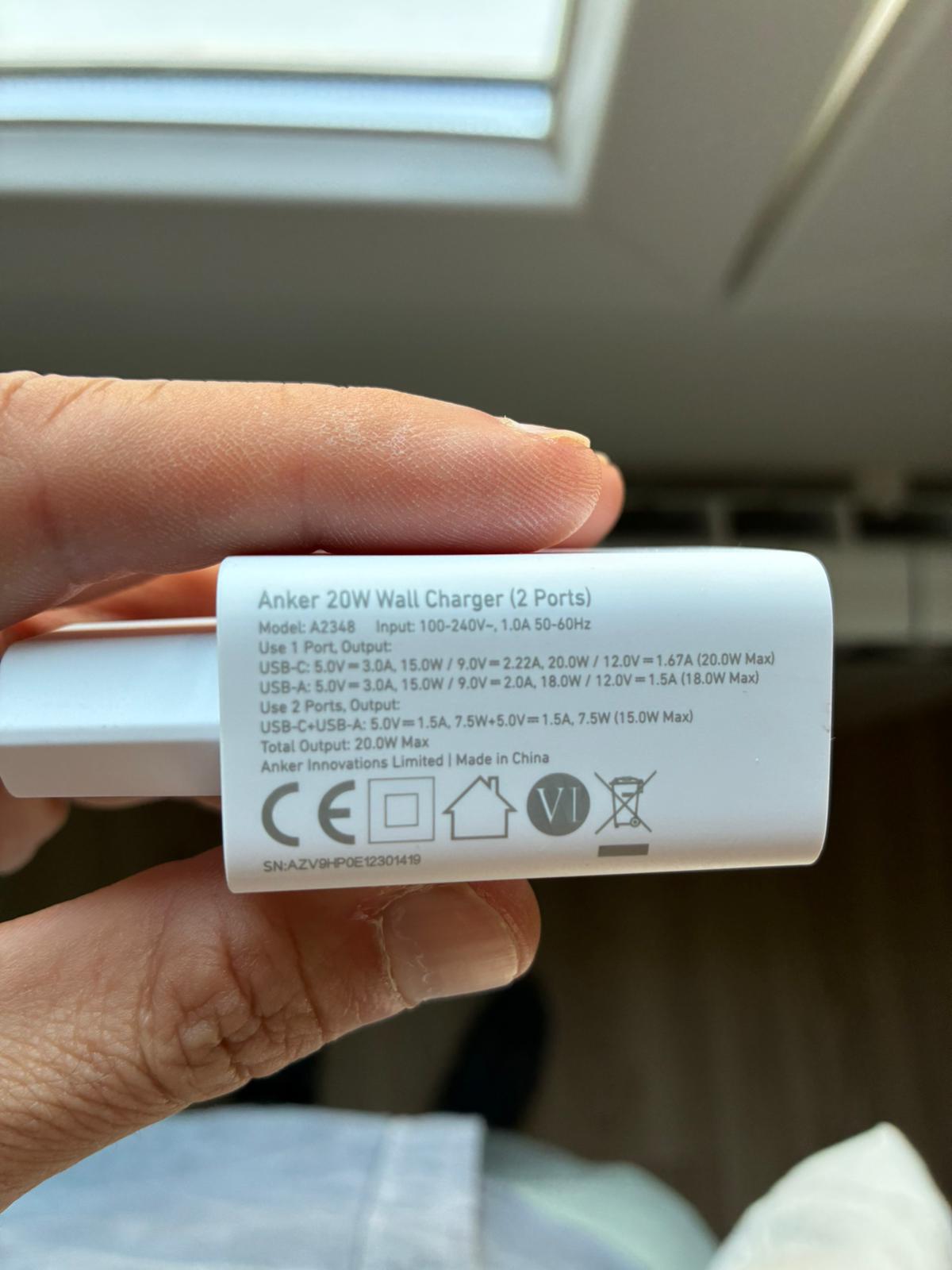
  • I am using an Anker power supply that provides easily 20W. See picture bellow. Plus, Allo Piano DAC has the power supply led bright.
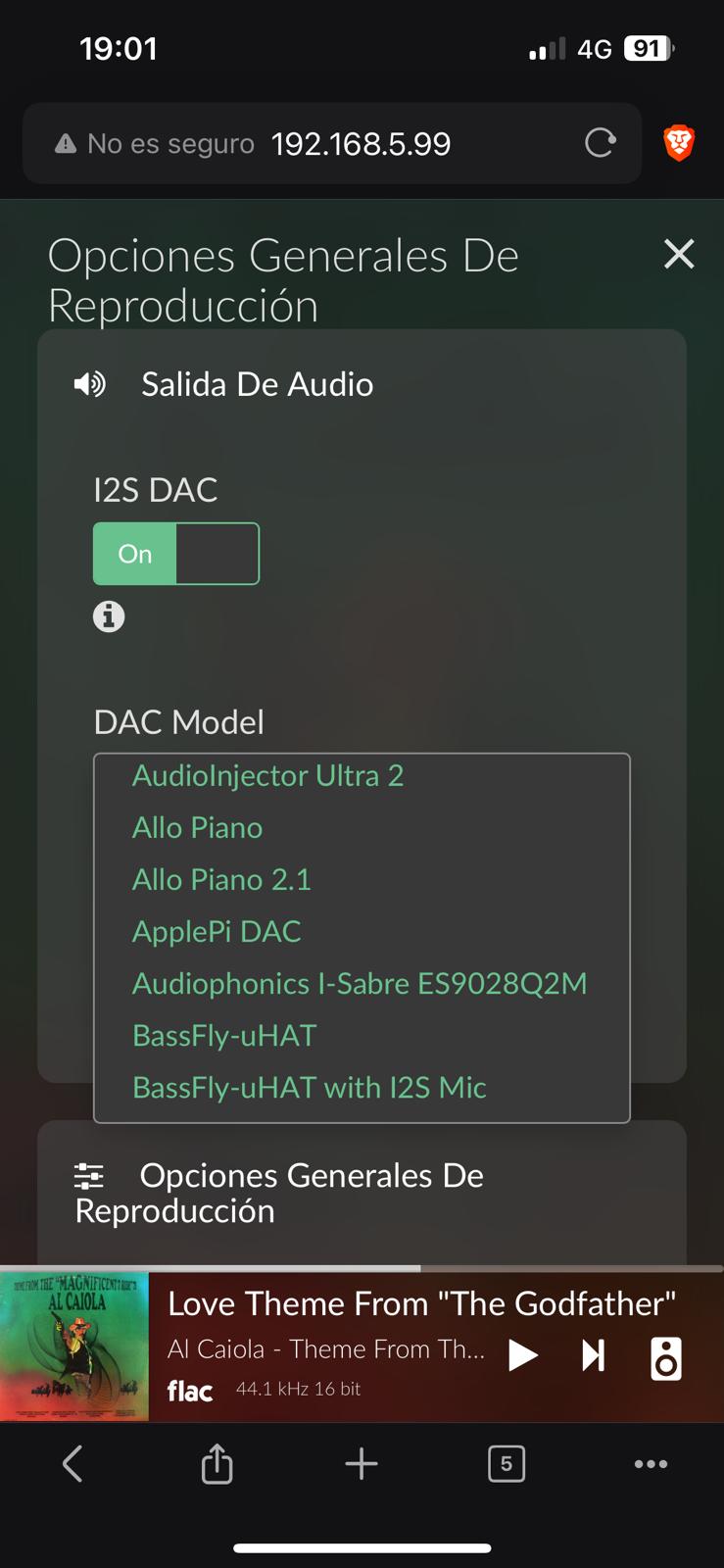
  • I selected “Allo Piano” since “Allo Piano 1.1” does not exist. See picture bellow.
  • Here’s the log: http://logs.volumio.org/volumio/OcColzz.html

Thanks in advanced!


That power supply will only give enough juice when only one USB port is used. It can’t deliver it simultaneous on both USB-C and USBA.
Next be careful which cable you use to power the rPi, as these power supply are very critical.

1 Like

Ouch… thank you for the information. I always thought that 5V with 2,5A was more than enough. Plus 0,5A for the DAC, would be 5V with 3A, which is easily covered by the power supply employed. Wise to remember that Anker is not cheapy chinny brand from Ali…

Anyways, what’s the current I need to supply the Raspberry pi plus de Allo Piano DAC?

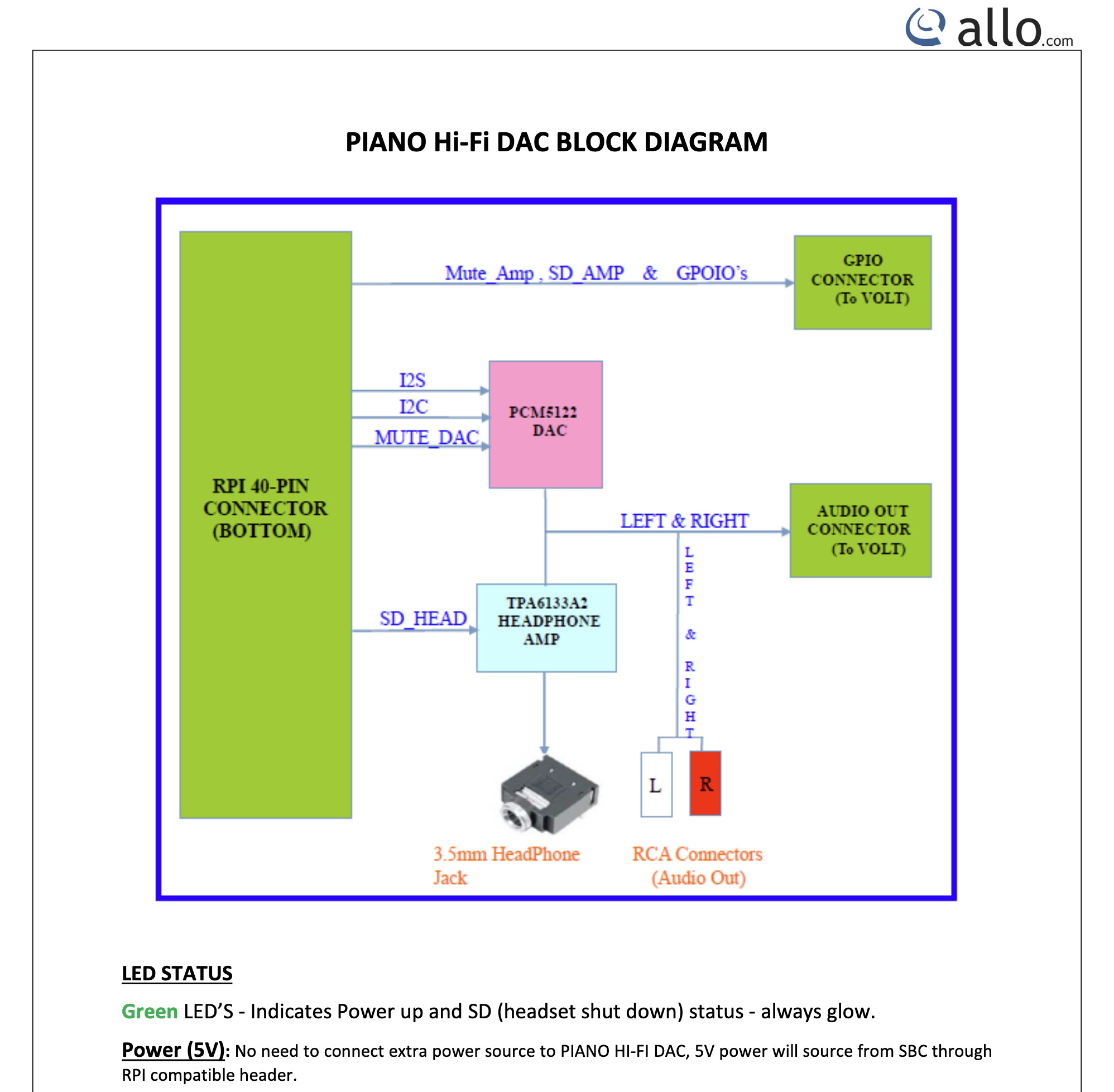
Ok, I took a moment to study the tehcnical documentation by Allo in regard to the DAC Allo Piano. It states very clear: “Power (5V): No need to connect extra power source to PIANO HI-FI DAC, 5V power will source from SBC through RPI compatible header.” Most probably the DAC consumption ranges from 30 to 80 mA.

Plus, I confirm the green LED so I’d discard the power supply as the root cause for the ALSA error.

Hey @statequieta,

Looking at your uploaded log, the critical part is that there is no ALSA device corresponding to the Allo Piano. Volumio configured the overlay correctly, but the kernel failed to bring the card up. That is why MPD cannot open “alsa”.

The next step is to confirm whether the DAC is even visible to the Pi on the I2C bus. Please do the following:

  1. Power down the Pi completely and disconnect it from mains.
  2. Reseat the Allo Piano DAC on the GPIO header, making sure all pins are aligned and firmly pressed in place. Inspect for bent pins or debris.
  3. Boot the Pi, then connect via SSH and run:
    aplay -l
    i2cdetect -y 1
    dmesg | egrep -i "pcm512|allo|i2c"

If the DAC is detected, i2cdetect should show an entry at address 0x4c. If it is missing, the kernel will continue to log probe errors and the card will not appear in aplay -l.

This will tell us if the issue is a physical connection or a driver probe failure.

Kind Regards,

1 Like

Here’s the outcome:

bash-5.0# aplay -l
**** List of PLAYBACK Hardware Devices ****
card 0: b1 [bcm2835 HDMI 1], device 0: bcm2835 HDMI 1 [bcm2835 HDMI 1]
  Subdevices: 4/4
  Subdevice #0: subdevice #0
  Subdevice #1: subdevice #1
  Subdevice #2: subdevice #2
  Subdevice #3: subdevice #3
card 0: b1 [bcm2835 HDMI 1], device 1: bcm2835 HDMI 1 [bcm2835 HDMI 1]
  Subdevices: 1/1
  Subdevice #0: subdevice #0
card 1: Headphones [bcm2835 Headphones], device 0: bcm2835 Headphones [bcm2835 Headphones]
  Subdevices: 4/4
  Subdevice #0: subdevice #0
  Subdevice #1: subdevice #1
  Subdevice #2: subdevice #2
  Subdevice #3: subdevice #3
bash-5.0# i2cdetect -y 1
     0  1  2  3  4  5  6  7  8  9  a  b  c  d  e  f
00:          -- -- -- -- -- -- -- -- -- -- -- -- -- 
10: -- -- -- -- -- -- -- -- -- -- -- -- -- -- -- -- 
20: -- -- -- -- -- -- -- -- -- -- -- -- -- -- -- -- 
30: -- -- -- -- -- -- -- -- -- -- -- -- -- -- -- -- 
40: -- -- -- -- -- -- -- -- -- -- -- -- -- -- -- -- 
50: -- -- -- -- -- -- -- -- -- -- -- -- -- -- -- -- 
60: -- -- -- -- -- -- -- -- -- -- -- -- -- -- -- -- 
70: -- -- -- -- -- -- -- --                         
bash-5.0# dmesg | egrep -i "pcm512|allo|i2c"
[    0.000000] Memory policy: Data cache writealloc
[    0.000000] pcpu-alloc: s41812 r8192 d23724 u73728 alloc=18*4096
[    0.000000] pcpu-alloc: [0] 0 [0] 1 [0] 2 [0] 3 
[    0.000000] mem auto-init: stack:off, heap alloc:off, heap free:off
[    0.000000] ftrace: allocating 36457 entries in 107 pages
[    0.000000] ftrace: allocated 107 pages with 5 groups
[    0.000000] NR_IRQS: 16, nr_irqs: 16, preallocated irqs: 16
[    0.015026] DMA: preallocated 1024 KiB pool for atomic coherent allocations
[    2.043084] mmc-bcm2835 3f300000.mmcnr: DMA channel allocated
[   16.710221] i2c_dev: i2c /dev entries driver
[   19.936943] brcmfmac: brcmf_fw_alloc_request: using brcm/brcmfmac43430-sdio for chip BCM43430/1
[   20.133759] pcm512x 1-004c: supply AVDD not found, using dummy regulator
[   20.133992] pcm512x 1-004c: supply DVDD not found, using dummy regulator
[   20.134061] pcm512x 1-004c: supply CPVDD not found, using dummy regulator
[   21.206506] i2c-bcm2835 3f804000.i2c: i2c transfer timed out
[   21.206559] pcm512x 1-004c: Failed to reset device: -110
[   21.210433] pcm512x: probe of 1-004c failed with error -110
[   98.407166] i2c-bcm2835 3f804000.i2c: i2c transfer timed out
[   99.447183] i2c-bcm2835 3f804000.i2c: i2c transfer timed out
[  100.487208] i2c-bcm2835 3f804000.i2c: i2c transfer timed out
[  101.527239] i2c-bcm2835 3f804000.i2c: i2c transfer timed out
[  102.567225] i2c-bcm2835 3f804000.i2c: i2c transfer timed out
[  103.617224] i2c-bcm2835 3f804000.i2c: i2c transfer timed out
[  104.647223] i2c-bcm2835 3f804000.i2c: i2c transfer timed out
[  105.687222] i2c-bcm2835 3f804000.i2c: i2c transfer timed out
[  106.729165] i2c-bcm2835 3f804000.i2c: i2c transfer timed out
[  107.767208] i2c-bcm2835 3f804000.i2c: i2c transfer timed out
[  108.807079] i2c-bcm2835 3f804000.i2c: i2c transfer timed out
[  109.846956] i2c-bcm2835 3f804000.i2c: i2c transfer timed out
[  110.896858] i2c-bcm2835 3f804000.i2c: i2c transfer timed out
[  111.926834] i2c-bcm2835 3f804000.i2c: i2c transfer timed out
[  112.966737] i2c-bcm2835 3f804000.i2c: i2c transfer timed out
[  114.006898] i2c-bcm2835 3f804000.i2c: i2c transfer timed out
[  115.046640] i2c-bcm2835 3f804000.i2c: i2c transfer timed out
[  116.086761] i2c-bcm2835 3f804000.i2c: i2c transfer timed out
[  117.126803] i2c-bcm2835 3f804000.i2c: i2c transfer timed out
[  118.166865] i2c-bcm2835 3f804000.i2c: i2c transfer timed out
[  119.206877] i2c-bcm2835 3f804000.i2c: i2c transfer timed out
[  120.246984] i2c-bcm2835 3f804000.i2c: i2c transfer timed out
[  121.287079] i2c-bcm2835 3f804000.i2c: i2c transfer timed out
[  122.327183] i2c-bcm2835 3f804000.i2c: i2c transfer timed out
[  123.367218] i2c-bcm2835 3f804000.i2c: i2c transfer timed out
[  124.407244] i2c-bcm2835 3f804000.i2c: i2c transfer timed out
[  125.447381] i2c-bcm2835 3f804000.i2c: i2c transfer timed out
[  126.487414] i2c-bcm2835 3f804000.i2c: i2c transfer timed out
[  127.527472] i2c-bcm2835 3f804000.i2c: i2c transfer timed out
[  128.567441] i2c-bcm2835 3f804000.i2c: i2c transfer timed out
[  129.607480] i2c-bcm2835 3f804000.i2c: i2c transfer timed out
[  130.647572] i2c-bcm2835 3f804000.i2c: i2c transfer timed out
[  131.687615] i2c-bcm2835 3f804000.i2c: i2c transfer timed out
[  132.737687] i2c-bcm2835 3f804000.i2c: i2c transfer timed out
[  133.767732] i2c-bcm2835 3f804000.i2c: i2c transfer timed out
[  134.807780] i2c-bcm2835 3f804000.i2c: i2c transfer timed out
[  135.847972] i2c-bcm2835 3f804000.i2c: i2c transfer timed out
[  136.897912] i2c-bcm2835 3f804000.i2c: i2c transfer timed out
[  137.927964] i2c-bcm2835 3f804000.i2c: i2c transfer timed out
[  138.968047] i2c-bcm2835 3f804000.i2c: i2c transfer timed out
[  140.008098] i2c-bcm2835 3f804000.i2c: i2c transfer timed out
[  141.048132] i2c-bcm2835 3f804000.i2c: i2c transfer timed out
[  142.088160] i2c-bcm2835 3f804000.i2c: i2c transfer timed out
[  143.138196] i2c-bcm2835 3f804000.i2c: i2c transfer timed out
[  144.178228] i2c-bcm2835 3f804000.i2c: i2c transfer timed out
[  145.208294] i2c-bcm2835 3f804000.i2c: i2c transfer timed out
[  146.248313] i2c-bcm2835 3f804000.i2c: i2c transfer timed out
[  147.298393] i2c-bcm2835 3f804000.i2c: i2c transfer timed out
[  148.328390] i2c-bcm2835 3f804000.i2c: i2c transfer timed out
[  149.368389] i2c-bcm2835 3f804000.i2c: i2c transfer timed out
[  150.408426] i2c-bcm2835 3f804000.i2c: i2c transfer timed out
[  151.448493] i2c-bcm2835 3f804000.i2c: i2c transfer timed out
[  152.488506] i2c-bcm2835 3f804000.i2c: i2c transfer timed out
[  153.528533] i2c-bcm2835 3f804000.i2c: i2c transfer timed out
[  154.568559] i2c-bcm2835 3f804000.i2c: i2c transfer timed out
[  155.618569] i2c-bcm2835 3f804000.i2c: i2c transfer timed out
[  156.648648] i2c-bcm2835 3f804000.i2c: i2c transfer timed out
[  157.688664] i2c-bcm2835 3f804000.i2c: i2c transfer timed out
[  158.728701] i2c-bcm2835 3f804000.i2c: i2c transfer timed out
[  159.768730] i2c-bcm2835 3f804000.i2c: i2c transfer timed out
[  160.808756] i2c-bcm2835 3f804000.i2c: i2c transfer timed out
[  161.848766] i2c-bcm2835 3f804000.i2c: i2c transfer timed out
[  162.888810] i2c-bcm2835 3f804000.i2c: i2c transfer timed out
[  163.928867] i2c-bcm2835 3f804000.i2c: i2c transfer timed out
[  164.968908] i2c-bcm2835 3f804000.i2c: i2c transfer timed out
[  166.008922] i2c-bcm2835 3f804000.i2c: i2c transfer timed out
[  167.048881] i2c-bcm2835 3f804000.i2c: i2c transfer timed out
[  168.088762] i2c-bcm2835 3f804000.i2c: i2c transfer timed out
[  169.138649] i2c-bcm2835 3f804000.i2c: i2c transfer timed out
[  170.168562] i2c-bcm2835 3f804000.i2c: i2c transfer timed out
[  171.208496] i2c-bcm2835 3f804000.i2c: i2c transfer timed out
[  172.248411] i2c-bcm2835 3f804000.i2c: i2c transfer timed out
[  173.288396] i2c-bcm2835 3f804000.i2c: i2c transfer timed out
[  174.338239] i2c-bcm2835 3f804000.i2c: i2c transfer timed out
[  175.368185] i2c-bcm2835 3f804000.i2c: i2c transfer timed out
[  176.408124] i2c-bcm2835 3f804000.i2c: i2c transfer timed out
[  177.448101] i2c-bcm2835 3f804000.i2c: i2c transfer timed out
[  178.488006] i2c-bcm2835 3f804000.i2c: i2c transfer timed out
[  179.527922] i2c-bcm2835 3f804000.i2c: i2c transfer timed out
[  180.567869] i2c-bcm2835 3f804000.i2c: i2c transfer timed out
[  181.607815] i2c-bcm2835 3f804000.i2c: i2c transfer timed out
[  182.647754] i2c-bcm2835 3f804000.i2c: i2c transfer timed out
[  183.687691] i2c-bcm2835 3f804000.i2c: i2c transfer timed out
[  184.737606] i2c-bcm2835 3f804000.i2c: i2c transfer timed out
[  185.767582] i2c-bcm2835 3f804000.i2c: i2c transfer timed out
[  186.807541] i2c-bcm2835 3f804000.i2c: i2c transfer timed out
[  187.847470] i2c-bcm2835 3f804000.i2c: i2c transfer timed out
[  188.887471] i2c-bcm2835 3f804000.i2c: i2c transfer timed out
[  189.937386] i2c-bcm2835 3f804000.i2c: i2c transfer timed out
[  190.967360] i2c-bcm2835 3f804000.i2c: i2c transfer timed out
[  192.009527] i2c-bcm2835 3f804000.i2c: i2c transfer timed out
[  193.057311] i2c-bcm2835 3f804000.i2c: i2c transfer timed out
[  194.087268] i2c-bcm2835 3f804000.i2c: i2c transfer timed out
[  195.127238] i2c-bcm2835 3f804000.i2c: i2c transfer timed out
[  196.167194] i2c-bcm2835 3f804000.i2c: i2c transfer timed out
[  197.207200] i2c-bcm2835 3f804000.i2c: i2c transfer timed out
[  198.247111] i2c-bcm2835 3f804000.i2c: i2c transfer timed out
[  199.287111] i2c-bcm2835 3f804000.i2c: i2c transfer timed out
[  200.327060] i2c-bcm2835 3f804000.i2c: i2c transfer timed out
[  201.370802] i2c-bcm2835 3f804000.i2c: i2c transfer timed out
[  202.407023] i2c-bcm2835 3f804000.i2c: i2c transfer timed out
[  203.447000] i2c-bcm2835 3f804000.i2c: i2c transfer timed out
[  204.486975] i2c-bcm2835 3f804000.i2c: i2c transfer timed out
[  205.526926] i2c-bcm2835 3f804000.i2c: i2c transfer timed out
[  206.566948] i2c-bcm2835 3f804000.i2c: i2c transfer timed out
[  207.616864] i2c-bcm2835 3f804000.i2c: i2c transfer timed out
[  208.646851] i2c-bcm2835 3f804000.i2c: i2c transfer timed out
[  209.696791] i2c-bcm2835 3f804000.i2c: i2c transfer timed out
[  210.726788] i2c-bcm2835 3f804000.i2c: i2c transfer timed out
[  211.766778] i2c-bcm2835 3f804000.i2c: i2c transfer timed out
[  212.806760] i2c-bcm2835 3f804000.i2c: i2c transfer timed out
[  213.846757] i2c-bcm2835 3f804000.i2c: i2c transfer timed out
[  214.886744] i2c-bcm2835 3f804000.i2c: i2c transfer timed out
[  215.926732] i2c-bcm2835 3f804000.i2c: i2c transfer timed out
[  216.966703] i2c-bcm2835 3f804000.i2c: i2c transfer timed out
[  218.006733] i2c-bcm2835 3f804000.i2c: i2c transfer timed out
[  219.046728] i2c-bcm2835 3f804000.i2c: i2c transfer timed out
bash-5.0# 

Important to remember that the raspberry pi is brand new, as I have tried with another RaspPi 3 model b v1.2.

Hey @statequieta,

Thanks for the precise outputs. They confirm the root cause:

  • aplay -l shows only HDMI and Headphones. No I2S card.
  • i2cdetect -y 1 shows an empty bus.
  • Kernel logs show repeated I2C timeouts and the PCM512x codec probe failing with error -110 at address 0x4c.

Conclusion: the Piano DAC is not visible on I2C. Until 0x4c appears, ALSA will not create the card and MPD will keep failing to open “alsa”.

Please run the following, in order. Keep the DAC fitted only when asked.

  1. Baseline the I2C bus without the HAT
  • Action: fully power off, remove the Piano HAT, boot the Pi.
  • Run: i2cdetect -y 1
  • Expectation: a quick scan with no timeouts. Share the full output.
  • Also run: vcgencmd get_throttled
  1. Refit the HAT carefully
  • Action: power off, reseat the Piano on the 40-pin header. Ensure all 40 pins align, spacers are not shorting anything, and the board sits flat.

  • Boot and run:

    • i2cdetect -y 1
    • dmesg | egrep -i “pcm512|allo|i2c”
    • aplay -l
  • Expectation: address 0x4c should appear in i2cdetect. If it is still missing or the scan times out, the bus is being held or not connected.

  1. Quick physical sanity checks
  • With power off, gently press along the 40-pin mating area to ensure full insertion.
  • Inspect pins 3 and 5 on the Pi header (SDA1/SCL1) for damage or contamination.
  • If you have another 40-pin ribbon or spacer, try it to rule out mechanical tolerance.
  • If you can, try the Piano on your second Pi 3B v1.2 again after a careful refit and rerun i2cdetect -y 1.

Notes

  • Your overlay selection is correct: use the Allo Piano option in Volumio. No separate “1.1” entry exists and is not required.
  • Power: undervoltage can make I2C flaky. Even if the LED is on, please still capture vcgencmd get_throttled so we can rule out brownouts during probe.

Once you post the i2cdetect baseline without the HAT, and then with the HAT after refitting, we will know if this is a bus-level issue, a seating/connector issue, or a failed control side on the DAC.

Kind Regards

1 Like

Here you go:

Baseline the I2C bus without the HAT

Action: fully power off, remove the Piano HAT, boot the Pi.
Run: i2cdetect -y 1
Expectation: a quick scan with no timeouts. Share the full output.
Also run: vcgencmd get_throttled
bash-5.0# i2cdetect -y 1
     0  1  2  3  4  5  6  7  8  9  a  b  c  d  e  f
00:          -- -- -- -- -- -- -- -- -- -- -- -- -- 
10: -- -- -- -- -- -- -- -- -- -- -- -- -- -- -- -- 
20: -- -- -- -- -- -- -- -- -- -- -- -- -- -- -- -- 
30: -- -- -- -- -- -- -- -- -- -- -- -- -- -- -- -- 
40: -- -- -- -- -- -- -- -- -- -- -- -- -- -- -- -- 
50: -- -- -- -- -- -- -- -- -- -- -- -- -- -- -- -- 
60: -- -- -- -- -- -- -- -- -- -- -- -- -- -- -- -- 
70: -- -- -- -- -- -- -- --                         
bash-5.0# vcgencmd get_throttled
throttled=0x50000
bash-5.0# 

Refit the HAT carefully
Action: power off, reseat the Piano on the 40-pin header. Ensure all 40 pins align, spacers are not shorting anything, and the board sits flat.
Boot and run:
i2cdetect -y 1
dmesg | egrep -i “pcm512|allo|i2c”
aplay -l

bash-5.0# i2cdetect -y 1
     0  1  2  3  4  5  6  7  8  9  a  b  c  d  e  f
00:          -- -- -- -- -- -- -- -- -- -- -- -- -- 
10: -- -- -- -- -- -- -- -- -- -- -- -- -- -- -- -- 
20: -- -- -- -- -- -- -- -- -- -- -- -- -- -- -- -- 
30: -- -- -- -- -- -- -- -- -- -- -- -- -- -- -- -- 
40: -- -- -- -- -- -- -- -- -- -- -- -- -- -- -- -- 
50: -- -- -- -- -- -- -- -- -- -- -- -- -- -- -- -- 
60: -- -- -- -- -- -- -- -- -- -- -- -- -- -- -- -- 
70: -- -- -- -- -- -- -- --                         
bash-5.0# dmesg | egrep -i “pcm512|allo|i2c”
bash: allo: command not found
bash: $'i2c\342\200\235': command not found
bash-5.0# dmesg | egrep -i “pcm512|allo|i2c”
bash: allo: command not found
bash: $'i2c\342\200\235': command not found
bash-5.0# aplay -l
**** List of PLAYBACK Hardware Devices ****
card 0: b1 [bcm2835 HDMI 1], device 0: bcm2835 HDMI 1 [bcm2835 HDMI 1]
  Subdevices: 4/4
  Subdevice #0: subdevice #0
  Subdevice #1: subdevice #1
  Subdevice #2: subdevice #2
  Subdevice #3: subdevice #3
card 0: b1 [bcm2835 HDMI 1], device 1: bcm2835 HDMI 1 [bcm2835 HDMI 1]
  Subdevices: 1/1
  Subdevice #0: subdevice #0
card 1: Headphones [bcm2835 Headphones], device 0: bcm2835 Headphones [bcm2835 Headphones]
  Subdevices: 4/4
  Subdevice #0: subdevice #0
  Subdevice #1: subdevice #1
  Subdevice #2: subdevice #2
  Subdevice #3: subdevice #3

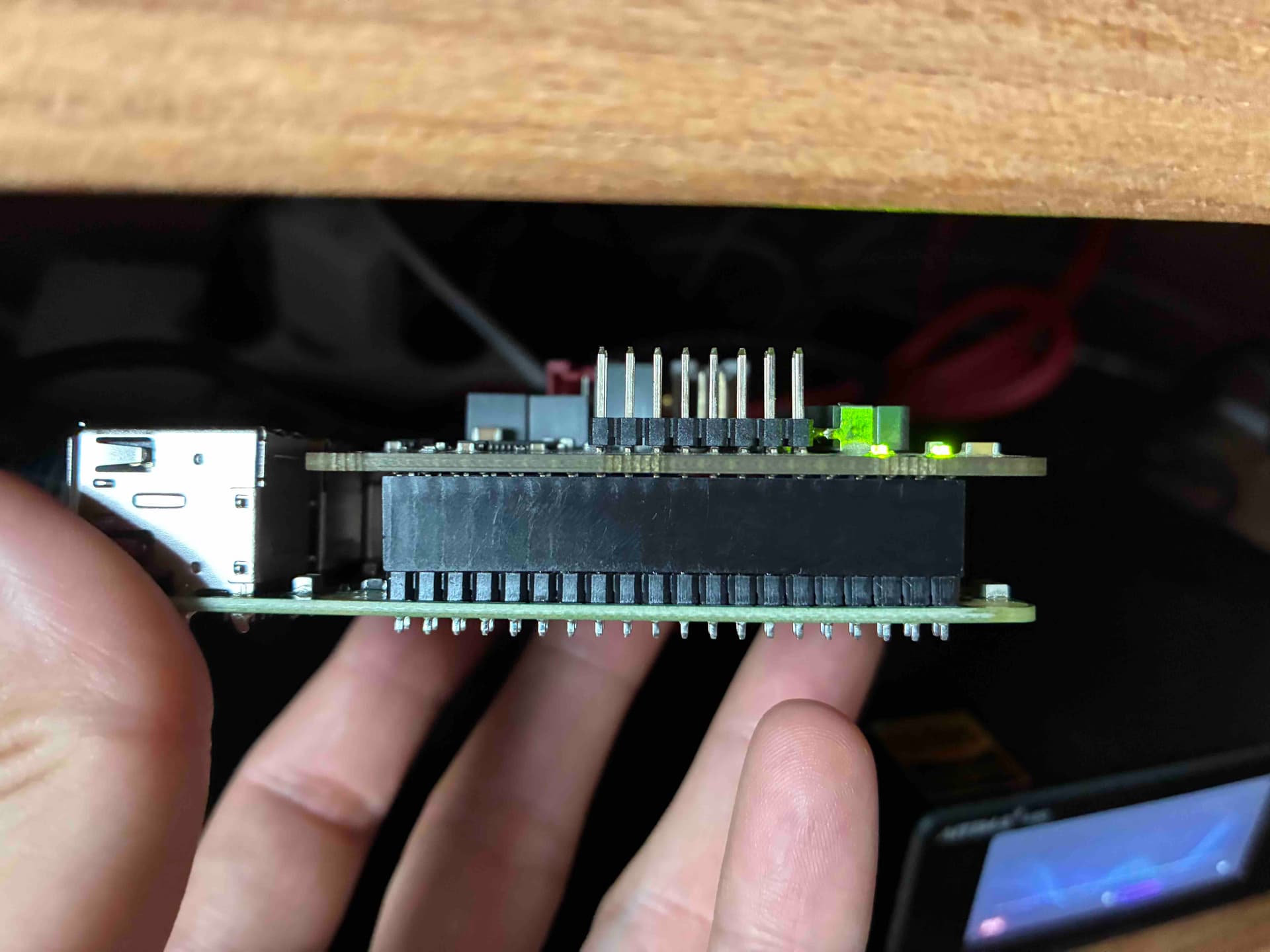
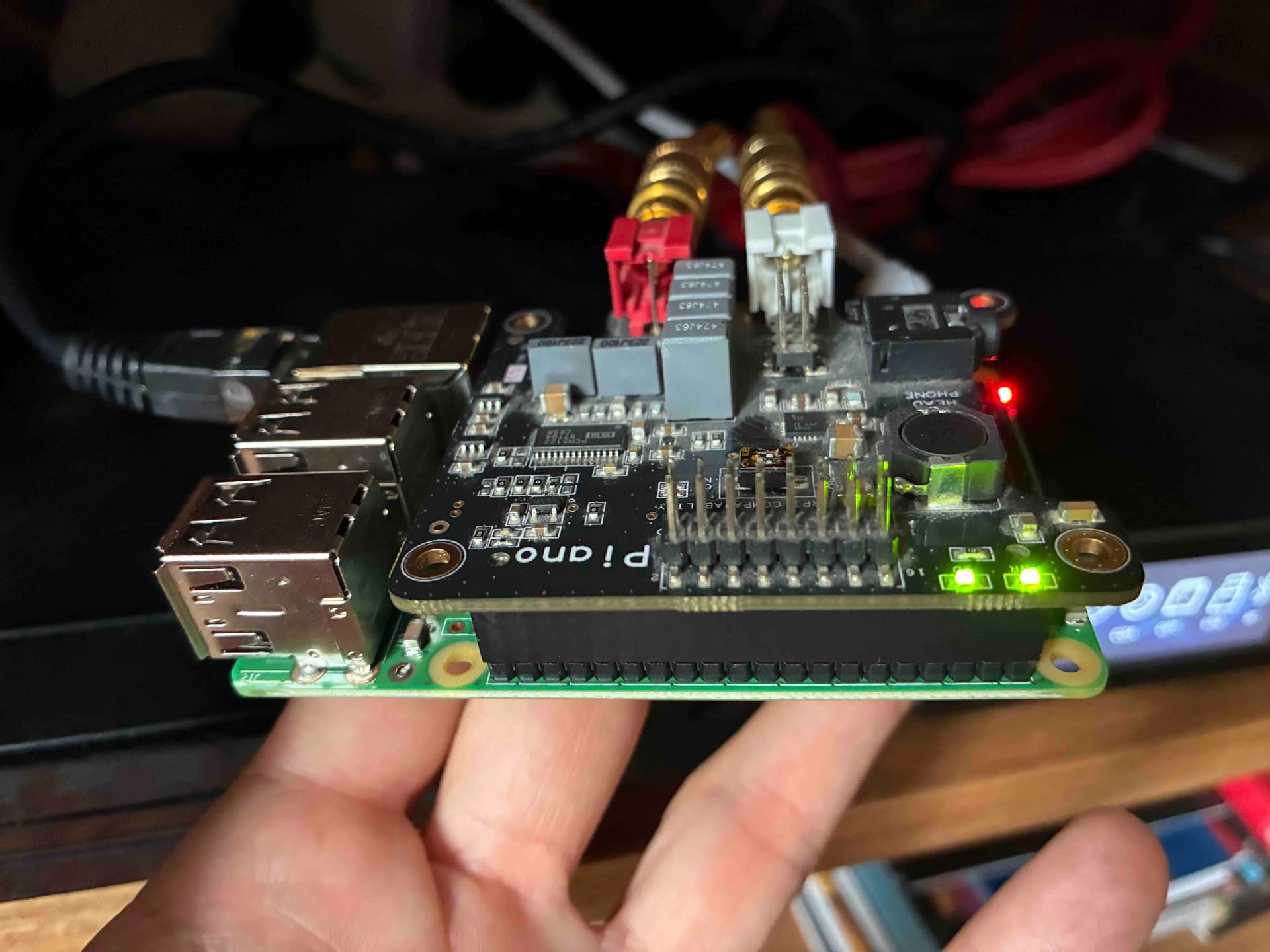
Pictures below, but physical inspection is OK and I can’t see anything wrong, nor a toasted component…


Power:

bash-5.0# vcgencmd get_throttled
throttled=0x50000

Hey @statequieta

Should be:

dmesg | egrep -i "pcm512|allo|i2c"

not

dmesg | egrep -i “pcm512|allo|i2c”

Kind Rgerads,

Hey @statequieta,

Thank you for all the careful checks and the photos. At this point the situation is quite clear:

  • aplay -l still shows only HDMI and Headphones.
  • i2cdetect -y 1 returns an empty map both with and without the Piano HAT.
  • Kernel logs are full of I2C transfer timeouts and the PCM512x probe failing with error -110.
  • vcgencmd get_throttled confirms undervoltage events have been recorded, but the Pi is not currently throttled.

This means the DAC is not responding on the I2C bus at all. Until the device appears at address 0x4c, ALSA will never create the card and MPD will continue to fail with “alsa” errors.

I researched whether forcing a static I2C baud rate could help in such cases. The Pi’s I2C bus speed can be pinned with dtparam=i2c_arm_baudrate=100000 or 400000 in /boot/config.txt. This is useful if a device responds unreliably at higher speeds. However, in your case the bus is completely empty - no acknowledgement at any clock rate. In that state, changing the baud rate will not revive the DAC.

Reports from other users show that Allo Piano boards sometimes fail to probe on newer kernels, but those cases usually still show an I2C device at 0x4c. With your board never appearing, and the same results on two different Pi 3B v1.2 units, the evidence points to a hardware fault on the Piano’s I2C control side.

Next possible steps:

  • If you have access to another I2S HAT (even a basic PCM5122 card), test it on the same Pi. If that card shows up at 0x4c, the Piano board is confirmed faulty.
  • If you want to exhaust every option, you could add dtparam=i2c_arm_baudrate=100000 in /boot/userconfig.txt, reboot, and re-run i2cdetect -y 1. But based on your logs it is very unlikely to change the outcome.
  • The practical resolution is replacement of the Piano DAC board.

Kind Regards,

1 Like

it could also be a faulty RPi.
I’ve seen a few, apparently working fine, but with broken I2C GPIOs, so not able to recognize and initialize a I2C device, showing the exact same symptoms described before (i2cdetect -y 1 returns an empty map)

1 Like