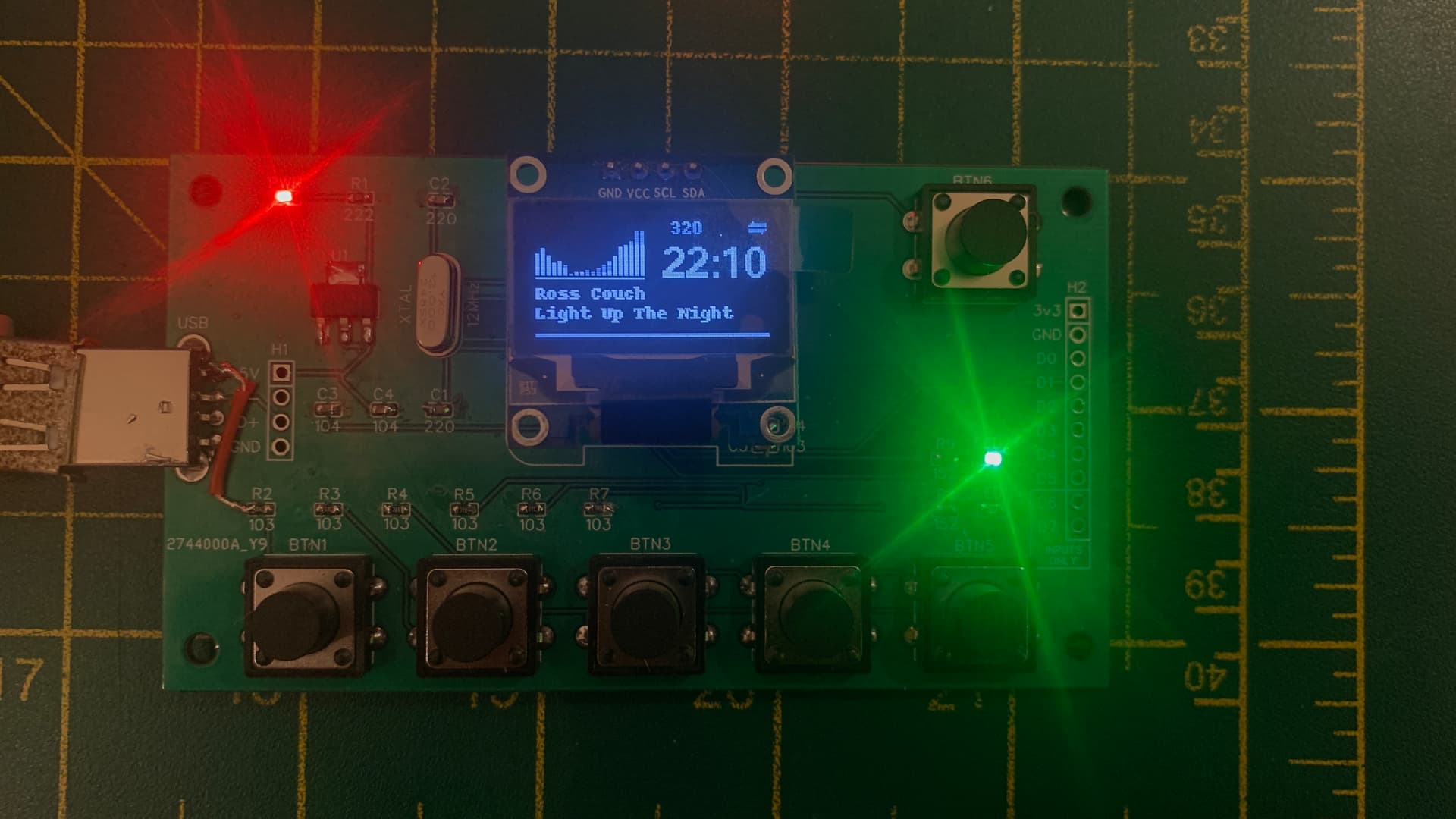
I saw this board more of a breakout for the CH341 but with some extra features for Volumio use. The board isn’t designed to be mounted and used as a method of user input/output for Volumio. It is way too small and fiddly, things are too close together and I don’t want to dictate where buttons and a screen should go. Are there any boards out there that do? I wouldn’t mind having a look!
This board is simply:
quick way of being able to test buttons and oled screen
quick way of being able to hook up a screen and buttons using the pin headers allowing buttons and screen to be placed wherever
The whole thing would probably need to come in 2 flavours: as a kit or fully completed. By using the kit mode, that would give the option to:
omit the usb connector
use 45 degree pin headers
mount pin headers on the back
use ribbon cable and solder to the board instead of pin headers
use an internal USB cable
This is just for fun. I don’t think anyone would actually buy this. I was gonna make some boards and give them away to you guys.
Well looking at the plugins,
MPD_OLED, GPIO Buttons, I expect there is demand.
Not sure for the x-86 variant, as we Adrii, you and me are the only ones polluting this topic
But I like your thoughts of 2 types.
Would be nice if people reply to this topic
There is a linux DRI graphics interface for the display, which should allow it to be used with SDL. I am unsure if there is a driver for enabling the touch interface, which probably uses an XPT2046 on my unit, but there is a linux driver for the possibly compatible (or same?) ADS7846, which would hopefully also allow the touch to be used for input with SDL. I think it should be possible for the display and touch interface to both work with the CH341 just by using CS0 for the display and CS1 for the touch.
The idea is to have it work as a visualiser, and when you touch it then a panel of controls pops up. I would probably just have some radio stations to select, a stop button, and a volume control.
Let us know the outcome. I’m not going to order one, as I have no use for it.
(to big to add, to small to operate)
However I do have some concerns if the CH341A is fast enough to drive such display, as there is a big amount of data to transport. I guess it becomes a slide show.
For only 8bit color: 320*240*8 = 614k4 per image
And yes after F*^&%$ up my Volumio installation, I remember.
The entry for MPD_OLED is in the file “/volumio/app/plugins/music_service/mpd/mpd.conf.tmpl”
However with the x86 installation, the audio pipe won’t use the file “mpd_oled_fifo” but creates a new file like cava_fifo_509 (file end is a random number). I can only start mpd with CAVA using the root -u volumio. This is working for all other sources, but failing for spop.
I leave it as is for now.
So far:
in mpd.conf_templ added:
audio_output {
        type            "\""fifo"\""
        name            "\""mpd_oled_FIFO"\""
        path            "\""/tmp/mpd_oled_fifo"\""
        format          "\""44100:16:2"\""
}"
Modified the mpd_oled.service with the needed startup string:
sudo -u volumio /usr/local/bin/mpd_oled -b 32 -g 1 -P s -L n -o SSD1306,128X64,I2C,bus_number=1 -f 50
volumio@volumio-x86-s2:~$ mpd_oled_usrlocal_check

A check is being run to look for files that indicate mpd_oled has
installed more than once and to different system locations

FOUND: mpd_oled found in /usr/local/bin
FOUND: mpd_oled service file includes /usr/local

No conflicts found: mpd_oled is installed only in /usr/local
These are FIFOs for different purposes. mpd_oled_fifo is where audio is written by the player for cava to read (if the FIFO method is used), cava_fifo_NNN is where cava writes bar data for mpd_oled to read (always).
Just done some testing with my CH341A and I’m getting 84 FPS on Windows (using 750 Khz transfer speed) with a test program, so there’s nothing wrong with the chip itself in terms of data throughput.
Yeah, the CH341A runs smooth, compared to those CP units. At the highest speed the CP units even struggles with displaying a time format with seconds. It goes like 01, 02, 04, 06, 07, 09. At least we’ve tried a couple of them. We should stick with the CH341A for the x-86 devices.
@Wheaten I just re-read the documentation for MCP222 and it says “up to 400 kHz Clock Rate”. I tried all sorts of speeds (in code) but couldn’t get the display updated faster than 8 FPS and that’s using the vendors libraries.
CH341A for the win!
Now I’m gonna try and get mpd_oled running on my Wyse 3040!
@Wheaten@Adrii My custom CH341A boards arrived and I built one to test. So far it works great - I had to manually add a pull down resistor to ACT# (pin 1) on the CH341 to set the correct mode. I didn’t know about this at the time which causes the chip to go into serial mode otherwise. The chip has 2 input pins (D6 and D7) and 6 tristate pins (D0-D5) in this configuration.
I got the CH341A driver built and installed no problem. I had to change line 182 static uint speed = CH341_I2C_STANDARD_SPEED; in the driver to enable high speed mode 750kHz. The display was sluggish in standard mode but is now pretty snappy.
I also changed line 131 to enable GPIO3 to be used as an input { 19, CH341_PIN_MODE_IN , "gpio4" , 1 }, // used as input with hardware IRQ
I installed the gpio-buttons plugin which allow the buttons to work and I also updated my gpio_control plugin so that the 2 LEDs on the board can be controlled too. The board is plugged into my Wyse with a USB cable. I’m using the new version of mpd_oled as per @Wheaten’s instructions
The board (buttons and OLED) also work fine on my Windows machine too with some C# programming.