Using System Version: 3.874
Yes, it works. Miraculously.
Try searching the forum for connect NAS, you’ll be greeted by a modest avalanche of 80+ hits.
And just a gentle reminder: posting “How does one connect a network drive to it” is about as helpful as asking “How do I internet?”
Maybe, just maybe, venture into the wild and mention something outrageous like:
– A USB disk dangling off your router
– A QNAP NAS (yes, people still use those)
– Or the forbidden phrase: “the share is on Windows”
The more specific you get, the less we have to channel our inner psychic to help you. Revolutionary, I know.
Right! I did search, and I did see your posts, did not help.
Ok, NAS is Synology DS220+ (DSM 7.2.2-72806 Update 4)
I am able to mount nfs drives from it onto the other machines, just not on volumio.
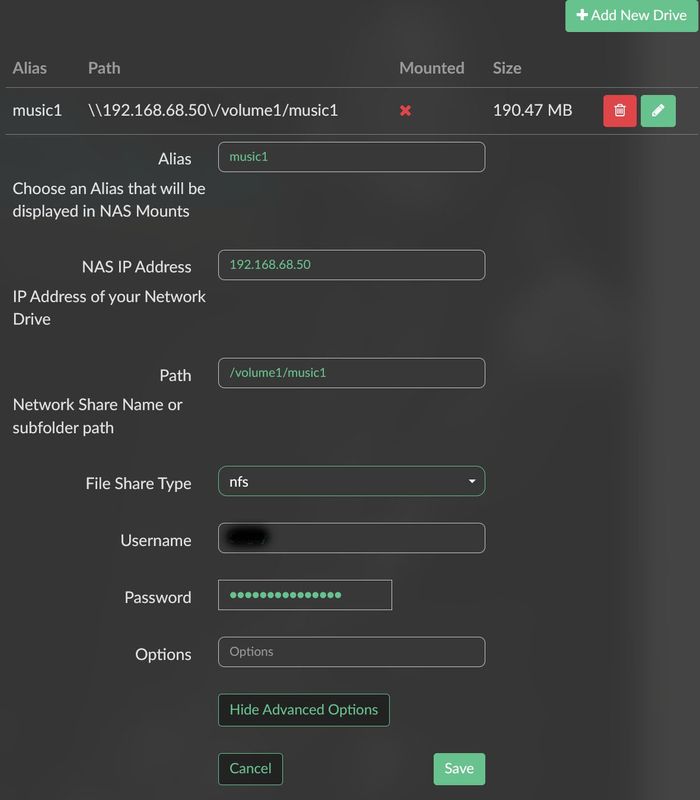
Here is the settings page,
Here is the reply
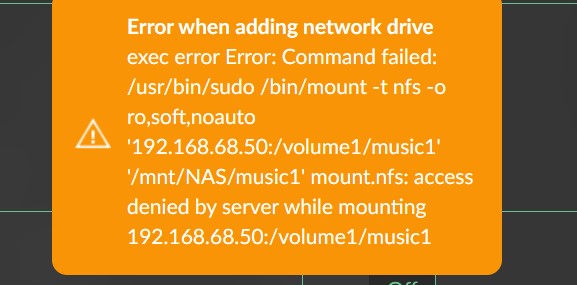
The very last line in the reply is almost identical to how it is set in /etc/fstab on the other machine. Except the other parameters, of course. So what gives?
I assume the NFS is setup on your NAS for the used folder?
Did you try to use the option with regards to NFS version?
Try with one at the time in the options field:
- nfsvers=2 or
- nfsvers=3 or
- nfsvers=4

… and only 3, 4 or 4.1 can be set as max.
Version 4.1 is not supported by the Synology DS220+. (even though your screenshot shows otherwise)
Put it on NFSv4 in Synology and fill in Options by Volumio nfsvers=4
Make sure that NFS is enabled on your share,
Same thing, tried with 3 and 4 - moment! I get the same error when mounting (trying to) from the other machine as well. Looking for it.
@sngreen Don’t forget to set NFS permissions on the NAS shared folder, I set squash to “map all users to admin”. And give read permission to admin. Also set ip of the client (volumio) or use “*”
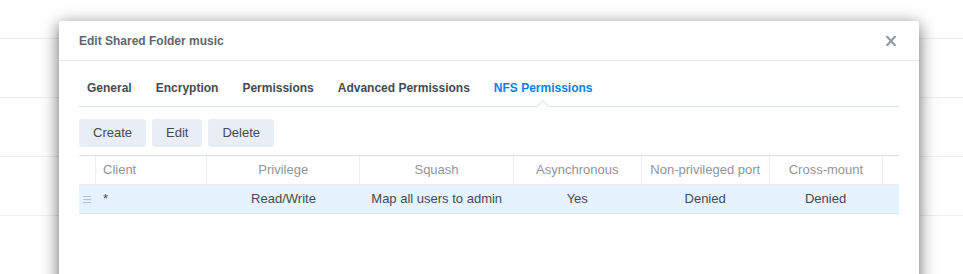
Yes, I see it. It works now. Thank you.
1 Like
On a slightly different note, i’ve also forgot the path in Windows Explorer to search for the attached USB / storage. It was working in the past but perhaps i’ve turned off some of the network sharing or upnp on the router for security. guess can easily unplug.