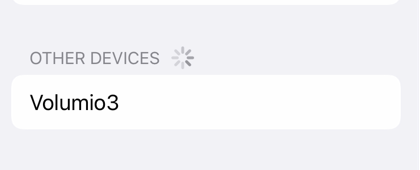
I just noticed that Volumio is in my list of Bluetooth devices (on phone, tablet and on laptop). I don’t need (and don’t even want) any wireless signal so I have switched it off in sources. Despite that it seems that Bluetooth is always on.
Is it a bug? And how to switch bluetooth off completely?
I just tested on mine after turning it off in Sources. I can also still see it as a bluetooth device and can even pair with it. It doesn’t actually connect and play though. Looks like a bug.
V3.179
Pi4
I did notice yesterday that this issue still seems to be there in some form, after updating to 3.378 I noticed when checking some other things on the network that I had an Volumio Bluetooth instance active.
Bluetooth is deactivated in Volumio, but can be seen both on Android and in Windows 11 - it can be paired, but at least it seems like the connection is refused.
You do understand that this is not Google’s Android development forum - right? Perhaps you should discuss this with your smartphone manufacturer, why it caches discovered devices for a duration not to your liking.
Unless I have missed your point entirely in Aug 2026.
The Bluetooth toggle in Volumio governs the Bluetooth audio plugin, not the radio itself. Think of it as closing the app rather than switching on flight mode. The controller can remain powered, and if the host stack is still up, a phone can still see it and can still complete a pairing exchange. Nothing is registered to accept the audio connection afterwards, which is why the connection then refuses. That matches what what you described in 2022.
If you want genuine flight mode, block the radio:
sudo rfkill block bluetooth
Check the result:
rfkill list bluetooth
To reverse it:
sudo rfkill unblock bluetooth
Note that systemctl stop bluetooth is not equivalent. That stops bluetoothd only and leaves the controller powered.
I have a plugin in the works for Volumio 4 that would put this under proper control, but I am not going to commit to a timeline on it.
If you want the underlying behaviour looked at rather than worked around, post your board model, your exact Volumio version, and a log link from http://<your_volumio_ip>/dev, taken with the toggle set to off. Without that there is nothing to investigate.