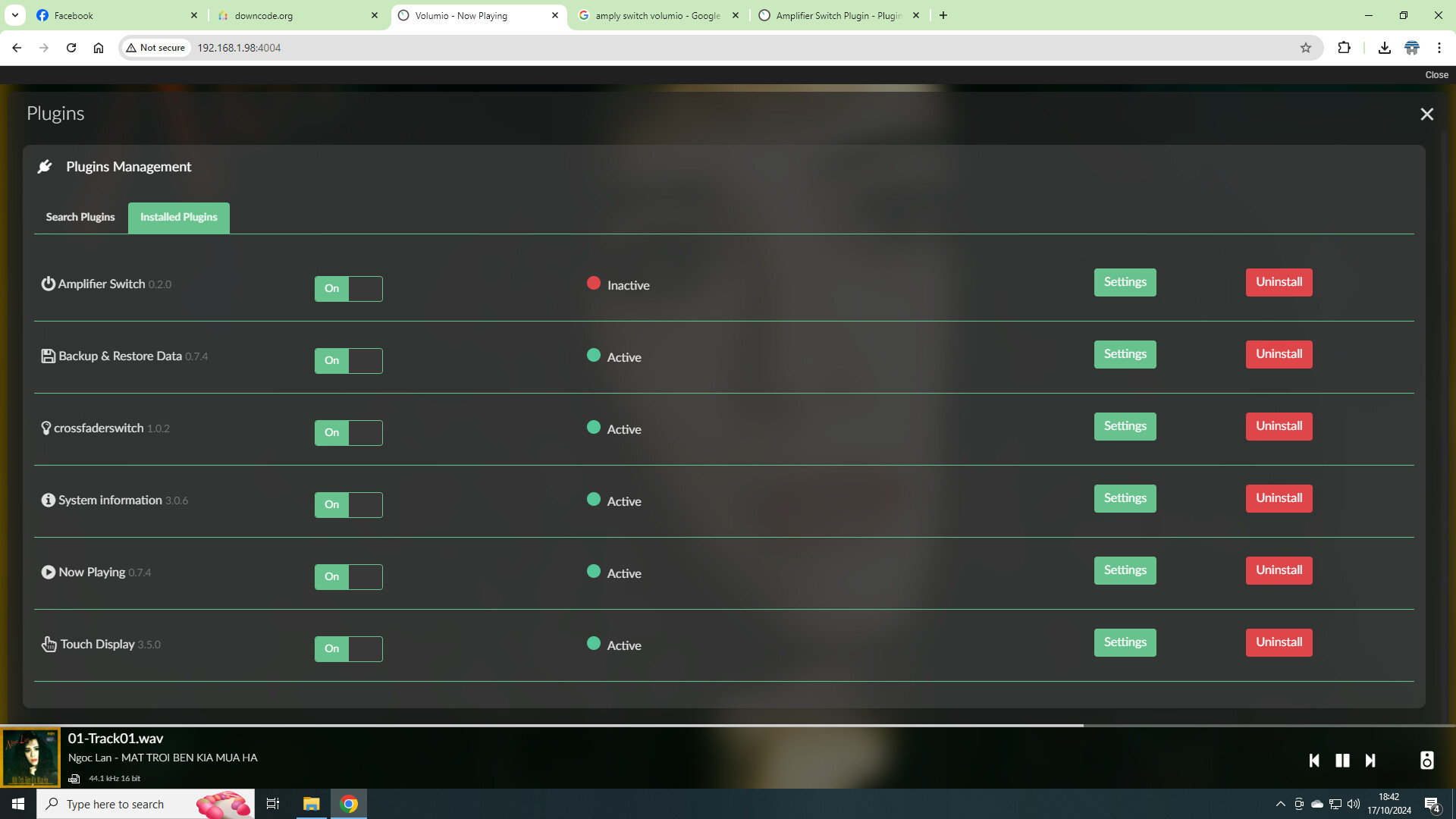
Hi @SomethingGood
I installed the plugin (0.2.0) on V3.251 to see what it does. I don’t need it, but can’t uninstall. Each time I hit uninstall, it restarts the Volumio service, but the plugin is still there in my installed plugin list. I tried toggling between test plugin mode on and off and full power restart, but it’s still there. Also after a Volumio OTA upgrade,
Any ideas?
1 Like
Thanks. I have not encountered that behavior. I can tell you how to force an uninstall from ssh, but would like to ask you, if you could reboot your volumio, try to uninstall (and probably fail) and provide me with a log file so I can see what goes wrong.
Unfortunately I have an extremely busy time at the moment, so the debugging and fixing will not happen for a number of weeks.
Thanks for bringing this to my attention.
Cheers!
This always happened to me with Volumio 2 as well.
Hi @SomethingGood, thanks for getting back so soon.
Here is the log
I just tried to install the ampswitch plugin on Volumio 3.01 from “git clone https://github.com/schusto/volumio-plugins.” I get an warning and the installation fails to complete.
Warning:
Unhandled promise rejections are deprecated. In the future, promise rejections that are not handled will terminate the Node.js process with a non-zero exit code. See details and log file below.
Any suggestions?
Configuration:
OS info: Version of Volumio: 3.301
Audio info: Hw audio configured: DigiHug USB Audio
Board info: Model: Raspberry Pi 3 Model B Rev 1.2
Plugins Installed: Pandora 2.11.1, Spotify 3.0.1, System Information 3.0.0
Installation Output:
volumio@volumioportable:~/volumio-plugins/plugins/miscellanea/ampswitch$ volumio plugin install
This command will install the plugin on your device
================================ WARNING ====================================
This plugin is not verified by Volumio. Installing it is UNSAFE and can make you r system UNSTABLE!
You are STRONGLY advised not to install plugins manually, better wait they are o fficially available.=============================================================================
? Do you want to install this plugin anyway? Yes
Compressing the plugin
No modules found, running “npm install”
gyp ERR! build error
gyp ERR! stack Error: not found: make
gyp ERR! stack at getNotFoundError (/usr/lib/node_modules/npm/node_modules/which/which.js:13:12)
gyp ERR! stack at F (/usr/lib/node_modules/npm/node_modules/which/which.js:6 8:19)
gyp ERR! stack at E (/usr/lib/node_modules/npm/node_modules/which/which.js:8 0:29)
gyp ERR! stack at /usr/lib/node_modules/npm/node_modules/which/which.js:89:1 6
gyp ERR! stack at /usr/lib/node_modules/npm/node_modules/isexe/index.js:42:5
gyp ERR! stack at /usr/lib/node_modules/npm/node_modules/isexe/mode.js:8:5
gyp ERR! stack at FSReqCallback.oncomplete (fs.js:183:21)
gyp ERR! System Linux 5.10.92-v7+
gyp ERR! command “/usr/bin/node” “/usr/lib/node_modules/npm/node_modules/node-gy p/bin/node-gyp.js” “rebuild”
gyp ERR! cwd /home/volumio/volumio-plugins/plugins/miscellanea/ampswitch/node_mo dules/epoll
gyp ERR! node -v v14.15.4
gyp ERR! node-gyp -v v5.1.0
gyp ERR! not ok
npm WARN ampswitch@0.2.0 No repository field.npm ERR! code ELIFECYCLE
npm ERR! errno 1
npm ERR! epoll@4.0.1 install:node-gyp rebuild
npm ERR! Exit status 1
npm ERR!
npm ERR! Failed at the epoll@4.0.1 install script.
npm ERR! This is probably not a problem with npm. There is likely additional log ging output above.npm ERR! A complete log of this run can be found in:
npm ERR! /home/volumio/.npm/_logs/2022-06-29T15_21_19_440Z-debug.log
Error installing node modules: Error: Command failed: /usr/bin/npm install --pro duction
gyp ERR! build error
gyp ERR! stack Error: not found: make
gyp ERR! stack at getNotFoundError (/usr/lib/node_modules/npm/node_modules/w hich/which.js:13:12)
gyp ERR! stack at F (/usr/lib/node_modules/npm/node_modules/which/which.js:6 8:19)
gyp ERR! stack at E (/usr/lib/node_modules/npm/node_modules/which/which.js:8 0:29)
gyp ERR! stack at /usr/lib/node_modules/npm/node_modules/which/which.js:89:1 6
gyp ERR! stack at /usr/lib/node_modules/npm/node_modules/isexe/index.js:42:5
gyp ERR! stack at /usr/lib/node_modules/npm/node_modules/isexe/mode.js:8:5
gyp ERR! stack at FSReqCallback.oncomplete (fs.js:183:21)
gyp ERR! System Linux 5.10.92-v7+
gyp ERR! command “/usr/bin/node” “/usr/lib/node_modules/npm/node_modules/node-gy p/bin/node-gyp.js” “rebuild”
gyp ERR! cwd /home/volumio/volumio-plugins/plugins/miscellanea/ampswitch/node_mo dules/epoll
gyp ERR! node -v v14.15.4
gyp ERR! node-gyp -v v5.1.0
gyp ERR! not ok
npm WARN ampswitch@0.2.0 No repository field.npm ERR! code ELIFECYCLE
npm ERR! errno 1
npm ERR! epoll@4.0.1 install:node-gyp rebuild
npm ERR! Exit status 1
npm ERR!
npm ERR! Failed at the epoll@4.0.1 install script.
npm ERR! This is probably not a problem with npm. There is likely additional log ging output above.npm ERR! A complete log of this run can be found in:
npm ERR! /home/volumio/.npm/_logs/2022-06-29T15_21_19_440Z-debug.log/bin/mv: cannot stat ‘*.zip’: No such file or directory
(node:5174) UnhandledPromiseRejectionWarning: Error: Command failed: /bin/mv .z ip /tmp/plugins/ampswitch.zip
/bin/mv: cannot stat '.zip’: No such file or directoryat checkExecSyncError (child_process.js:616:11) at execSync (child_process.js:652:15) at /volumio/pluginhelper.js:778:17 at processTicksAndRejections (internal/process/task_queues.js:93:5)(Use
node --trace-warnings ...to show where the warning was created)
(node:5174) UnhandledPromiseRejectionWarning: Unhandled promise rejection. This error originated either by throwing inside of an async function without a catch block, or by rejecting a promise which was not handled with .catch(). To termina te the node process on unhandled promise rejection, use the CLI flag--unhandle d-rejections=strict(see Command-line API | Node.js v22.8.0 Documentation ns_mode). (rejection id: 1)
(node:5174) [DEP0018] DeprecationWarning: Unhandled promise rejections are depre cated. In the future, promise rejections that are not handled will terminate the Node.js process with a non-zero exit code.
^C
Not sure this plugin can run on volumio 3.
But in your case, the problem is that dependencies are missing to compile node modules.
You can try
sudo apt update
sudo apt install build-essential
And then try to install.
But it may not work 
1 Like
Thanks balbuze!!
Plugin installed. However does not work, no configuration available. I manually created the configuration directory and copied the config.json file into /data/configuration/miscellanea/ampswitch and rebooted.
@balbuze , I enabled test plugins from the dev page and the test version is working fine. Thanks for the suggestion and response!! I see a number of your posts and really appreciate your support!
Hi. I try to download this but i get " error 404 page not exist". Will this plugin be available to download again?
Hi Fu_Han, how did you try to download it? This works for me:
- in the browser go to http://volumio.local/dev (replace volumio.local with your name or IP)
- Click on the “True” button under Plugin Test Mode (no feedback will be provided)
- Go to your Volumio homepage http://volumio.local (replace volumio.local with your name or IP)
- Under the hamburger menu
 select plugins
 - Select “System Hardware”
- in the Amplifier Switch plugin, select details
- select Install V0.2.0 (Beta)
8 after install select enable - Go to the Installed Plugins Tab and configure.
Hope that Helps,
Glenn
1 Like
Hi eveyone,
I have installed the Amplifier Switch Plugin, following the procedure described by GlennBurnett.
The plugin appears in the “Installed plugins” tab, is enabled, but the status is inactive.
I’ve been looking for log files and found one located at
/data/plugins/system_controller/ampswitch/npm-debug.log
It looks like the plugin didn’t install properly, here is the end of the log file:
5309 warn ampswitch@0.1.0 No repository field.
5310 verbose If you need help, you may report this error at:
5310 verbose     <https://github.com/npm/npm/issues>
5311 verbose stack Error: epoll@0.1.22 install: `node-gyp rebuild`
5311 verbose stack Exit status 1
5311 verbose stack     at EventEmitter.<anonymous> (/lib/node_modules/npm/lib/utils/lifecycle.js:255:16)
5311 verbose stack     at emitTwo (events.js:106:13)
5311 verbose stack     at EventEmitter.emit (events.js:191:7)
5311 verbose stack     at ChildProcess.<anonymous> (/lib/node_modules/npm/lib/utils/spawn.js:40:14)
5311 verbose stack     at emitTwo (events.js:106:13)
5311 verbose stack     at ChildProcess.emit (events.js:191:7)
5311 verbose stack     at maybeClose (internal/child_process.js:891:16)
5311 verbose stack     at Process.ChildProcess._handle.onexit (internal/child_process.js:226:5)
5312 verbose pkgid epoll@0.1.22
5313 verbose cwd /home/volumio/volumio-plugins/plugins/miscellanea/ampswitch
5314 error Linux 4.9.41-v7+
5315 error argv "/bin/node" "/usr/local/bin/npm" "install"
5316 error node v6.11.0
5317 error npm  v3.10.10
5318 error code ELIFECYCLE
5319 error epoll@0.1.22 install: `node-gyp rebuild`
5319 error Exit status 1
5320 error Failed at the epoll@0.1.22 install script 'node-gyp rebuild'.
5320 error Make sure you have the latest version of node.js and npm installed.
5320 error If you do, this is most likely a problem with the epoll package,
5320 error not with npm itself.
5320 error Tell the author that this fails on your system:
5320 error     node-gyp rebuild
5320 error You can get information on how to open an issue for this project with:
5320 error     npm bugs epoll
5320 error Or if that isn't available, you can get their info via:
5320 error     npm owner ls epoll
5320 error There is likely additional logging output above.
5321 verbose exit [ 1, true ]
Any help would be much appreciated.
Cedric
The plugin works just fine, however maybe it’s time to upgrade your Volumio OS.
error Linux 4.9.41-v7+
Volumio runs on:
Linux version 6.1.77-v7l+
So which version are your running?
Hi Wheathen,
I guess I’m on the latest version, it’s a brand new install made with Raspberry Pi Imager.
volumio@volumio-kitchen:~$ uname -r
6.1.77-v7+
System Version: 3.703 Released: Tue 04 Jun 2024 08:41:12 PM CEST
Installed the plugin yesterday on V3.703, no issues found.
Please uninstall the plugin, reinstall it and send the complete log (copy the url here)
Uninstall doesn’t seem to work either.
It goes all the way but the plugin is still there, even after a reboot.
I’ll install a fresh system once again and try to install the plugin…
EDIT:
Mmm I can’t post a new message, new users seem restricted to 3 messages per topic 
I restored volumio from a backup I made before installing the plugin, then tried to install it again.
Same issue happened.
Here is the log file:
http://logs.volumio.org/volumio/7FsdpIw.html
Ok I managed to start the plugin!
The issue comes from the IO port. I tried another GPIO and it now works.
The problem is that my raspberry case uses GPIO7 for external relay control so I don’t have the choice to use another GPIO…
When using GPIO7, I get this error in the logs:
error: Failed callmethod call: Error: EBUSY: resource busy or locked, write
I guess it is used by something else, but what would that be?
It looks like GPIO7 is used by SPI CS1.
I don’t really know why Volumio enables SPI by default and I didn’t figure out how to disable it.
Nevertheless, you can reclaim GPIO7 by redirecting CS1 to another pin.
You just need to add this line is userconfig.txt:
dtoverlay=spi0-cs,cs1_pin=16