Xplorio - eXplore your Volumio-Library in a different way

Hi there,
as a happy user of the Musical Fidelity MX-stream I am limited to the provided Hardware CM3 Module and volumio 2. (I know there are possibilities to flash newer versions but then I would loose the included subscription-free features like Artist- and Album-Info.)
But the interface of volumio 2 was not what I expected from my everyday use player.

So I startet to experiment (together with claude code) in order to create a simple html-file that could be used to display Album-Art and Info in a nicer way (inspired by Artwork One by Michal Tamas ).

The moment I realised how easily the AI was able to turn my ideas into code, I got carried away…

Today I would like to share it with you in the hope it will be useful for others.

My library is about 40.000 tracks so an interface that mainly shows a long list of artists or albums only leads me to the same 20 or so albums.
But I wanted a player that helps me to rediscover my music in a different way.
All screenshots generated in german but Xplorio is available in different languages (so far EN/DE/ES/IT/FR)

Xplorio

Xplorio is the music player I always wanted to have.
Instead of making you scroll through endless lists, it takes you on a journey of discovery through your own music.


You know what you want to hear?

Just type it. Search finds artists, albums, tracks and genres in your collection and, if you like, on TIDAL, Qobuz or HIGHRESAUDIO too (valid subscription needed). One tap, and it plays.

Can’t decide?

As soon as you open it, Xplorio greets you with the album of the day, what you played recently and what is new in the collection. Or leave the search field empty and let yourself be inspired:
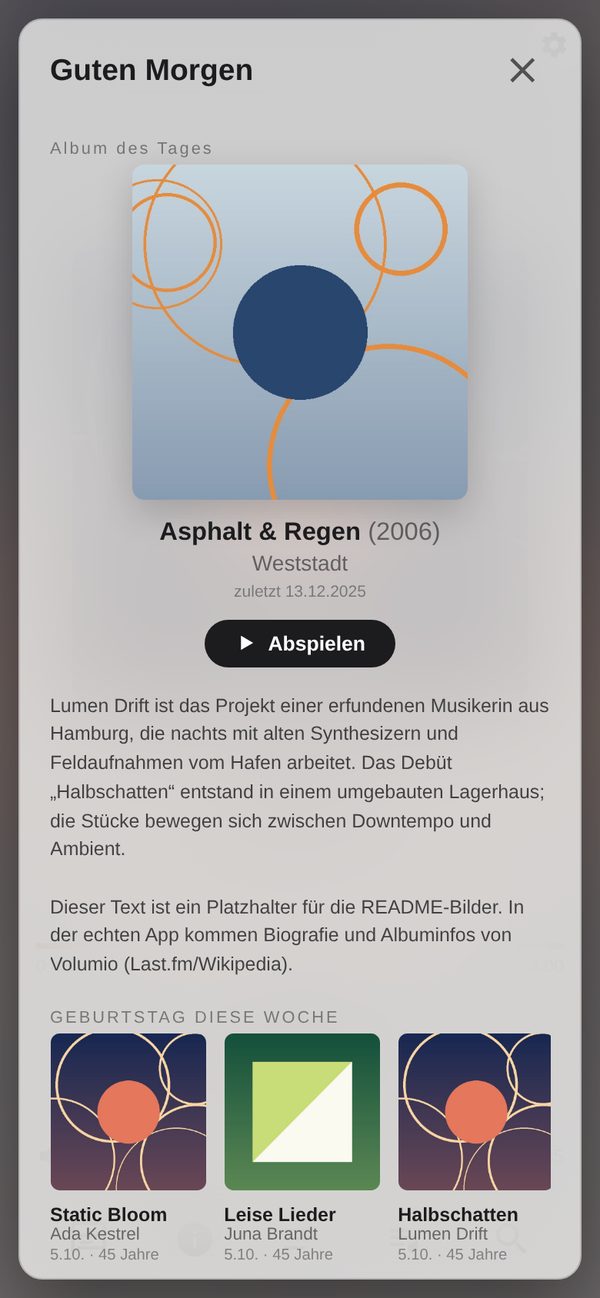
  • Birthdays celebrate albums released today, this week or this month, with round anniversaries in gold.
  • Random Discoveries brings up albums that haven’t played in a long time.
  • Played a Year Ago reminds you of what kept you company last autumn.
  • Once Played a Lot brings back old favourites you had almost forgotten.
  • Never Heard shows what has been sitting unplayed on the shelf for years.
  • Hidden Gems finds music you barely know that matches exactly what you love. And Xplorio tells you why: “Like Lumen Drift”, “Melancholic · Jazz” or “:heart: Unheard” from a favourite artist.

Or tap a mood, an energy level, a style or a decade: Dreamy, High energy, Soulful, the 80s. You get all matching albums from your collection, and one tap on the dice plays 25 random tracks from them.

Looking for music for exactly this moment?

The Mood Mix puts together a playlist for you: pick one or more moods, how much energy you want, which genres and how adventurous the mix should be, from your favourites to the hidden gems. Before anything plays, you see every track with the reason it was picked. Don’t like one? Out it goes.
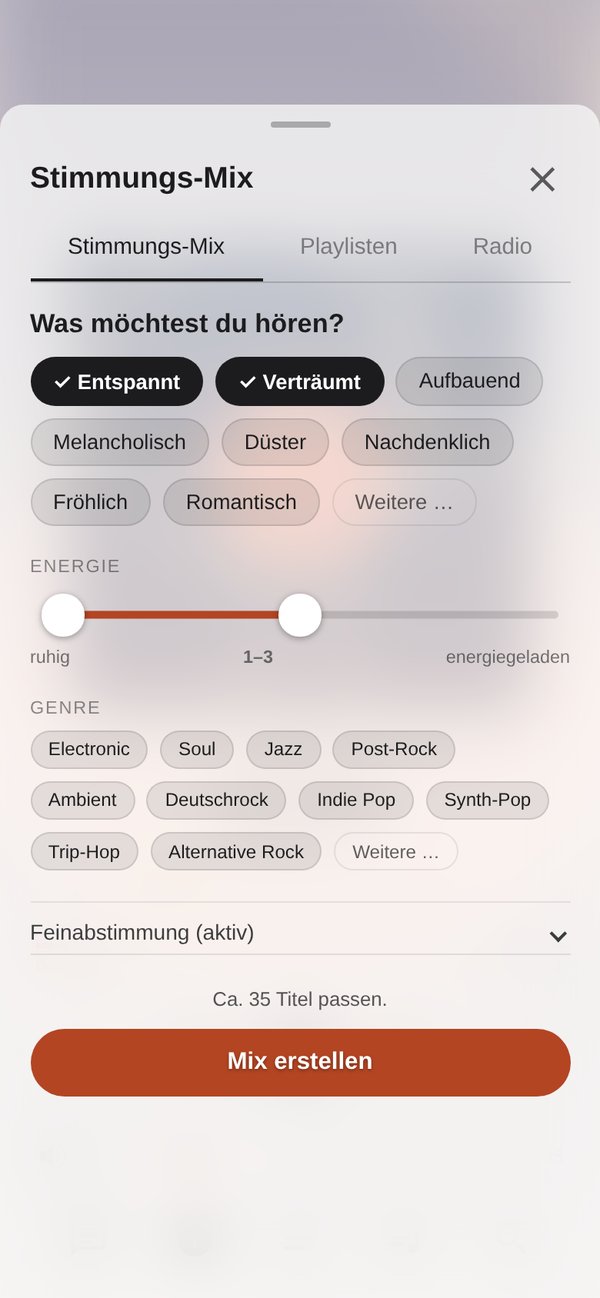
And when the mix is over? With the optional AutoDJ, the journey simply continues, with music that fits what was just playing.

See the complete descripton on gitHub: xplorio/docs/xplorio_en.md at main · Celindir69/xplorio

Xplorio is a custom web interface for Volumio 2 (built for a Musical Fidelity MX-Stream, Raspberry Pi CM3), running directly in the browser without a build step.
Some parts are especially designed for my setup (Rotel Amp / macOS / iOS) but I tried my best to make it work on different setups (tested successfully on Volumio 4) but some features may need some tweaking to fit your specific needs.

But as always it comes with absolutely no warranty.

try it on GitHub

This really is beautiful.

Might it be possible to get the Volumio 4 section in english? The google translation of it remains quite confusing.

See: xplorio/docs/setup.md at main · Celindir69/xplorio · GitHub

The link in the English version resolves to the wrong page.

Hello!
Just to warn you.
Using this will prevent your system to update Volumio as it modifies some system files.

Hello @balbuze
thank you for pointing this out.
This is only half true for it does not modify some system files but only adds some new ones.
But in the end you are right that this prevents automatic updates for volumio checks the system integrity before updating.

The solution is using the xplorio-deploy script as described in setup.md

Recommended: remove the interface temporarily.

sudo xplorio-deploy --check-update   # shows whether only Xplorio is in the way
sudo xplorio-deploy --remove         # back up the interface (with config.local.js) and remove it from /volumio
# now run the update in Volumio; after the restart:
sudo xplorio-deploy --restore        # the interface back exactly as before
sudo xplorio-deploy                  # optional: install the newest version

This makes updates possible at any time without losing your configuration.

Hi @Wheaten,
can you please point me to where you found the wrong link, so I can correct it?
Thank you

I can’t anymore.
it was this link: xplorio/docs/setup.md at main · Celindir69/xplorio · GitHub
it pointed before to the German Volumio 4 page.

thank you. So it was fixed in the last update.

Hi @krztoff,
thanks for your compliment.
Installing on volumio 4 works just as simple as on volumio 2 First time Setup

The Volumio 4 Section is just to explain the differences on that system

Hi @balbuze
I overthought your comment and decided to transform xplorio into a plugin to match the official standards for Volumio.

This will include a proper way to migrate from an existing Xplorio installation.

This is a vibe-coding project so it may be realised in a short time but I will definitely do some heavy testing before merging to the main branch.

Thanks again for pointing me in the right direction.

Have fun
Celindir

Hello,
please have look at GitHub - volumio/volumio-plugins-sources-bookworm · GitHub
and
Plugin system overview | Volumio Developers Documentation
and
Plugin Submission Checklist | Volumio Developers Documentation

Thanks

Hello everyone,
took a weekend but Xplorio is now a plugin.
By now it is not yet available via the plugin-store but I am planning to submit it as soon as I have some daily use experience and can be sure the plugin works as stable as the initial version did.
Did my best to follow all the technical requirements from the developers documentation.

Have fun

Celindir

To whom it may concern…

Just wanted to keep you updated:
I have decided not to submit the Xplorio-Plugin to the plugin store any time soon.

The public demand made me realize that it might just be interesting for myself…

So I will concentrate on my backlog to make it the best Player for Volumio to explore and manage big libraries.
Anyone who likes to give it a try is still invited to get it via GitHub. (But please do not use your productive System for testing - Although it is supposed to run stable and deinstall without any side effects, it is not yet officially approved by the volumio Team)
Feedback is always welcome.

Have fun

Celindir

Update:
Xplorio now supports Versions.
Albums of the same name (appendices like (HD), - Remaster etc. do not count) and artist are now grouped as one entry, indicating the number of versions that are in your library. A tap opens the list of available versions, indicating the details like quality, library-path etc.

@admins: Can someone move this thread to the Plugin-Category?