Hi,
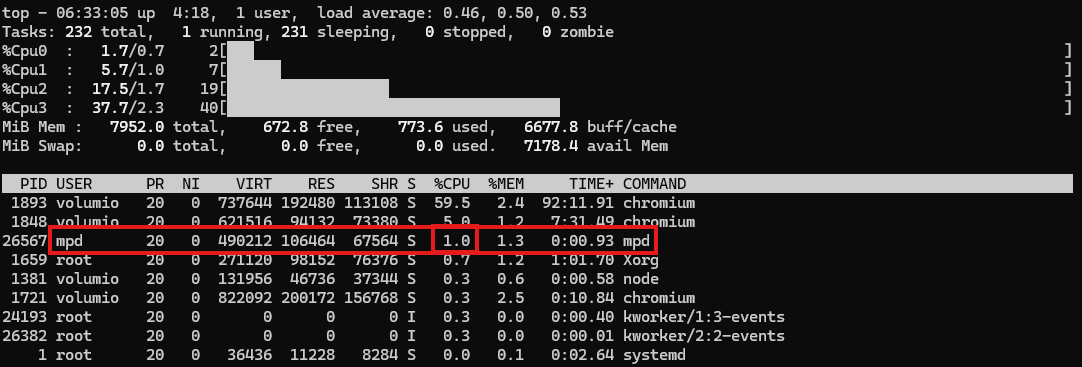
I’ve noticed that MPD process hits (and passes) 100%. I think this never happened before.
Here is the log:
http://logs.volumio.org/volumio/c1SNEXk.html
Any suggestion?
BR
Paulo Nunes
Hey @pjorgenunes,
Facts from log analysis:
/etc/asound.conf contains Stylish Player’s ALSA pipeline which uses:
multi plugin (splits audio to two destinations)plug plugin forcing rate conversion to 44100 Hz S16_LEvolumiofifo plugin writing to /tmp/stream.mp3Working theory (not yet verified):
The Stylish Player ALSA configuration is the probable cause of the high CPU. The multi plugin duplicates every audio sample in software - one copy goes to your DAC, one copy gets rate-converted and written to a FIFO for the visualization. This design imposes CPU overhead by necessity.
I cannot confirm this is THE cause without testing.
Required verification:
top or htopIf MPD CPU drops to normal (typically under 10% on Pi 5), this confirms Stylish Player is responsible. If it remains high, something else is wrong and we look further.
Can you run this test?
Kind Regards,
Hi @nerd ,
Thank you very much. It really was the responsable. After uninstalling it:comes between 1-5%.