Raspberry Pi config cadence issues on Volumio 4.231, 4.239

Looks like Volumio-Kiosk is not working with latest build (has worked before).
I have a Pi 3B+ with original DSI 7" Touch-Display.
“/var/log/Xorg.0.log” shows this:

[ 58.638] (II) LoadModule: “modesetting”
[ 58.638] (II) Loading /usr/lib/xorg/modules/drivers/modesetting_drv.so
[ 58.773] (II) Module modesetting: vendor=“X.Org Foundation”
[ 58.773] compiled for 1.21.1.7, module version = 1.21.1
[ 58.773] Module class: X.Org Video Driver
[ 58.773] ABI class: X.Org Video Driver, version 25.2
[ 58.773] (II) modesetting: Driver for Modesetting Kernel Drivers: kms
[ 58.777] (WW) Falling back to old probe method for modesetting
[ 58.777] (EE) open /dev/dri/card0: No such file or directory
[ 58.777] (WW) Falling back to old probe method for modesetting
[ 58.777] (EE) open /dev/dri/card0: No such file or directory
[ 58.777] (EE) No devices detected.
[ 58.777] (EE)
Fatal server error:
[ 58.778] (EE) no screens found(EE)
[ 58.778] (EE)

Maybe a problem with “vc4-kms-v3d”?

Edit
After manual loading vc4-kms-v3d:

dtoverlay vc4-kms-v3d

The Kiosk is starting. ATM i have only remote access, so i need to test later if it is really working. But “/var/log/Xorg.0.log” looks good so far.
So it looks like the dtoverlay is not loaded during boot. I ask me if it has something to do that the “config.txt” is under /boot/ and not under /boot/firmware/?

Hey @The_Raven,

Using AI (Absolute Ignorance) as your troubleshooting method is your choice. The preference on this forum is different: give us the details a human needs to actually look at the problem. Without them there is nothing to investigate, and nobody will be guessing on your behalf.

What we need, as per Tips and guidelines to get faster help

  • Exact board identification. “Pi 3B+” is a start, but please confirm it with the revision code using this guide: [GUIDE] Identifying Your Raspberry Pi Board on Volumio: A Comprehensive Guide to Revision Codes
  • Storage type: SD card, USB or SSD.
  • Exact Volumio version as shown in System settings, for example 4.xyz. “Latest build” is not a version. Also the last version where this was known to work.
  • A log link from http://<volumio_IP>/dev taken after reproducing the problem and BEFORE any reboot. Logs live in RAM and are gone after a power cycle. How-to: How to send a log link for a bug report? | Volumio
  • Display details: which display exactly, how it is connected, Touch Display plugin version, and the full content of /boot/userconfig.txt.
  • A description: what you did, what you expected, what happened instead, and the steps to reproduce.

Once that is posted we can look at it properly. Or you can keep hallucinating with a toll which has no clue about Volumio ecosystem

Kind Regards,

Thanks for the useless answer full of insinuations.
I’m going to look for another system to listen to music with in the future.
So Long, and Thanks for All the Fish :sunglasses:

Hey @The_Raven,

Make wise choices, best of luck.

However should you choose to provide the details, perhaps a community member will find the problem or at least will point in the right direction.
Irrespective of your choice - offer stands.

Kind Regards,

As said many times on these forums, please be very wary of AI. When it doesn’t know something for certain, it can sometimes “hallucinate” and generate information that sounds convincing but is actually incorrect or entirely fictitious. The problem is that it often presents these answers confidently, making it hard to distinguish fact from fiction.

Hi,

Same issue here. I upgraded few days ago to 4.231 (Revision Mon Oct 12 13:56:12 UTC 2026).
Since then, the screen remains blank.

My system is:

  • Raspberry Pi 3 Model B Rev 1.2, BCM2835 Revision: a02082
  • using an SD card
  • the display is an official 7in raspberry touch display (I don’t know how to get the exact characteristics)
  • touch display plugin version is 3.6.0
    Here is a log link, /boot/userconfig.txt has not been modified (empty but a comment line)

Thanks for any help.

EDIT: Another issue was raised here: Problems after latest update - #7 by Roberto_Grieco but so far I don’t think it’s related. I also reinstalled the plugin, but I did’nt have any packages issues, and apt-get check does not report any issue either.

Same problem for me after update to 4.231
No problems at all with 4.119
Only rollback solved the issue.

Thanks in advance.

Hey @mhz,

Thank you, that is a complete report and gives us something to work with.

@The_Raven’s Xorg log on 4.231 showed /dev/dri/card0 missing, which means the kernel graphics driver was not loaded at boot. The first step is to see whether your system shows the same, and what the firmware actually applied when it booted. Nothing below changes anything; please post all output as text in code blocks, not screenshots.

  1. Does the graphics device exist:
ls -l /dev/dri/
  1. Which overlays the firmware applied at boot:
ls /proc/device-tree/chosen/overlays/
  1. The complete boot configuration, all files, unedited:
cat /boot/config.txt /boot/volumioconfig.txt /boot/userconfig.txt /boot/videoconfig.txt

The last file normally does not exist on your setup; an error for it is fine, the other three are what matters.

Once that is posted, one test. It is a test, not a fix, so keep the backup.

  1. Back up the only user-editable boot file:
sudo cp /boot/userconfig.txt /boot/userconfig.txt.bak
  1. Open it:
sudo nano /boot/userconfig.txt

Below the existing comment line add this single line, exactly as written, and nothing else:

dtoverlay=vc4-kms-v3d

Save with Ctrl+O, Enter, leave with Ctrl+X, then:

sudo reboot
  1. After the reboot, post again:
ls -l /dev/dri/
ls /proc/device-tree/chosen/overlays/

and say whether the screen shows the UI.

If the player does not come back after the reboot, put the SD card in another computer: the boot partition is readable anywhere, and restoring userconfig.txt.bak over userconfig.txt (or deleting the added line) is the way back.

@Alex79 and @The_Raven, the same steps apply to your boards if you want to contribute data; the outputs from step 1 to 3 on 4.231 are the useful part.

Kind Regards,

Thanks. Here is the output. The graphics device does not seem to exist

$ ls -l /dev/dri/
ls: cannot access '/dev/dri/': No such file or directory
$ ls /proc/device-tree/chosen/overlays/
ls: cannot access '/proc/device-tree/chosen/overlays/': No such file or directory
$ cat /boot/config.txt /boot/volumioconfig.txt /boot/userconfig.txt /boot/videoconfig.txt
### DO NOT EDIT THIS FILE ###
### APPLY CUSTOM PARAMETERS TO userconfig.txt ###
initramfs volumio.initrd
gpu_mem=128
gpu_mem_256=32
gpu_mem_512=32
gpu_mem_1024=128
max_usb_current=1
[pi5]
usb_max_current_enable=1
[all]
include volumioconfig.txt
include userconfig.txt

#### Volumio i2s setting below: do not alter ####
dtoverlay=justboom-digi
### DO NOT EDIT THIS FILE ###
### APPLY CUSTOM PARAMETERS TO userconfig.txt ###

# Compute Module 4 USB configuration
[cm4]
dtoverlay=dwc2,dr_mode=host
otg_mode=1

# Pi 5 NVMe/PCIe support
[pi5]
# dtparam=uart0_console # Disabled by default
dtparam=nvme
dtparam=pciex1_gen=2

# DRM/KMS graphics driver - per-board to avoid Pi Zero 2 W boot issues
# Firmware auto-remaps overlay to board-specific variant
[pi2]
dtoverlay=vc4-kms-v3d
# Pi 3A+ (0x9020e0): Before applying to [pi3], apply with lower 128MB contiguous memory setting
# Pi 3A+ has only 512MB RAM and suffers boot issues otherwise
[0x9020e0]
dtoverlay=vc4-kms-v3d,cma-128
[0x9020e1]
dtoverlay=vc4-kms-v3d,cma-128
[pi3]
dtoverlay=vc4-kms-v3d
[pi4]
dtoverlay=vc4-kms-v3d
[pi5]
dtoverlay=vc4-kms-v3d

# Pi Zero 2 W - KMS omitted due to boot failures and no DSI connector
# HDMI works via firmware framebuffer without KMS
[pi02]

# Common settings
[all]
arm_64bit=0
dtparam=audio=on
audio_pwm_mode=2
dtparam=i2c_arm=on
disable_splash=1
hdmi_force_hotplug=1
force_eeprom_read=0
display_auto_detect=1
# Add your custom config.txt options to this file, which will be preserved during updates
cat: /boot/videoconfig.txt: No such file or directory


After the changed you described and the reboot, the display is on and work again.

$ ls -l /dev/dri/
total 0
drwxr-xr-x 2 root root         80 Oct 25 19:38 by-path
crw-rw---- 1 root video  226,   0 Oct 25 19:38 card0
crw-rw---- 1 root render 226, 128 Oct 25 19:38 renderD128
$ ls /proc/device-tree/chosen/overlays/
ls: cannot access '/proc/device-tree/chosen/overlays/': No such file or directory

Thanks.
Best regards,

Hey @mhz,

Thank you, that is exactly the data we needed, and it is unambiguous.

What your outputs show:

  • Your stock 4.231 boot files are untouched. volumioconfig.txt carries the line that loads the kernel graphics driver for the Pi 3 (dtoverlay=vc4-kms-v3d under [pi3]), yet at boot it was not applied: no /dev/dri at all.
  • The identical line in userconfig.txt, which the firmware reads last, is applied: card0 and renderD128 appear and the display works again.

So the overlay, the kernel and your display are fine; what is under investigation is why the line in the stock file is not being applied on this build. That is being verified on the bench and belongs in the build system, not in anything on your side. (The device-tree listing I asked for does not exist on this firmware, so its “No such file” is expected and tells us nothing.)

What to do now:

  • Keep the dtoverlay=vc4-kms-v3d line in userconfig.txt. That file is preserved across updates, so the display will stay up through the next OTA.
  • When a build with the correction ships, we will say so in this thread; at that point remove the line again, so the driver is not requested twice.
  • No need to reinstall the Touch Display plugin. Your /dev/dri listing shows its permissions in place, and its configuration adapts at every start; nothing in it was damaged by running without the driver.

@Alex79, @The_Raven: the same single line in /boot/userconfig.txt is the interim measure for a Pi 3B or 3B+ on 4.231 with the official 7" display. Steps 4 to 6 above apply as written; keep the backup.

Kind Regards,

That’s true, but I don’t work with AI. So please stop making these accusations.

I noticed that my display wasn’t working, then realized that the “volumio-kiosk” service wasn’t starting, and then analyzed the log file “/var/log/Xorg.0.log.” There, I saw that “/dev/dri/card0” was missing, which in turn suggests there’s a problem with “vc4-kms-v3d.” I don’t need AI for that.

And as it turns out, that’s exactly where the problem lies. “vc4-kms-v3d” isn’t loading—it’s not yet clear why. In newer Pi images, the “config.txt” file is located in the “/boot/firmware/” folder. So it’s entirely possible that the new kernel is ignoring the “/boot/config.txt” file. But yeah, that was just a hunch on my part. Still, sometimes you find the solution by chance or through a assumption. In any case, my hunch pointed in the right direction. Even though it’s now clear that this theory (with /boot/firmware/" was incorrect, since the “userconfig.txt” file is being loaded.

Dear Volumionauts,

A short reminder on why the help template asks for what it asks for, using this thread as the example, because it shows both outcomes side by side.

Two reports of the same symptom came in: display dark on 4.231, Xorg unable to open /dev/dri/card0.

  • Report one: an Xorg excerpt and a model name. No revision code, no storage type, no exact version, no display details, no log, no userconfig.txt. From that there was nothing to separate a single board, a single display revision, a plugin state or a build-wide fault, so nothing could be investigated.
  • Report two (@mhz): revision code, storage, exact version, display, plugin version, confirmation that userconfig.txt was stock, log link. One exchange later the stock boot file was shown to be the thing not being applied, and a working interim measure was confirmed on his board. Same symptom, same thread; the difference was the data.

What each item does, and why “Pi 3” or “Pi 4” is not an answer:

  • Exact board and revision code (from /proc/cpuinfo, with /proc/device-tree/compatible, as in the identification guide). This is not pedantry. Some board and display combinations simply do not work, and the code is the only way to tell them apart from the outside:
    • Pi Zero 2 W has no DSI connector and the image deliberately loads no kernel graphics driver on it. A DSI display question on a Zero 2 W has no answer.
    • Pi 3A+ has 512 MB. With the kernel graphics driver at its default memory reservation it does not boot at all; it needs its own setting, and the stock boot configuration treats it separately from a 3B or 3B+. Same “Pi 3” in a forum post, different outcome.
    • Pi 5, 500 and CM5 drive DSI through the RP1 I/O chip, a different driver path and a different overlay variant from every earlier Pi. Advice for a Pi 4 applied to a Pi 5 is wrong advice.
    • Compute Modules depend entirely on the carrier board for whether DSI exists at all.
    • Board revisions within one model have differed in how the firmware applies conditional sections of the boot configuration; this thread turns on exactly such sections.
  • Display details: which display exactly, which PCB revision, how connected, Touch Display plugin version. The official 7" exists in several PCB revisions, and Touch Display 1 and Touch Display 2 use different panel overlays and different touch controllers. Naming the wrong one sends the investigation down the wrong overlay.
  • Storage type. Decides the recovery route if a boot-file edit goes wrong: an SD card is readable in any computer, an NVMe drive is not.
  • Exact version. Every Volumio build maps to one commit of the build system, so 4.231 tells us precisely which files were written. “Latest” maps to nothing.
  • Log link, taken before any reboot. One link carries the kernel messages, the journal, the installed plugin list and the system state. /var/log lives in RAM and is empty after a power cycle, so a log taken after a reboot describes a different boot than the one that failed.
  • The full content of /boot/userconfig.txt. It is the one user-editable boot file, and a single line in it changes the outcome, as this thread shows.
  • A description: what you did, what you expected, what happened, how to reproduce. “Does not work” is not reproducible.

Two technical points that came up along the way, for the record:

  • The kernel is not the variable here. On @mhz’s board the same kernel and the same overlay file failed when requested from volumioconfig.txt and worked when requested from userconfig.txt. What differs is where the request sits, and that is being corrected in the build system.
  • The location of config.txt (/boot on Volumio, /boot/firmware on Raspberry Pi OS Bookworm) cannot play a role. The Raspberry Pi firmware reads config.txt from the FAT boot partition before Linux starts; the kernel never reads it, and where Linux later mounts that partition is irrelevant to which lines are applied.

A correct reading of a log line is a good start. It is an observation, not a diagnosis, and without the surrounding details nobody can turn it into one. As such, request for the details is far from being useless. The template is the minimum set of facts that lets someone else reproduce your situation instead of guessing at it.

Kind Regards,

OK, great. Thanks.

just letting you know, that adding the dtoverlay=vc4-kms-v3d line in userconfig.txt also fix my raspberry 3b as well

Dear Volumionouts,

Short update. Thanks @jt705, that is the fourth board confirming the same cure.

Where it stands: on 4.231 the stock boot file requests the kernel graphics driver for Pi 3, 4 and 5, but on those boards the request is not being applied; the identical line placed in userconfig.txt is. Working theory, from the build system history: a change made for the Pi 3A+ inserted two conditional sections ahead of the Pi 3/4/5 sections in that file, and the way the firmware combines conditional sections means the ones after them no longer take effect. It fits every report so far and is going to the bench now to be proven, together with a corrected layout that still protects the 3A+.

Until a corrected build ships: keep the single dtoverlay=vc4-kms-v3d line in /boot/userconfig.txt. When the fix is released we will say so here; the line then comes out again.

Kind Regards,

I had two issues with display after upgrading to 4.231.

  1. Display was rotated
  2. Backlight was not turning off with display going to standby

Below my system details:

  1. Board Revision : Raspberry Pi 4 Model B Rev 1.5, a03115
  2. Upgraded to 4.231 from 4.119
  3. HDD connection:
    WD Slim 10SPCX (1TB)
  4. Display
    https://www.waveshare.com/wiki/7inch_DSI_LCD
    DSI
    Powered from PI
    Touch in use
  5. A dongle for remote cum keyboard is connected. DAC is SMSL SU1 connected on USB.

Putting the below in userconfig.txt fixed both the issues for me.

dtoverlay=vc4-kms-v3d-pi4
dtoverlay=vc4-kms-dsi-7inch

Hardware & Version:

  • Device: Raspberry Pi 5 (8GB)

  • Screen: Waveshare 5.5-inch AMOLED Touch Screen (1080x1920 resolution)

  • Volumio Versions:

    • Working: v4.119 (Clean install)

    • Broken: v4.231 (Clean install / Update)

Issue Description: After updating or doing a clean installation of Volumio v4.231, the display becomes completely corrupted/garbled upon booting. It appears the system is failing to correctly recognize the screen driver and resolution.

For comparison:

Workaround Found: If I add the following line to /boot/userconfig.txt:

Plaintext

dtoverlay=vc4-kms-v3d,cma-256

Then v4.231 boots correctly, and the screen properly displays the QR code and interface.

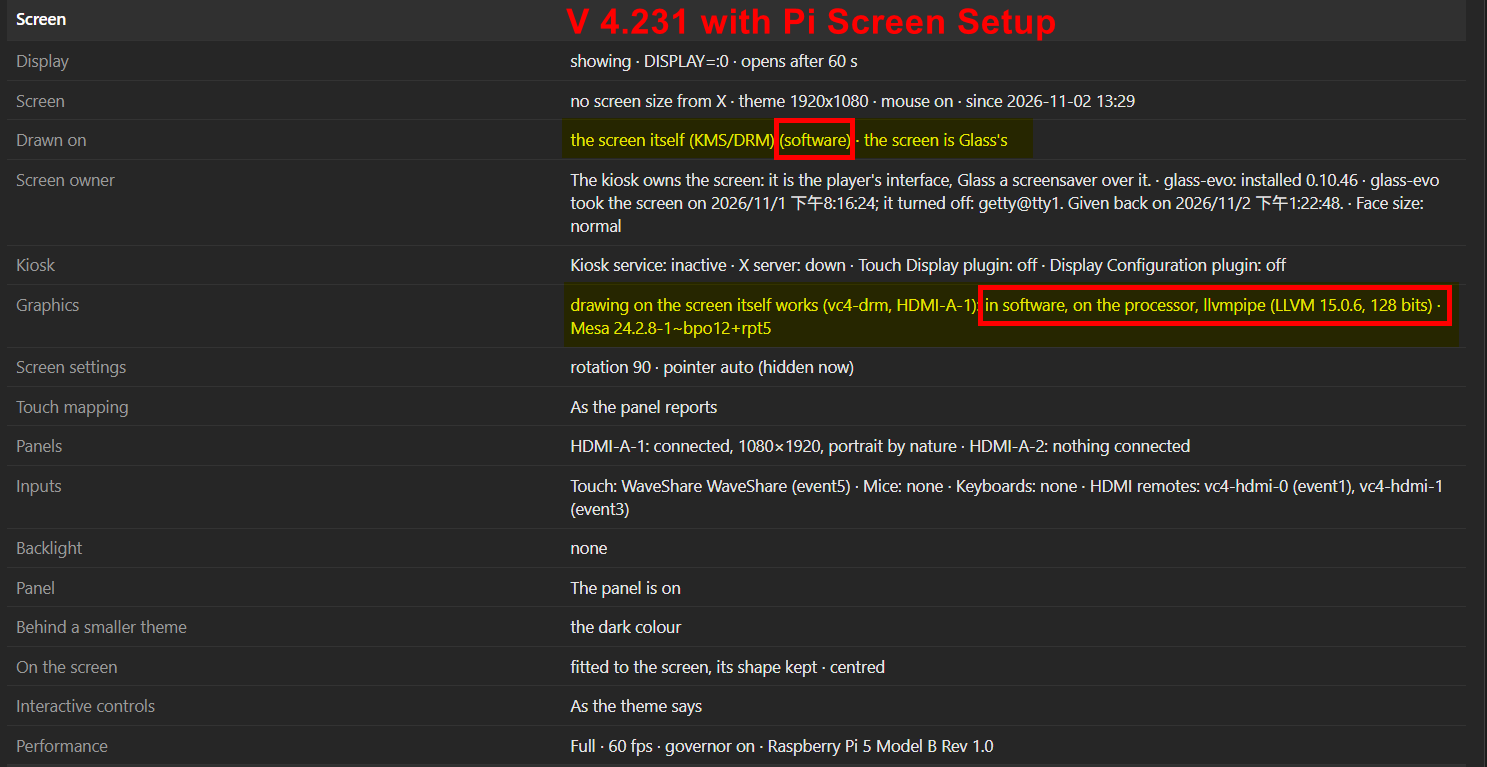
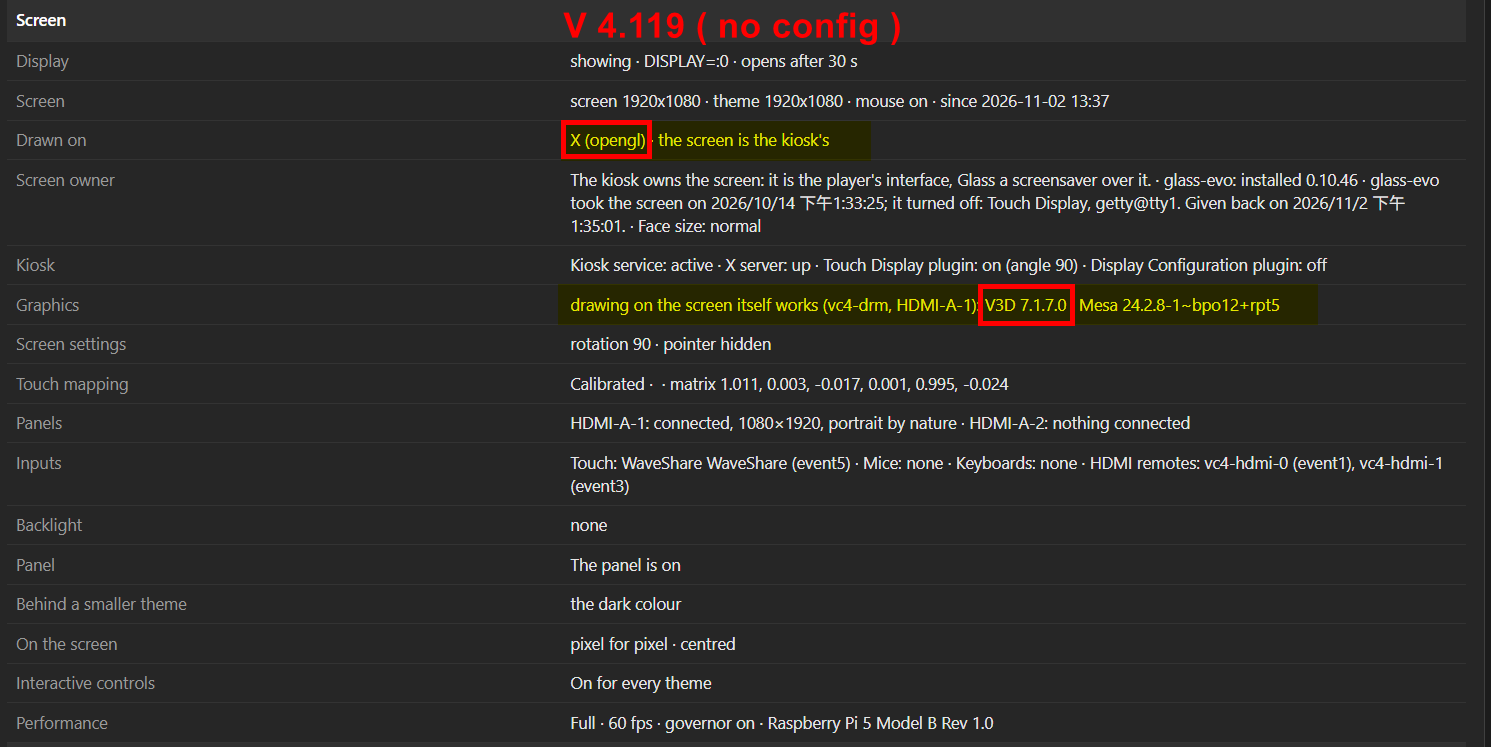
However, hardware acceleration does not seem to be properly invoked with this workaround. Running the Glass plugin results in a noticeable performance drop and sluggish rendering, suggesting that the system is falling back to CPU software rendering (e.g., llvmpipe) rather than utilizing GPU acceleration (e.g. opengl ).

Question: Could adding this overlay manually like this have any negative impact on system performance or stability? And is this something that needs a fix in the official build?

Thanks for your help!

Maybe post this in the Glass thread with a report from the plugin’s manager?

Hi @dewen

There is a plugin, pi screen setup.

Comment out you manually added line and use this plugin to setup your screen.

Then test again.

Thanks, Wheaten!

I tested the Pi Screen Setup plugin. It generated the following configuration in /boot/videoconfig.txt:

### pi_screen_setup managed - DO NOT EDIT ###
# Generated: 2026-11-02T05:19:29.460Z
# Model: Raspberry Pi 5 Model B Rev 1.0

# KMS Display Driver
dtoverlay=vc4-kms-v3d-pi5,cma-64

# HDMI0 Configuration
hdmi_group=2
hdmi_mode=87
hdmi_timings=1080 1 26 4 50 1920 1 8 2 6 0 0 0 60 0 135580000 3
max_framebuffer_height=1920
config_hdmi_boost=10
hdmi_drive=2

The Result: The outcome is very similar to when I manually added the dtoverlay. The screen turns on and displays the interface, but hardware acceleration is missing, causing sluggish performance.

To illustrate this, here is a comparison using the Glass Plugin diagnostic status:

  1. v4.119 (Clean, no config needed):

  2. v4.231 (with Pi Screen Setup / manual overlay):

It seems that under v4.231, forcing the custom overlay triggers a software fallback instead of utilizing the Pi 5’s GPU. Any thoughts on how we can get full hardware acceleration back with this screen on v4.231?