Mar 12 10:27:49 volumio volumio[1203]: error: [youtube2] Error in VideoModel.getInfo(4kHl4FoK1Ys): This video is unavailable Error: This video is unavailable
@patrickkfkan can help me?
Hi,
I’m not able to install the newest version (2.5.1) via the Volumio GUI.
I get a 404 error: files not found.
Anyone else?
v2.5.1 is basically the same as v2.5.0. I was hoping, with the version increment, I would be able to submit it to Volumio. Apparently they haven’t fixed the backend issue so v2.5.1 failed as well.
I’ve been advised to hold off until they notify me of a fix, hopefully today.
1 Like
I got the same issue with 2.5.0.
I am able to install 2.4.0, but it’s not working for me unfortunately.
v2.5.0 was my first failed attempt at submitting the plugin, because of Volumio backend issue.
v2.5.1 was my second attempt, also failed.
So either SSH into Volumio and install manually, or wait until Volumio fixes the backend issue so I can re-submit the plugin.
2 Likes
I will try Patrick, thanks for your answer. You are really good person, you know?
backend issue should be solved now, could you please try again?
2 Likes
Done. Had to increment version, but I’m able to submit and install from the plugin store now. Thanks.
3 Likes
I have a problem. I have two accounts on my YouTube channel. Until now, if I selected the second one and saved it, it could also be used. Now, only the first one can be used, it will start. If I select the second one and save it, the playback will not start. the same with the youtube music plugin
Please try v2.5.2
4 Likes
Thank you very much for your work, it works!
Thank you very much!
Thank you very much @patrickkfkan, i have dual boot android and volumio on raspberry pi 4 for a time while youtube2 plugin can not work. Now v2.5.2 is comeback
Where can i download v2.5.2 ?
Volumio Plugin still v2.5.0
You need to be on Volumio v 4.xx AND have plugin test mode enabled from yourvolumioIP/dev.
I am using Volumio 4.119
How to get 4.xx and where is testing mode ?
4.19 is good. Plugin test mode can be found by typing your Volumio’s IP address in your browser address bar, with /dev at the end, so …
ipaddress/dev
YT2 v2.5.2
Volumio 4.119
During setup, I confirmed the disclaimer.
I copied the cookie from Firefox and entered it.
YouTube isn’t working.
Reinstalled everything: Volumio and YouTube.
Installed YouTube 2 several times
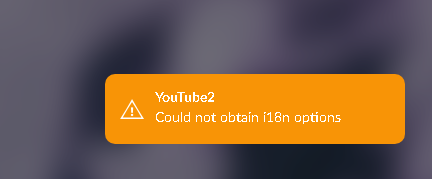
YT2 v2.5.2
Volumio 4.119
Why are there no settings in the YT2 Plugins section after I’ve entered all the disclaimer and cookie information?
And it’s not working.
It’s working fine for me, so maybe some logs would help. Also does it work if you don’t provide cookie?