Dear Volumionauts,
First, an apology. In April 2025 @VictorDUA asked whether stereo levels could be shown on an LCD1602. I answered with a mock-up nobody could test, and then went quiet for eighteen months. Victor, this one is yours: rewritten from scratch in Rust and tested on real hardware. The original request is here: VU meter for 1602
Second, an apology to the 1602 itself, which has spent decades showing “Hello World” and the time. It deserved better.
No other plugin authors need apologising to this time. I went through the Volumio plugin repositories back to Volumio 2, and there has never been a plugin for these displays. There have been DIY scripts on the forum over the years, but no plugin.
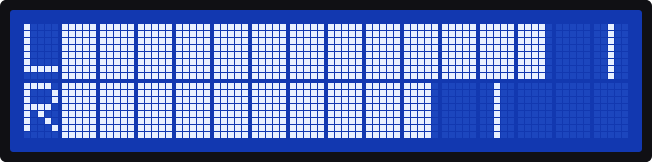
What it does
- two VU bars, left and right, with VU ballistics and peak hold
- an audio tap in the ALSA chain that passes every stream through unchanged and measures the levels on a thread of its own: files, radio, streaming, AirPlay and Spotify alike, DSD and DoP included
- a small daemon that reads the levels 20 times a second and rewrites only the characters that changed
- a pause screen, a standby clock and date, and boot, restart and shutdown messages
- RGB backlight on modules that have one
No spectrum here, just levels. A 16x2 has 32 characters and I am not going to pretend otherwise.
One thing to know: with a software mixer, the bars follow the recording level, not the volume control.
Displays
Verified on the bench: Waveshare LCD1602 RGB (AiP31068L, PCA9633 backlight).
Described from the data sheets, waiting for testers:
- other AiP31068L modules: Waveshare LCD1602 I2C, Grove LCD RGB Backlight, DFRobot Gravity RGB LCD1602
- ST7032i: Midas, Newhaven and other Sitronix modules
- US2066 / SSD1311 character OLEDs: Winstar, Newhaven
- HD44780 and WS0010 behind a PCF8574 backpack, the common “I2C LCD1602”
The plugin cannot tell an ST7032 from an AiP31068, or a WS0010 from an HD44780 behind a backpack, so for those you pick the controller in the settings. The Displays page has the details: Displays · foonerd/lcd1602-vumeter Wiki · GitHub
Built for Volumio 4 on a Pi 3, 4, 5 or Zero 2 W (32- or 64-bit image), or a PC with a USB I2C adapter. Four wires.
Testers wanted
Version 0.1.0. It is not in the plugin store yet. It goes there once it has been through field testing and Volumio’s review. Until then:
- download the zip from the releases page: Releases · foonerd/lcd1602-vumeter · GitHub
- install it by hand as the Quick Start shows: Quick Start · foonerd/lcd1602-vumeter Wiki · GitHub
- wire it from the drawings: Wiring · foonerd/lcd1602-vumeter Wiki · GitHub
Most wanted: anyone with a PCF8574 backpack module (the cheap and common one), and anyone with an ST7032, US2066 or WS0010.
When you report, please include:
- board and exact Volumio version
- module name, controller and I2C address
- what you expected and what you saw
- a log link from http://volumio.local/dev (how: How to send a log link for a bug report? | Volumio)
- a photo of the display if it is showing something odd
Issues: Issues · foonerd/lcd1602-vumeter · GitHub
Everything else: Home · foonerd/lcd1602-vumeter Wiki · GitHub
If your display is a small graphical OLED rather than a character LCD, Just OLED is its sibling: GitHub - foonerd/just_oled: Spectrum, VU bars, now playing and a clock on any I2C or SPI OLED, for Volumio 4. A Rust audio tap in the ALSA chain and a display daemon for SSD1306, SH1106, SSD1309, SSD1327, SSD1322, SSD1351 and the rest. · GitHub
Kind Regards,