I own substantially more HDMI cables than devices for them. However, I think I only own two HDMI cables with one end that is micro HDMI, because I have never had to use that connector before.
Out of curiosity, this is where the code resides, right?
I don’t understand the first thing about it, but it’s cool to see the code nonetheless. What programming language is it supposed to be?
Howdy fellas! Any news on this? I’m happy to test whatever you’re working on, even if it’s not finished.
Hey @PluggedIn,
That is indeed where it lives. The language is JavaScript - specifically Node.js, which is what Volumio’s entire plugin system runs on. If you squint at it long enough, the curly braces start to look like little prison cells for the logic trapped inside. Some of us find this comforting.
On the update - apologies for going quiet. I got pulled deep into some Volumio work that I cannot talk about yet. The kind where people say “can you just quickly…” and three weeks later you resurface wondering what month it is and why your coffee has evolved a civilisation.
The keepalive work is not abandoned. I know exactly what needs to be built and I have the hardware validation done. The short version: the original approach of patching MPD config turned out to be fundamentally the wrong tool for the job on HDMI. The replacement is an external silence feeder that keeps your Onkyo’s audio link alive between tracks. Think of it as a life support machine for your HDMI connection - quiet, persistent, and steps aside the moment actual music shows up.
I will get back to it soon. Your Onkyo is still my real-world test target, so yes - I will absolutely need you when the time comes.
Kind Regards,
Hey @PluggedIn,
Remember me? I am the one who disappeared into the codebase and forgot to come back. The good news is I brought souvenirs.
The plugin has been updated in the store - version 1.0.1. Still beta. When you install it, you will find a new mode selector in the settings: “Silence feeder (HDMI)”. That is the one you want. The old MPD config mode is still there for USB DAC users, but for your Onkyo it was about as useful as a screen door on a submarine.
Quick setup:
- Install or update Audio Keepalive from the plugin store
- Enable it
- Change mode to “Silence feeder (HDMI)”
- Leave idle delay at 1 second unless you have a reason not to
- Save
- Play something, stop it, play it again, and tell me if your Onkyo still takes a coffee break before producing sound
The code has been asleep in various states of review for long enough that it probably dreamt in JavaScript. I woke it up, made it presentable, and pushed it out the door before it could develop any more opinions about promise chains.
Let me know how it goes. Your TX-RZ50 is the real exam - everything else has been rehearsal.
Kind Regards,
This is a really welcome initiative! The reason that this was not fixed in Volumio is because it affected a really minuscule percentage of users, however for those affected it must have been a pain!
I just have a feedback on how the goal has been achieved:
- One of the main goals we as developers shall have is not solving a problem and creating others. In this case, the way that the plugin has been developed WILL create side effects and impact usability. Essentially it breaks convenience switching, which is a major part of how Volumio handles playback.
- Modifying mpd.conf is an anti-pattern. Core system confs shall not be modified as it impacts the overall architecture of configuration and makes debugging by our support team extremely time consuming (we assume files are written just by Volumio, for good reasons).
I would encourage to:
- Leverage AMMPP to achieve this result, in a way that works for all sources and does not impact convenience switching.
See: Volumio AAMPP Overview | Volumio Developers Documentation - Avoid modifying system or daemon files.
Please also refer to the plugin submission checklist:
I am available to help achieve the above to support this great initiative
Hey @volumio,
Thank you for the feedback. To clarify - the silence feeder mode (the HDMI solution) does not modify mpd.conf. No system or daemon files are touched. The feeder is a child aplay process managed entirely within the plugin lifecycle.
The volumioPlay wrapper exists because there is no pre-play lifecycle hook in the plugin API. It adds under 50ms when a feeder is running and zero when it is not. It does not interfere with convenience switching or source routing.
On AAMPP - the problem exists below AAMPP, at the ALSA PCM hardware level. When all sources are idle, snd_pcm_drop() stops the stream and HDMI audio info frames cease. No amount of source routing above ALSA can inject frames into a stopped hardware device. Kodi solved this with a dedicated silence layer in their audio engine. This plugin replicates that with the tools available to community plugins.
What would make this clean is one small thing from the backend: a pre-play lifecycle hook that fires before the active music service receives the play command. That eliminates the wrapper entirely. Everything else the plugin does is already self-contained.
Perhaps it is time to implement “Keep Audio Alive” controls directly in the backend by Volumio Core Team.
Kind Regards,
 Hard to forget you. In this grimm times, those we cherish the most are the ones who make us laugh.
You think so? The screen door in my submarine has proven very useful.
Excellent, I will try it now and come back with feedback.
OK, so it seemed to work one time, but for the most part it didn’t. At first it didn’t work at all, then it did, then it didn’t. I have a lot to do today, but as soon as I can I will send some logs your way when I have more time to test it. I would also have to test it without the Fusion DSP, which I have on all the time, and resampling to 24/96. I mean resampling on the Fusion DSP, since it recommends to not have both its resampling and the Volumio native resampler on at the same time, so the Volumio one is off and the Fusion DSP one is on.
One thing that would be good to achieve if possible would be that as long as Volumio is loaded, it always sends that silent HDMI signal, because the moment I pause any song, I see the display on the Onkyo show me that all the speakers disappear (I have the Volumio input set to a mode called “All Channel Stereo”, so it gets the stereo input and makes it come out of the 7.1 speakers).
So I think that if you find a way to make the silent feeder a permanent thing, that might take care of the problems.
Hey @PluggedIn,
The screen door comment was clearly premature. If yours is functional, I apologise to both you and the submarine.
The inconsistent behaviour you are describing is exactly what I expected from the silence feeder approach - and exactly why I have spent my last remaining grey brain cell on something better. The current plugin plays whack-a-mole with device access: feeder holds it, MPD wants it, feeder lets go, MPD grabs it, MPD lets go, feeder grabs it back. Sometimes the timing works. Sometimes it does not. Sometimes it works just to mock you.
Your Fusion DSP resampling to 24/96 makes this worse. Every time the feeder starts, it opens at 44100 Hz. The DSP is configured for 96000 Hz. The device format mismatch adds another negotiation step to an already fragile handoff. The feeder and the DSP are essentially arguing about sample rates while your Onkyo watches both of them and loses patience.
What you are asking for - permanent silence signal whenever Volumio is alive - is precisely what the new approach does. No more handoff. No more feeder starting and stopping. No more format arguments.
I have been building an ALSA plugin in C that sits inside the audio chain itself. It holds the connection to your Onkyo open permanently and feeds silence whenever nothing else is playing. When music starts, it passes the audio straight through unchanged - zero processing, zero resampling, zero quality impact. When music stops, it resumes silence. Your Onkyo never sees the stream drop. Ever.
The repo, for the betterment of humanity - or at least the subset of humanity shouting at their receivers:
I need to cross-compile it for the Pi, deploy it, and test it before sending it your way. Your Onkyo TX-RZ50 remains the final exam. I will not rest until those 7.1 speakers stay exactly where they are on that display - even if it costs me whatever remains of my sanity. The evidence suggests that ship sailed several commits ago.
Kind Regards,
Hey @PluggedIn,
That ship I mentioned? It did not just sail. It circumnavigated, returned to port, filed a bug report, and sailed again.
Audio Keepalive v1.1.0 is now in the plugin store under Audio Interfaces, listed as beta. Install it, enable it, open the settings, toggle the switch on. That is it. No configuration, no sample rate settings, no sacrificial offerings to the ALSA gods.
What changed from what I described in my last post: everything. The original architecture wrote audio to your hardware from the transfer callback, which is the ALSA equivalent of trying to hand someone a drink while both of you are on separate escalators going in opposite directions. It worked on paper. On actual hardware it produced sound best described as a fax machine falling down stairs.
The working version uses a timerfd-paced model lifted from undisclosed plugin - the one component in the entire audio chain that actually works reliably. The transfer callback now just accepts data. The pointer callback reads the timer, writes to the hardware at the correct rate, and advances the pointer. The silence thread feeds -100dB noise - not digital zeros - because some AVRs interpret prolonged zeros as “no signal” and enter standby. The noise is at 0.001% of full scale. Your Onkyo will not hear it. Your dog will not hear it. Theoretical physicists may debate whether it exists at all.
What I need from you:
- Install the plugin, enable it, toggle the switch on in its settings
- Play something, let it run for a minute, pause
- Does your Onkyo TX-RZ50 hold lock? Does the display still show the audio format?
- Play again. Any audible glitch at the transition?
- Stop completely. Wait 30 seconds. Does the Onkyo stay awake?
- Track change - does it transition cleanly?
If anything goes wrong, logs from http://volumio.local/dev before you reboot. You know the drill.
Your Fusion DSP at 24/96 should not matter anymore. The plugin negotiates whatever format the upstream chain hands it and holds that format for the silence feed. No more 44100 versus 96000 arguments. The feeder and the DSP have been given separate rooms.
Kind Regards,
It didn’t get stuck at the strait of Hormuz???


Well, I’m not so sure. I had it built by a guy called Stockton Rush, and I just heard he might not be as safety conscious as I thought he was, so maybe the screen door wasn’t the best idea.
Well, I forgot to do the steps one by one, but basically I removed the previous version, rebooted, installed the new version, rebooted (maybe it’s not needed, I’m an old guy so it’s a habit I picked up from the Windows 95/98/2000/XP/Vista/7/8.1/10/11 days), and proceeded to press play on random albums I remembered starting with sound from the very first second (classical music is not always great to test this, because the guys that produce those albums are smarter than most, so often times they leave 2-4 seconds of silence on the first track).
Unfortunately, nothing happens. The receiver receives a PCM 2.0 signal, but there’s no sound coming out. I did several reboots, and by the end I had disabled Fusion DSP and resampling. But it seems clear: if the plugin is enabled, nothing happens. It also seems to butt heads with something, because I got this error many times when trying to load some other song:
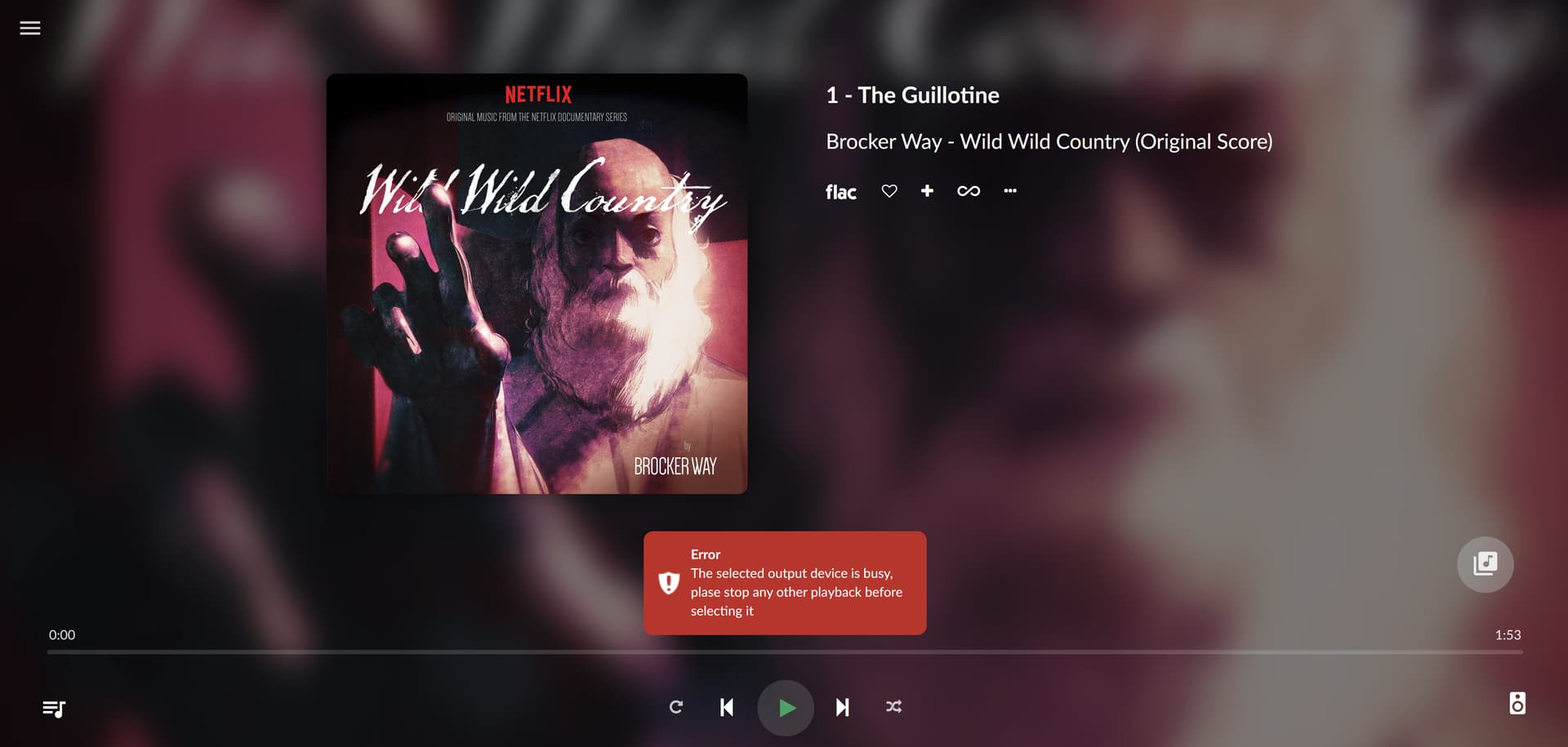
This never happens if the plugin is disabled, or with previous versions, but since you mentioned that you changed everything, that makes sense.
I did generate a log, which you can find here: http://logs.volumio.org/volumio/nC7XUFI.html
Well, this is not worth your sanity, my friend. As nice as it would be to have this working, it’s not something that’s needed for now or you lose something important. It would be great to have at some point, just don’t go crazy about it. I understand you because it reminds me of a time when I was trying to learn Unreal Engine and figure out how to achieve this or that, but in the end I spent a lot of personal time for a work project that didn’t amount to much, so that taught me a lesson.
Oh, and I got into the RZ50 internal webpage (not Onkyo’s site, the receiver itself), and downloaded a couple of files that perhaps will help you, perhaps won’t. So I’m going to try to attach them now.
RZ50 conf files.zip (208.7 KB)
Hey @PluggedIn,
Stockton Rush. That is dark. I approve.
Three bugs. That is what stood between your Onkyo and audio. Three bugs that only manifest on HDMI outputs and are completely invisible on I2S DACs, which is of course what I tested on, because apparently I enjoy the specific flavour of humiliation that comes from shipping code that works perfectly on every device except the one device the entire plugin was built for.
Bug one: the plugin has a silence thread that feeds noise to your Onkyo when nothing is playing - that is the whole keepalive mechanism. When MPD starts a new track, the ALSA framework calls prepare() before start(). My prepare() called snd_pcm_prepare() on the hardware. The silence thread was still writing to the hardware. On your HDMI output, calling prepare while a write is in progress corrupts the device state. The Onkyo sees “PCM 2.0” because the HDMI link is alive, but the audio pipeline is in a state best described as “existential crisis.” No sound comes out. On my DAC, the I2S bus does not care about this race condition because I2S is too simple to have opinions. HDMI is not.
Bug two: I open the hardware with a nonblocking flag. On your HDMI/iec958 chain, this means the hardware can say “I am busy, try again later” (EAGAIN). My silence thread did not handle this. It interpreted “try again later” as “everything is fine, carry on” and silently produced nothing. This is technically incorrect, it still produces gaussian noise. I can’t hear it, you can’t hear it. Not arguing, just saying.
Bug three: same problem in the audio data path. When the hardware buffer was momentarily full, the write function returned “try again later”, the plugin interpreted this as a catastrophic failure, triggered an underrun, and MPD got “Device or resource busy” when it tried to recover. That is your screenshot.
All three being fixed. Updated plugin incoming. Same drill - install, enable, toggle on, play something.
Regarding your concern about my sanity: I appreciate the sentiment, but you should know that I voluntarily chose to debug ALSA ioplug threading semantics on a Saturday. The sanity question was settled long before you entered the picture. You are not the cause. You are the witness.
Kind Regards,
Thanks. I was concerned that joke would implode horribly and my pen would be all that’s left.
I guess by that you mean “device class” rather than my individual device, correct? I mean, receivers with HDMI inputs. But I would assume that of all the people that know Volumio in the whole world, whether by owning a Volumio device or by doing the Raspberry Pi thing, there has to be a substantial amount that use it connected that way, or not so much? I mean, receivers with HDMI inputs is not a new thing, they’ve been around since the late 2000s I believe.
By this I’m not saying that they are the most common way of listening to music in the world, because audiophiles tend to have stereo amps or something similar, and most people think that a home theater is something that costs $30,000 or more, and that the common man version of that is a soundbar.
Now, I have no idea what an I2S DAC is, I only learned of the term when I went into the Volumio playback settings and there was a toggle for it. When I copied and pasted that into the Google machine, it seemed like an additional thing that probably wouldn’t be worth it for me, since I already had the HDMI output to go digitally to the Onkyo.
But if buying a rather inexpensive “hat” as they seem to be called, with two RCA outputs to go analogically to the Onkyo would take care of this issue and other possible ones (always something with HDMI and its handshakes and CEC and  , I wouldn’t mind. I have worn many hats in my life, so why not add another?
If the audio quality is equal or better than the HDMI one, I’m cool with that. The Onkyo can still upmix the 2 channels to 8, so I would still enjoy the pleasure of music from all around me rather than just two speakers.
In my family and circle of friends, and in every job I have, I’m always known as the consummate nerd. Anybody who has a technical problem comes to me, and 90% of the time, I give them a workable solution. Whether it’s computers (Mac or PC), consumer or prosumer electronics, I always have the solution. I have built several PCs both for me and friends and employers.
And yet, I seldom encounter someone like you that makes me wish I could go back in time and learn as much as you know. So speaking about hats, my hat’s off to you, Señor Nerd.
Hey @PluggedIn,
Your pen. All that was left. I am going to need a moment.
Yes, “device class” - HDMI audio outputs in general, not your specific Onkyo. Although at this point your specific Onkyo has become something of a celebrity in my development process. I have spent more time thinking about your receiver than some people spend thinking about their marriages.
You are correct that HDMI audio is not exotic. Receivers with HDMI have been around since approximately 2004, which means this output path is old enough to drink in most countries. And yet, the Volumio ecosystem has historically been dominated by I2S DAC hat users and USB DAC users - the audiophile crowd who would rather run copper wire directly into their cochlea than let an HDMI handshake anywhere near their signal path. So HDMI audio on Volumio has always been something that “works” in the sense that it technically produces sound, but has never received the kind of obsessive attention that the I2S path gets. Your use case - Pi into an AVR over HDMI for whole-room music - is completely valid and probably more common than the community’s forum traffic would suggest. The people for whom it works do not post. The people for whom it does not work post a lot. Survivorship bias in reverse.
On the I2S DAC question: an I2S hat is a small board that sits on top of your Pi and converts audio digitally to analogue right there on the board. The audio goes out as an analogue signal over RCA cables into your Onkyo’s analogue inputs. The quality depends on the DAC chip on the hat. A HifiBerry DAC2 Pro or an Allo Boss2 will give you audio quality that ranges from “very good” to “better than what your HDMI path delivers” depending on who you ask and how many thousands they have spent on cables.
However - and this is important - buying a hat to work around an HDMI bug in my plugin is not the correct answer. The correct answer is fixing the plugin. Which is what version 1.1.2, now in the store, attempts to do. The three HDMI bugs are fixed, the stutter on track changes is fixed, and the silence thread no longer performs amateur surgery on the hardware buffer every time MPD sneezes. Install it, test it, and tell me what your Onkyo thinks. If it still misbehaves, we diagnose further. If it works, you keep your current setup and your money stays in your pocket where it belongs.
If you later decide you want an I2S hat anyway for other reasons - lower latency, dedicated analogue outputs, avoiding HDMI-CEC arguments between your Pi and your TV - that is a separate conversation and a valid one. But not today. Today we fix HDMI.
As for the compliment - I appreciate it, genuinely. But what you are looking at is not genius. It is the accumulated scar tissue of decades of making exactly the kinds of mistakes I just made on your system, except previously there was nobody watching. An odd scribble here and there, enough years of scribbling, and eventually the scribbles start to look like they were intentional. They were not. I just ran out of eraser.
Kind Regards,
Sadly I don’t have a lot of time today, but just tested the new version, and there’s nothing coming out yet.
I just sent you a report: http://logs.volumio.org/volumio/gzF0Y8J.html
Maybe next time!
That’s all good, since it would be great to have the HDMI option, but I would like to learn more about the i2s options because I’m a sucker for the best possible sound quality, and that’s why I had in this room, both a home theater receiver with all the bells and whistles (or the most I could afford), and at at the same time, a Sansui G-5700 receiver connected to two Andrew Jones Pioneer tower speakers. Now I only have the Onkyo because it’s the first home theater receiver that can give me excellent sound quality for not just movies, but also for music. Don’t get me wrong, out of the box sounds like any other receiver since the '90s: like absolute garbage. Its saving feature is a thing called Dirac Live that gives you sort of a parametric EQ (not quite, but similar), and after wasting a lot of time taking tests and following a very awkward workflow, you can get it to sound like a '70s or '80s receiver.
I had an idea of what a “hat” was in this case, although you confirmed it in your post. The only problem there is that I would probably have to get another case for the whole thing, because my Canakit case doesn’t have the space for the hat, and the top of the case has a fan to cool down the Pi. However, if the end result will be higher quality sound, I’m willing to spend the time looking into it. This article on the Volumio website seems really interesting, even if some things fly over my head: Allo Kali I2S Reclocker: a true gamechanger - Volumio
Of course that reclocker along with the Allo Boss2 would be over $200, so I would really need to think about it. At 55, it’s not like I have the hearing I used to, even if it’s still good, but based on not-very-scientific tests I made, most likely I can’t hear anything over 13 Khz.
Hi,
Is there “Audio Keepalive” plugin in Volumio for Rpi. I have latest version of Volumio and can’t find plugin. Tnx.