I ll have a look. What is the hardware you use?.
Sorry for this issue. 
Rivo+
Thanks.
I can reproduce the issue.
I’m working on it.
1 Like
FusionDsp v3.1.3 stable
Convolution filter
- fix for white noise when clipping detection is running. Warning! To test, please turn down the volume level! @Kingpin

PEQ
- Design improvement
General
- fix for delay set to 0
please feedback!
Enjoy
Edit : stable now
Thank You @balbuze Your chunk size solution worked for me. I am using Rivo 4.208 and downloaded 3.1.3. I use the standard 15band EQ with no up sampling and preamp off. It was really crackling before on any hi-res song above 24/28 but with your fix, all is good. Thanks again for all your work on this great plug in. It really is one of the things that sets Volumio apart.
1 Like
FusionDsp v3.1.5 stable
Fix
- Camilladsp restart race. It should improve audio glitches on samplerate change. Thank you @squadgazzz !
- Peq server for web page is now started only when needed
- optimizatiion
New
- Peq graph is now “Nova” like and with light and dark theme
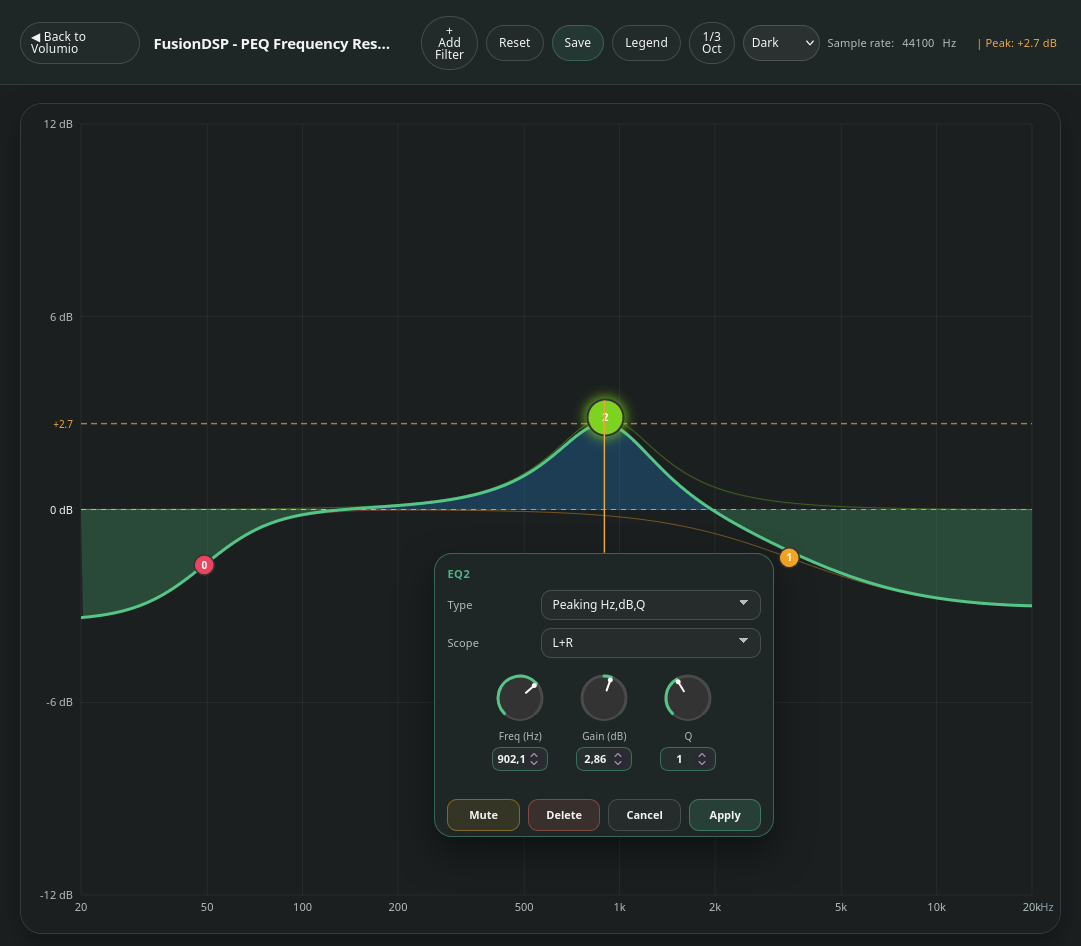

Enjoy!
2 Likes
Good day @balbuze ,
Many thanks for your great work to the community and setting such a nice plugin like Fusion DSP. I have prensetly a PiDesign Mercury V2 with the latest Volumio installed on it.
Since few weeks ago, the FusionDSP plugin is having issues when I want to add in the parametric EQ page an additional EQ…
With only one, it works but if I want to add a second one, the Volumio interface relaods and the web service is reloading…sometime, I even get into a web interface loading loop and I need to disable the plugin manually though SSH to be able to access volumio again…
I tried to re-install the whole volumio and switch to a new SD card but I reproduce the problem the whole time…
I am sure you would need some logs to understand what is happening but if you have a moment, please let me know and I will see to share.
Thank you again and wishing you all a great weekend.
Hello.
Oh, thats weird…
Could you please do the following:
Reboot with fusiondsp enabled
Try to add a pew such it causes issue.
Send a log link.
Beside, in fusiondsp instead of opening the graphics eq, click on show settings ( this is the old method) and add a pew to see if it is better.
Sorry for this and thank you for the feedback.
Many thanks @balbuze for your kind answer and quick reply…especially on a weekend. 
I have reproduced the problem and got the log link below:
http://logs.volumio.org/volumio/7ypvH5n.html
I was always actually using the old method of adding the PEQ as the graphic was crashing for me actually.
In addition, I tried multiple re-install and even I fully reinstalled Volumio…
I am not sure if this due to my Mercury V2 build that I get from the Pi Design website…
Mercury Streamer V2 - Pi2 Design
Mecury V2 uses a compute Module Pi4.
Hopefully, the logs will show something interesting.
Thank you!
Thanks you for the link.
Can you describe step by step exactly how to reproduce the issue.
I see the error but I need to understand what triggers it.
Sure!
Basically:
1 I enable FusionDSP
2 I then select Parametric EQ
3 I select the detailed view so I can see the PEQ
4 There is an existing one and when I click on add an EQ => then is when the web server reload (an error mentioning I get disconnected). and then nothing more happen…
sometime i then get endless disconnection and reconnection…
Hoping this helps to better understand.
Thank you!
FusionDsp v3.1.6 beta
- Fix for fatal error when adding a PEQ in the plugin original UI. @brissoukun , please if you can test and feedback !
This a beta, remove previous, reboot, install, test…
Enjoy !
Good day Balbuze,
Thank you so much for the beta version, I did exactly as instructed, enabled the test plugin channel and could get it installed (had a failure first and could then get it to work the second time).
I tested to add PEQ in both graph and basic mode and it worked without getting into a web interface loop.
http://logs.volumio.org/volumio/S1OcDFp.html
However, I am using a lot QOBUZ for my music streaming (hi-res titles).
I was browsing the interface while listning and I could get some serious stutter at some point.
After leaving the interface, right now the music plays fine.
The PEQ is truly a God send…it is a major part of Volumio to me and your work is very much appreciated.
I will continue to use it and report if I get more stutter.
I am wondering if this is due to the hard limitation of the compute module Rapsberry Pi4 which is maybe showing its age now?
Thank you again and wishing you a good evening.
Try at the bottom of the peq page to change the value for chunk size to see if it improves the stuttering issue.
Let me know.
Hello @balbuze ,
I have been testing and listening yesterday night and today.
The plugin is stable and we don’t get the loop.
One thing I noticed though is that the settings in the Graphique mode and the ones in the “list” mode can be different depending how I added settings.
If I set a setting in graphic mode, it doesn’t show up in list mode.
However, if I set things in list mode, this shows up fine in graphic mode.
It is not a major problem to me but I think you must have spend quite some time to make this very nice PEQ Graphic mode so, I want to report. Maybe this is just my setup.
Let me know though if you want me to test and share more logs on this.
Thanks!
Thanks for your feedback.
For the issue you reported, have press the save button in graphic mode? In this case, it should report it in the list.
Hi @balbuze,
Few feedbacks on my end, I understood that the big sound drops were due to my wifi. Once I got the streamer on RJ45 Wired, the major drops disappeared. For the settings…I did save them but I must have missed something. Right now, the graphic and list versions are properly reflecting each others.
Finally, I keep getting very small cracks once in a while…
I understand I can use the Chunk size, but would you be so kind as to explain what are normal average? Right now, I measured my network speed from my streamer to the network and we are at around 40Mbps with a latency on the network of 3ms so, the network is all good.
Thanks again for the replies and wishing you all a great day.

Have you noticed if it happens at the beginning of a new track with a sample rate change?
FusionDsp set the value that should work most of the time…
But according to your HW, the source, you can try to change the value… There is no good or bad value… If you are interested in : GitHub - HEnquist/camilladsp: A flexible cross-platform IIR and FIR engine for crossovers, room correction etc. · GitHub
Thanks
Hi everyone, hi @balbuze,
first of all, thanks for FusionDsp – it’s a great plugin!
I’m having trouble updating it and would appreciate any help:
System
• Volumio 4.204
• Raspberry Pi (kernel 6.12.75-v8+ aarch64)
• FusionDsp v3.1.5 installed
What happens
• Volumio offers an update for FusionDsp. I click “Update”, the installer finishes with “Plugin successfully updated” and no error.
• Afterwards the plugin still shows v3.1.5 and the “Update” button is still there.
• The installer downloaded from: https://plugins.volumio.workers.dev/pluginsv2/downloadLatest/fusiondsp/volumio/bookworm/armhf
• In the installer log, the success message appeared while camillagui was still being extracted.
Possibly related
• After the update attempt, fusiondsp.service was in state “failed” (“Control process exited, code=killed, status=15/TERM”). After starting it manually and rebooting, everything works fine again.
• The journal repeatedly shows: “Statefile could not be opened: /data/configuration/audio_interface/fusiondsp/statefile.yml [Errno 2] No such file or directory” (this message was already present before the update).
Is the newer version currently installable on Volumio 4.204, or is this a plugin store issue? I’m happy to provide a full log if needed.
Thanks a lot!
Hello,
What you see is an issue with the store…
I pushed a beta version for fusiondsp and this is why you see the update.
But a beta can’t update an installed version.
The is to ignore the message.
I expect to push a new updatable stable version today or tomorrow…
Have a good day 
1 Like